
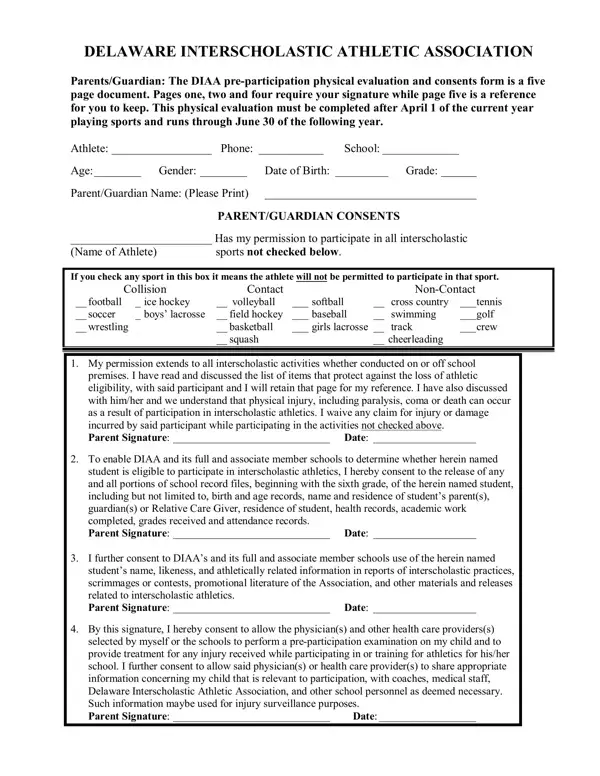
Stepping into the world of interscholastic athletics, the Delaware Interscholastic Athletic Association (DIAA) plays a crucial role in ensuring that student-athletes are primed and ready for competition. Central to this preparation is the DIAA Pre-Participation Physical Evaluation and Consents Form, an intricate, yet essential, five-page document designed to safeguard the health and eligibility of young athletes. This comprehensive form necessitates the detailed input and consent from both athletes and their parents or guardians, covering a wide range of critical aspects—from medical history, consent for medical treatment, to eligibility requirements. It mandates signatures on specific pages, ensuring informed consent and understanding of the various risks and responsibilities associated with participation in sports. Through questions on medical history, it aims to detect any underlying conditions that could be exacerbated by athletic exertion. Additionally, the form addresses eligibility criteria and consents, pinpointing the importance of academic standing, residency, and age in maintaining the athlete's eligibility to participate. This detailed approach not only emphasizes the physical readiness of the student-athletes but also underscores the importance of parental engagement, adherence to academic standards, and compliance with eligibility rules, creating a supportive and safe environment for student-athletes to thrive both on and off the field.
| Question | Answer |
|---|---|
| Form Name | Diaa Physical Form |
| Form Length | 5 pages |
| Fillable? | No |
| Fillable fields | 0 |
| Avg. time to fill out | 1 min 15 sec |
| Other names | diaa physical fill, diaa 2021 physical, delaware physical evaluation, diaa preparticipation physical evaluation |
Diaa Physical Form isn’t the one you’re looking for?