
Dol V Form PDF Details

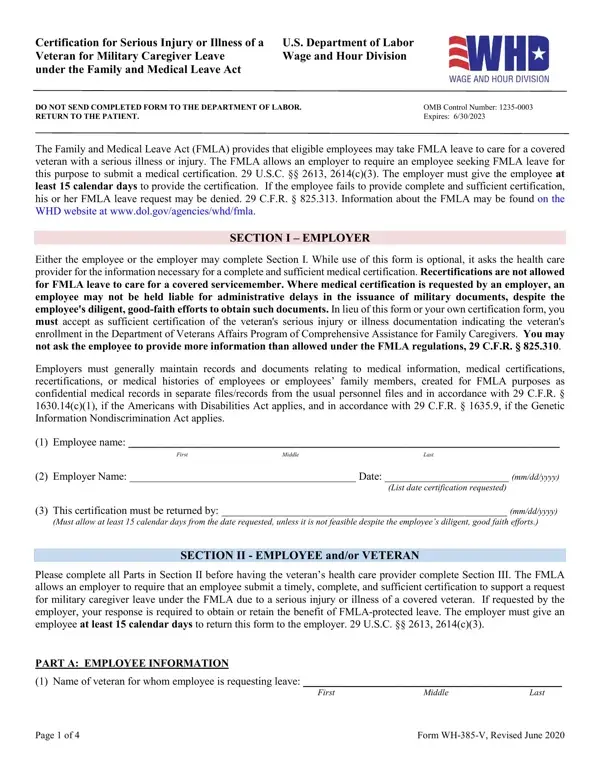
The Dol V Form, officially titled "Certification for Serious Injury or Illness of a U.S. Department of Labor Veteran for Military Caregiver Leave," serves a critical function under the Family and Medical Leave Act (FMLA). This document is used by employees to request FMLA leave for the purpose of caring for a covered veteran with a serious injury or illness. A unique feature of this form is that it requires medical certification to substantiate the leave request, a process regulated to protect both the employee's and employer's interests. The employer is mandated to allow a minimum of 15 calendar days for the submission of this certification, failing which the leave request may be denied, emphasizing the form's importance in the FMLA leave application process. Moreover, it contains sections detailing the veteran's health status, the nature of the caregiving required, and the estimated duration of the leave, alongside strict stipulations for maintaining the confidentiality of medical records in compliance with federal laws. Through its comprehensive nature, the Dol V Form plays an indispensable role in facilitating military caregiver leave, reflecting a broader commitment to supporting veterans and their families while balancing employers' operational needs.

QuestionAnswer
Form NameDol V Form
Form Length4 pages
Fillable?No
Fillable fields0
Avg. time to fill out1 min
Other namescertification illness form, v veteran caregiver form, fmla wh 385 form, veteran military caregiver form

How to Edit Dol V Form Online for Free

Handling PDF forms online can be very simple using our PDF editor. Anyone can fill in certification illness form here effortlessly. The editor is consistently improved by our team, getting new awesome features and turning out to be much more convenient. This is what you would need to do to get going:

Step 1: Click on the "Get Form" button above. It'll open up our pdf editor so you could start completing your form.

Step 2: The tool enables you to customize PDF files in various ways. Improve it by including any text, correct what's originally in the PDF, and place in a signature - all within the reach of several mouse clicks!

This document will need particular information to be entered, therefore make sure you take the time to enter precisely what is required:

1. The certification illness form will require particular information to be entered. Be sure that the following fields are finalized:

Writing part 1 in v veteran caregiver form

2. Once your current task is complete, take the next step – fill out all of these fields - Employee Name, Select your relationship to the, Spouse, Parent, Child, Next of Kin, Spouse means a husband or wife as, PART B VETERAN INFORMATION AND, The veteran was honorably, Guard or Reserves List the date of, Please provide the veterans, The veteran is is not, Briefly describe the care you, Assistance with basic medical, and Transportation with their corresponding information. Make sure to double check that everything has been entered correctly before continuing!

Guard or Reserves List the date of, Next of Kin, and Spouse means a husband or wife as in v veteran caregiver form

3. This stage is normally simple - fill in all the empty fields in Assistance with basic medical, Transportation, Psychological Comfort, Physical Care, Other, Give your best estimate of the, If a reduced work schedule is, schedule you are able to work From, SECTION III HEALTH CARE PROVIDER, Please provide your contact, and Note For purposes of FMLA military to finish this part.

Part number 3 in filling out v veteran caregiver form

4. To move ahead, this next form section will require typing in several form blanks. These include Employee Name, Need for care includes both, A complete and sufficient, PART A HEALTH CARE PROVIDER, Health Care Providers Name Print, Health Care Providers business, Type of PracticeMedical Specialty, and Telephone Fax Email, which are vital to going forward with this particular document.

How to prepare v veteran caregiver form part 4

Regarding Health Care Providers Name Print and Employee Name, be certain you do everything properly in this section. The two of these could be the key fields in this file.

5. To wrap up your document, the final part includes a couple of additional blank fields. Completing Please select the type of FMLA, DOD health care provider VA, PART B MEDICAL INFORMATION, Please provide appropriate medical, Patients Name, List the approximate date, Provide your best estimate of how, The veterans injury or illness, and Was incurred in the line of duty is going to conclude everything and you'll be done quickly!

Stage no. 5 of submitting v veteran caregiver form

Step 3: Make sure the information is accurate and click "Done" to complete the task. Grab your certification illness form the instant you join for a free trial. Immediately gain access to the pdf from your personal account, together with any edits and adjustments being all synced! FormsPal offers safe form editing without personal data record-keeping or sharing. Rest assured that your data is safe here!