
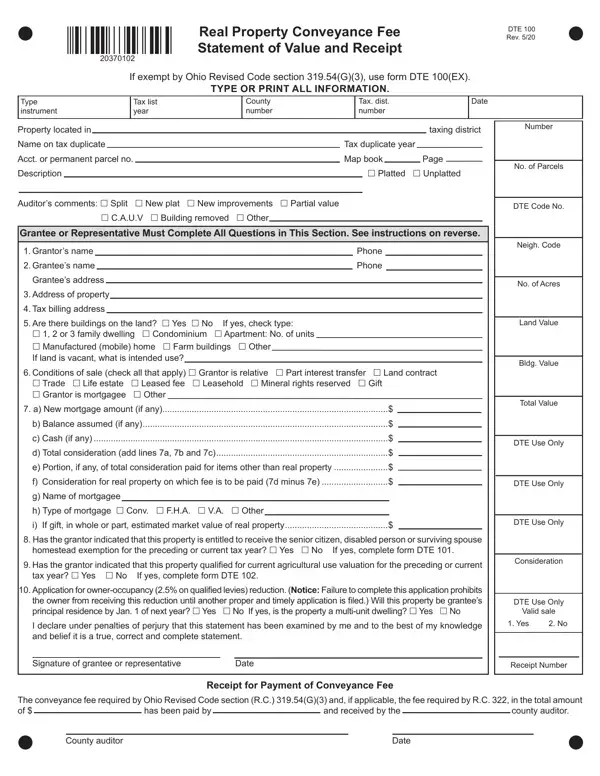
Dte Form 100 PDF Details

Understanding the DTE 100 form is essential for anyone involved in the transfer of real property as it pertains to exemptions from conveyance fees. Specifically, this form, also known as the "Statement of Reason for Exemption from Real Property Conveyance Fee," plays a pivotal role in documenting the justification for not paying such fees under various circumstances as outlined by Ohio Revised Code Sections 319.202 and 319.54(F)(3). Its comprehensive guidelines require detailed information about the property transaction, including the date, county number, and details about the property location and involved parties. Furthermore, the form categorizes exemptions into several types ranging from transfers involving governmental entities, confirmation or correction of previous deeds, gifts among family members, sales for delinquent taxes, and many other specific conditions that negate the need for conveyance fees. With frequent references to the necessity for accuracy under the penalty of law, the DTE 100 form underscores the need for diligence and honesty in declaring an exemption. It also links to other forms like the DTE 101 and DTE 102 for properties subject to specific tax treatments, thereby serving as a gateway to understanding broader obligations to the county and state regarding property transfers.

QuestionAnswer
Form NameDte Form 100
Form Length2 pages
Fillable?No
Fillable fields0
Avg. time to fill out30 sec
Other namessummit county conveyance form, portage county exempt conveyance form, Grantees, Instr

How to Edit Dte Form 100 Online for Free

You may work with grantor instantly by using our online PDF editor. The tool is consistently improved by our staff, receiving handy functions and turning out to be better. By taking a few easy steps, it is possible to begin your PDF editing:

Step 1: Just click the "Get Form Button" in the top section of this webpage to open our pdf form editor. Here you will find all that is necessary to work with your file.

Step 2: As you access the online editor, you will find the document all set to be completed. Besides filling in different blanks, you might also do some other actions with the PDF, namely putting on any text, modifying the original textual content, inserting graphics, putting your signature on the document, and a lot more.

It's straightforward to complete the form adhering to this detailed tutorial! Here's what you must do:

1. Whenever completing the grantor, be sure to complete all of the needed blank fields within its relevant area. This will help hasten the work, enabling your information to be processed swiftly and appropriately.

Grantors conclusion process explained (step 1)

2. Once your current task is complete, take the next step – fill out all of these fields - Grantors Name Phone Number, e s t a t e a n d t h e t r a n s, H a s t h e g r a n t o r i n d, Y E S N O I f y e s c o m p l e t, and a n d t i m e l y a p p l i c a t with their corresponding information. Make sure to double check that everything has been entered correctly before continuing!

Grantors completion process explained (part 2)

Be very mindful while filling in e s t a t e a n d t h e t r a n s and Grantors Name Phone Number, since this is the part where most users make errors.

3. The next step is fairly simple, a n d t i m e l y a p p l i c a t, Y E S N O I f y e s i s t h e p r, I d e c l a r e u n d e r p e n a, s t a t e m e n t, SIGNATURE OF GRANTEE OR, and PRINTED NAME D A T E - each one of these blanks will have to be completed here.

Part # 3 for filling out Grantors

Step 3: Right after you've looked once again at the information in the document, just click "Done" to complete your FormsPal process. Go for a free trial option at FormsPal and get instant access to grantor - which you'll be able to then begin using as you would like inside your personal account. FormsPal offers protected form completion with no personal information record-keeping or sharing. Rest assured that your details are secure with us!