
Dwc Form 150 PDF Details

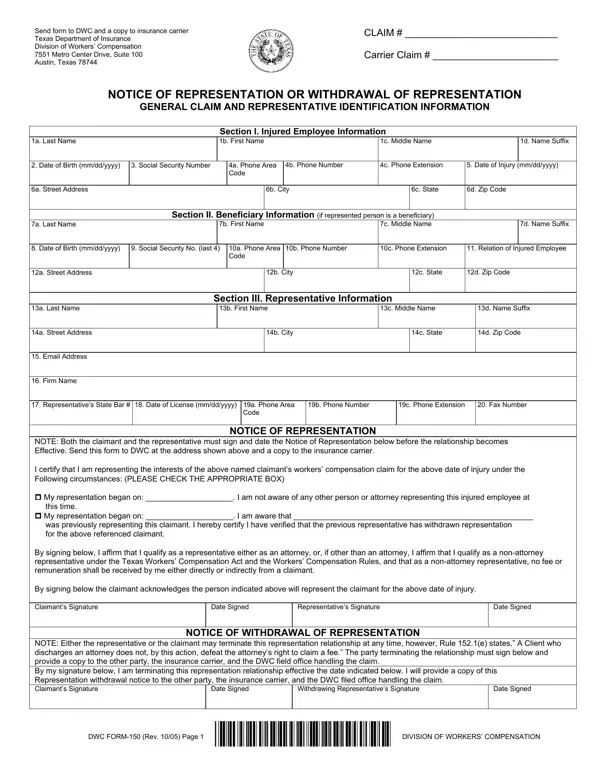
Understanding the DWC 150 form is pivotal for individuals navigating through the nuances of workers' compensation claims in Texas. This form serves as a critical tool for claimants seeking to either appoint a representative to handle their workers' compensation claims or to notify about the withdrawal of such representation. It facilitates clear communication between the injured employee or beneficiary and the Texas Department of Insurance, Division of Workers’ Compensation, along with the insurance carrier, ensuring all parties are informed about the representation status. The form is segmented into detailed sections, including the injured employee's personal information, beneficiary details if applicable, and representative information, which encompasses contact details, firm name, and attorney credentials, if the representative is a lawyer. Additionally, it emphasizes the importance of both the claimant and the representative's signatures to validate the representation, along with the stipulation for withdrawal of representation. This not only streamlines the process but also protects the rights and interests of all involved, adhering to regulatory compliances. A copy of the completed form must be sent to the Division as well as the insurance carrier, underlining the procedure’s transparency and accountability.

QuestionAnswer
Form NameDwc Form 150
Form Length2 pages
Fillable?No
Fillable fields0
Avg. time to fill out30 sec
Other names10a, 14d, scwcc dwc 150, xxx-xx12a

How to Edit Dwc Form 150 Online for Free

yyyy can be filled in online with ease. Just use FormsPal PDF editing tool to accomplish the job right away. We at FormsPal are committed to giving you the absolute best experience with our editor by consistently presenting new functions and upgrades. Our editor is now much more intuitive as the result of the latest updates! At this point, filling out documents is a lot easier and faster than before. Should you be looking to get started, here is what it requires:

Step 1: Hit the "Get Form" button at the top of this page to access our editor.

Step 2: After you open the PDF editor, you will find the form all set to be completed. In addition to filling in various blank fields, you may also perform many other things with the Document, specifically writing your own text, modifying the original text, adding illustrations or photos, affixing your signature to the form, and more.

Be attentive while filling in this pdf. Make sure all required areas are done correctly.

1. Begin filling out your yyyy with a number of necessary fields. Note all the important information and be sure there is nothing forgotten!

Part # 1 of filling out 12c

2. Once this segment is finished, you'll want to put in the necessary specifics in NOTE Both the claimant and the, Representatives Signature, Date Signed, Date Signed, NOTICE OF WITHDRAWAL OF, NOTE Either the representative or, Withdrawing Representatives, Date Signed, Date Signed, DWC FORM Rev Page, and DIVISION OF WORKERS COMPENSATION allowing you to move forward to the 3rd part.

12c writing process explained (portion 2)

Regarding DIVISION OF WORKERS COMPENSATION and NOTE Both the claimant and the, make sure you review things here. Both of these are definitely the key fields in this file.

Step 3: You should make sure your information is right and press "Done" to complete the project. Sign up with FormsPal now and easily gain access to yyyy, available for downloading. Each change you make is conveniently preserved , which enables you to edit the pdf later anytime. FormsPal is committed to the personal privacy of all our users; we make sure that all information processed by our system is kept secure.