
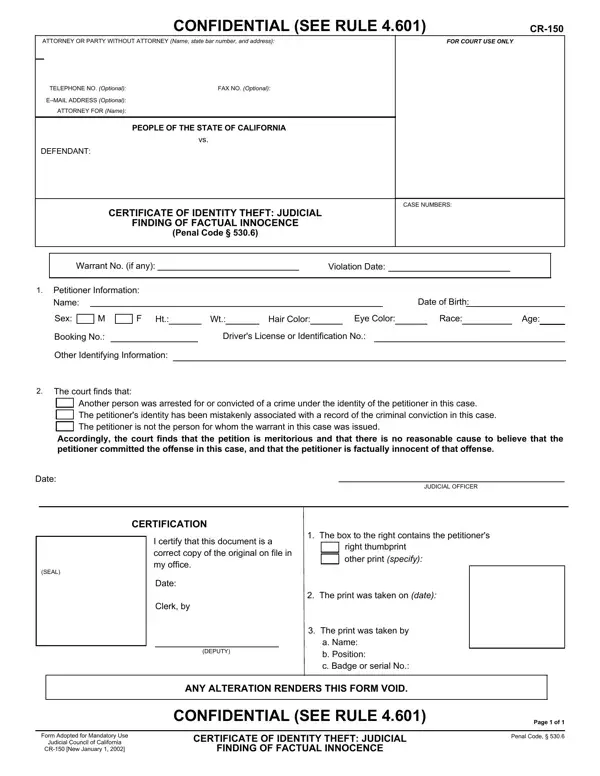
To fill out the CA CR-150 form, you do not need to download any software. Use the FormsPal online PDF editor, which is updated regularly and works in any modern browser. Follow the steps below to complete the form:
Step 1: Open the editor by clicking the "Get Form Button" at the top of this page.
Step 2: The form will appear ready to fill in. You can enter text in blank fields, edit existing text, add images, and apply your signature. Review each field before moving on.
Complete every field carefully. Blank or incorrect entries may delay processing of your petition.
1. The CA CR-150 form requires specific details in the first section. Be sure these fields are completed correctly:
2. After finishing the first part, move on to the next section and complete all of these fields: Other Identifying Information, The court finds that, Another person was arrested for or, Accordingly the court finds that, Date, SEAL, JUDICIAL OFFICER, CERTIFICATION, I certify that this document is a, The box to the right contains the, right thumbprint other print, Date, Clerk by, DEPUTY, and The print was taken on date.
The Clerk by field is where errors are most commonly made in this section. Read what you type here twice before continuing.
3. The final section includes: a Name b Position c Badge or, ANY ALTERATION RENDERS THIS FORM, CONFIDENTIAL SEE RULE, Form Adopted for Mandatory Use, Judicial Council of California, CR New January, CERTIFICATE OF IDENTITY THEFT, FINDING OF FACTUAL INNOCENCE, Page of, and Penal Code. Complete each of these fields as applicable.
Step 3: After reviewing all entries, click "Done" to finalize the form. Start a 7-day free trial at FormsPal to download, email, or save the form in your account. FormsPal.com keeps all information you enter secure and private.
Frequently Asked Questions About Filling Out the CR-150
Can I complete the CR-150 form entirely online?
Yes. The FormsPal PDF editor lets you fill in, sign, and download the form from any browser. No downloads or installation are required.
What information do I need before I start?
You will need your full name, date of birth, and identifying information such as a thumbprint. You will also need details about the case where your identity was misused, including case number and court location.
Where do I file the completed CR-150 form?
File the form at the clerk's office of the superior court in the county where the underlying crime was charged. The clerk will review the form and provide instructions on the next steps in the petition process.
Are there other forms I may need to file alongside the CR-150?
Depending on your situation, you may also need an FTC Identity Theft Affidavit to report the theft to federal authorities. For other California judicial forms, visit the California Judicial Council forms page.
Can I make changes after submitting the form?
Once filed with the court clerk, changes must go through the court. Review the completed form carefully before filing to avoid delays in processing your petition.
