
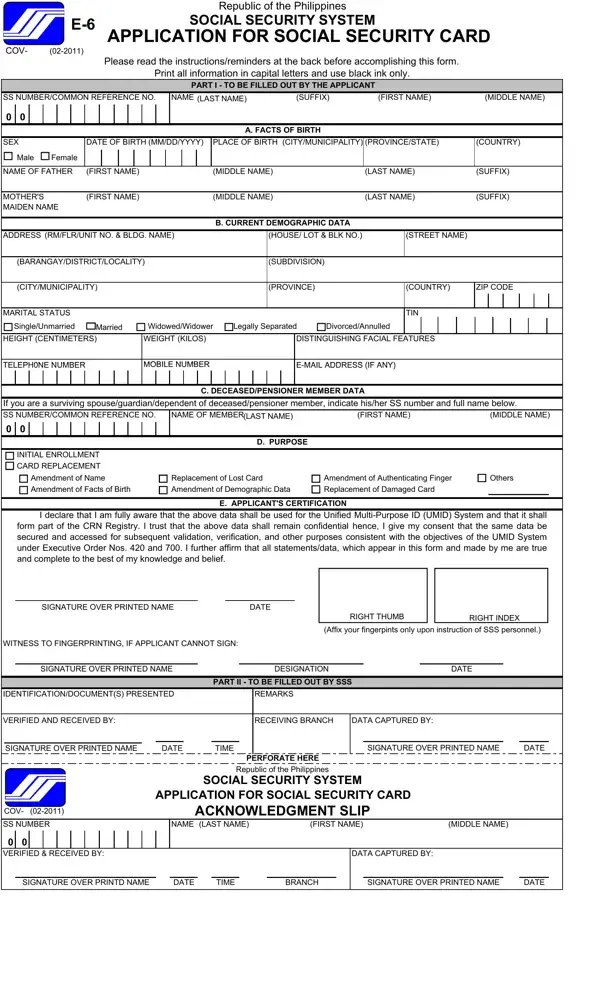
E6 Form Sample PDF Details

Navigating the process of securing a Social Security Card in the Philippines can seem daunting, but understanding the E6 Sample Form is a great place to start. This form is essential for anyone looking to apply for a Social Security Card, whether it's for the first time or to replace a lost, damaged, or outdated card. Detailed instructions on the form guide applicants through filling it out, including specifying information in capital letters using black ink, which is crucial for clarity. The form is divided into various sections, capturing an array of information from personal details and demographic data to specifics regarding the purpose of the application, like initial enrollment or card replacement. It’s also designed with privacy and security in mind, as it collects sensitive information that forms part of the Unified Multi-Purpose ID (UMID) System, ensuring confidentiality and proper use under the executive orders that govern it. Additionally, the form outlines the necessary supporting documents and the process for submission, payment of the required fee, and how to accurately indicate choices for the form's purposes. Understanding the E6 Sample Form is a key step for applicants in navigating their social security needs efficiently and with confidence.

QuestionAnswer
Form NameE6 Form Sample
Form Length2 pages
Fillable?No
Fillable fields0
Avg. time to fill out30 sec
Other namessss e6 form 2021, sss form e6, sss form e 6, sss id online application

How to Edit E6 Form Sample Online for Free

Using the online PDF tool by FormsPal, you may fill out or modify e 6 form sss here and now. Our tool is continually evolving to deliver the best user experience possible, and that's due to our dedication to continual enhancement and listening closely to customer feedback. To get the process started, consider these basic steps:

Step 1: Firstly, open the pdf tool by clicking the "Get Form Button" above on this site.

Step 2: Using our advanced PDF editor, you could do more than simply complete blank fields. Express yourself and make your docs look faultless with customized textual content added in, or modify the file's original content to excellence - all that accompanied by an ability to add your personal images and sign the PDF off.

When it comes to blanks of this particular PDF, here is what you need to do:

1. Fill out your e 6 form sss with a number of necessary blank fields. Gather all the required information and ensure nothing is overlooked!

Filling in segment 1 in ss form e 6 acknowledgment stub

2. After finishing this section, go on to the subsequent step and fill in the necessary particulars in these blank fields - If you are a surviving, NAME OF MEMBER, LAST NAME, FIRST NAME, MIDDLE NAME, INITIAL ENROLLMENT, CARD REPLACEMENT, D PURPOSE, Amendment of Name, Replacement of Lost Card, Amendment of Authenticating Finger, Others, Amendment of Facts of Birth, Amendment of Demographic Data, and Replacement of Damaged Card.

Part number 2 in filling out ss form e 6 acknowledgment stub

People generally get some points wrong while filling out Replacement of Damaged Card in this part. You should definitely read twice whatever you enter here.

3. Through this part, examine VERIFIED AND RECEIVED BY, RECEIVING BRANCH, DATA CAPTURED BY, SIGNATURE OVER PRINTED NAME, DATE, TIME, SIGNATURE OVER PRINTED NAME, DATE, PERFORATE HERE, Republic of the Philippines, SOCIAL SECURITY SYSTEM, APPLICATION FOR SOCIAL SECURITY, ACKNOWLEDGMENT SLIP, NAME LAST NAME, and FIRST NAME. All of these will need to be taken care of with greatest precision.

Step no. 3 for completing ss form e 6 acknowledgment stub

Step 3: As soon as you've reviewed the details in the document, just click "Done" to conclude your form at FormsPal. Try a 7-day free trial account with us and gain direct access to e 6 form sss - readily available in your personal account. FormsPal guarantees secure form tools without personal data record-keeping or any kind of sharing. Be assured that your data is in good hands with us!