
Enrollment Promise PDF Details

Navigating the complexities of the Pennsylvania PROMISe™ Provider Enrollment Base Application can be a daunting task for new and returning healthcare providers alike. This comprehensive form serves as a gateway for providers to participate in Pennsylvania's Medicaid program, necessitating accuracy and attention to detail in its completion. Whether providers are applying for the first time, revalidating, reactivating a provider number, or adding a provider to an existing group, the application demands that each step be completed with precision. Key requirements include typing or using black ink for clarity, avoiding staples due to the scanning process, and providing proof of Medicaid participation for out-of-state providers. The application instructs on various critical entries such as provider identification, service locations that must have a physical address rather than a P.O. Box, and the necessary financial and legal documents. Special attention is also given to compliance with the Americans with Disabilities Act (ADA), understanding the nuances of Provider Eligibility Programs (PEPs), and the importance of indicating managed care organization participation. The inclusion of licensing and certification information, alongside specifics about service locations, underscores the thorough nature of this process. Adherence to these guidelines ensures that healthcare providers can successfully navigate the enrollment process, paving the way for them to offer vital services to Medicaid recipients across Pennsylvania.

QuestionAnswer
Form NameEnrollment Promise
Form Length31 pages
Fillable?Yes
Fillable fields500
Avg. time to fill out35 min 56 sec
Other namespa promise, dpw provider, enrollment application promise, dpw provider enrollment

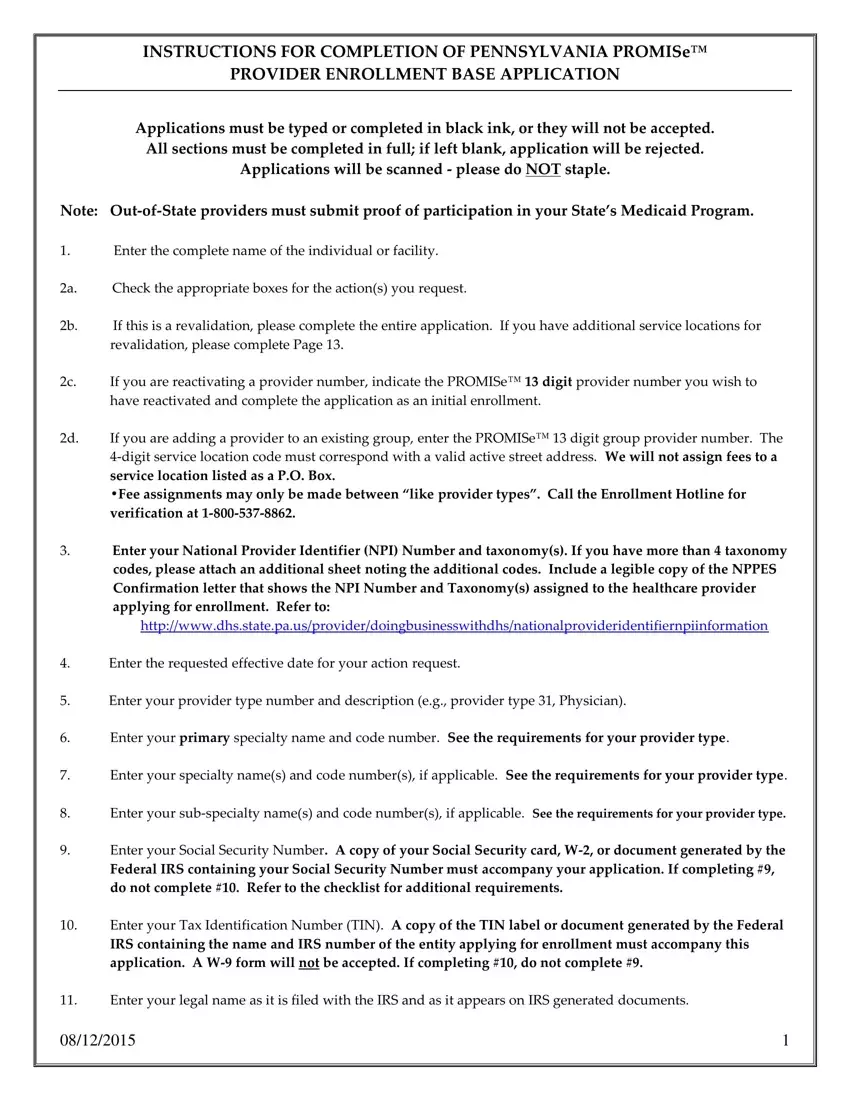
Form Preview Example

INSTRUCTIONS FOR COMPLETION OF PENNSYLVANIA PROMISe™

PROVIDER ENROLLMENT BASE APPLICATION

Applications must be typed or completed in black ink, or they will not be accepted.

Applications will be scanned - please do NOT staple.

Note: Out-of-State providers must submit proof of participation in your State’s Medicaid Program.

1.Enter the complete name of the individual or facility.

2a.

Check the appropriate boxes for the action(s) you request.

2b.

If this is a revalidation, please complete the entire application. If you have additional service locations for


revalidation, please complete Page 13.

2c.

If you are reactivating a provider number, indicate the PROMISe™ 13 digit provider number you wish to


have reactivated and complete the application as an initial enrollment.

2d.

If you are adding a provider to an existing group, enter the PROMISe™ digit group provider number. The


4-digit service location code must correspond with a valid active street address. We will not assign fees to a

service location listed as a P.O. Box.

•Fee assignments may only be made between like provider types . Call the Enrollment Hotline for verification at 1-800-537-8862.

3.Enter your National Provider Identifier (NPI) Number and taxonomy(s). If you have more than 4 taxonomy codes, please attach an additional sheet noting the additional codes. Include a legible copy of the NPPES Confirmation letter that shows the NPI Number and Taxonomy(s) assigned to the healthcare provider applying for enrollment. Refer to:

http://www.dpw.state.pa.us/provider/doingbusinesswithdpw/nationalprovideridentifiernpiinformation

4.Enter the requested effective date for your action request.

5.Enter your provider type number and description (e.g., provider type 31, Physician).

6.Enter your primary specialty name and code number. See the requirements for your provider type.

7.Enter your specialty name(s) and code number(s), if applicable. See the requirements for your provider type.

8.Enter your sub-specialty name(s) and code number(s), if applicable. See the requirements for your provider type.

9.Enter your Social Security Number. A copy of your Social Security card, W-2, or document generated by the

Federal IRS containing your Social Security Number must accompany your application. If completing #9, do not complete #10. Refer to the checklist for additional requirements.

10.Enter your Tax Identification Number (TIN). A copy of the TIN label or document generated by the Federal

IRS containing the name and IRS number of the entity applying for enrollment must accompany this application. A W-9 form will not be accepted. If completing #10, do not complete #9.

11.Enter your legal name as it is filed with the IRS and as it appears on IRS generated documents.

03/27/2014

1


12a. Indicate whether or not you participate with any Pennsylvania Medicaid Managed Care Organizations (MCOs).

12b. Enter the names of any Pennsylvania Medicaid Managed Care Organizations with which you participate.

13a. Indicate whether the provider operates under a fictitious business/doing-business as (d/b/a) name.

13b. If applicable, enter the statement/permit number and the name. Attach a legible copy of the

recorded/stamped fictitious business name statement/permit.

14.Enter your date of birth.

15.Enter your gender.

16.Enter the title/degree you currently hold.

17a. Enter your IRS address. This address is where your 1099 tax documents will be sent.

17b-f. Enter the contact information for the IRS address.

18.Check the appropriate box for the business type of the individual or facility applying for enrollment. Check 1 box only. Include corporation papers from the Department of State Corporation Bureau or a copy of your business partnership agreement, if applicable.

19a-d. Enter your license number (if applicable), issuing state, issue date, and expiration date. *A copy of your license must be included with the application.

20.Enter your Drug Enforcement Agency (DEA) Number (if applicable).

* A copy of your DEA certificate must be included with the application.

21.If you have a CLIA certificate and a Dept. of Health Laboratory Permit associated with this service location. *A copy of both documents must be included with the application.

22.Enter your CMS number.

*A copy of your CMS certification must be included with the application.

23a. Enter a valid service location address. The address must be a physical location, not a post office box. The zip code must contain 9 digits and the phone number must be for the service location. Refer to block #27 of the application to list an additional address (es) for Pay-to, Mail-to, and/or Home Office locations if different from the Service Location address entered in Block 23a.

NOTE* you can sign up for the Electronic Funds Transfer Direct Deposit Option by following the link below:

http://www.dpw.state.pa.us/provider/doingbusinesswithdpw/electronicfundstransferdirectdepositinformation/index.htm

23b. Answer question, if yes, enter your E-mail Address. If no, follow directions to access the bulletin information yourself. If you require paper bulletins or R“ s please call the phone number listed.

23c. If you wish Medicare claims to crossover to this service location check this box. Note: This crossover can be added to only one service location.

23d-g. Enter contact information.

23h. Indicate whether you or your staff is able to communicate with patients in any language other than English.

03/27/2014

2


23i. If applicable, list the additional languages in which you or your staff can communicate.

23j. Answer questions 1 through 4 pertaining to the Americans with Disabilities Act (ADA).

23k. Enter the appropriate Provider Eligibility Program(s) (PEP(s)). Refer to the PEP Descriptions and the

requirements for your provider type.

24.Indicate whether you retain any managing employees or agents.

*IF yes complete “ttachment I found here: http://www.dpw.state.pa.us/cs/groups/webcontent/documents/form/p_011861.pdf

25a-e. The individual applying for enrollment OR the representative of the facility applying for enrollment must complete ALL confidential information questions, A through E.

If you answer Yes to any of the questions, you must provide a detailed explanation (on a separate piece of paper) and attach it to your application. (Refer to the Confidential Information sheet).

25f. Include responses to 25F, 1 to 14, if you answered YES to any of the questions in 25A-E.

26.Sign the application and print your name, title, and date (The signature should be that of the individual applying for enrollment or someone able to represent the facility applying for enrollment). Use black ink.

27. This page, beginning with block #27, may be used to add a mail-to, pay-to, and/or home office address to the

previously defined service location address listed in 23a. This sheet cannot be used to add a service location.

27a. Enter the corresponding mail-to, pay-to, and/or home office address for the service location.

27b. Indicate whether you are adding a mail-to, pay-to, and/or home office address.

27c. Enter the e-mail address of the contact person for this address.

27d-g. Enter the contact information for this address.

Use page 13 to add additional service locations upon the INITIAL ENROLLMENT OF AN INDIVIDUAL.

Facilities must complete a new base application to add additional service locations to their file.

The individual applying for enrollment or a representative of the facility applying for enrollment must complete the Provider Agreement included with the application.

When completed, review the Did You Remember… Checklist included with the application.

Return your application and other documentation to the address listed on the requirements for your specific provider type.

If no address is listed on the requirements for your specific provider type/specialty, please mail to:

DPW Provider Enrollment PO Box 8045 Harrisburg, PA 17105-8045

03/27/2014

3


Provider Eligibility Program (PEP) Descriptions

A Provider Eligibility Program (PEP) code identifies a program for which a provider may apply. A provider must be approved in that program to be reimbursed for services to consumers of that program. Providers should use the following PEP codes when enrolling in PROMISETM and should use the descriptions in this document to determine which PEP code to use when enrolling in PROMISETM.

Adult Autism Waiver Contact Number: (866) 539-7689

Email: ra-odpautismwaiver@pa.gov

Website: http://www.dpw.state.pa.us/foradults/autismservices/adultautismwaiver/index.htm

The AAW is designed to help adults with an autism spectrum disorder participate in their communities in the way that they want to, based on their individual needs. It is a statewide home and community-based waiver. To become an AAW provider, contact the Bureau of Autism Services and an enrollment representative will reply by phone or by sending an electronic "Provider Packet." The packet includes necessary links, information and instructions on how to become an enrolled provider.

Aging Waiver – Contact Number: (717) 772-2570 or (800) 932-0939

Email: ra-hcbsenprov@pa.gov

Website: http://www.dpw.state.pa.us/fordisabilityservices/alternativestonursinghomes/agingwaiver/index.htm

Aging Waiver provides home and community-based services to eligible persons age 60 or older who are clinically eligible for nursing facility care. Eligibility criteria includes: U.S. citizen or permanent resident, Individuals age 60 or older, Asset limit of $8,000, and Income limit of 300% of the federal benefit rate. Individuals must require a nursing facility level of care. Information and listing of services provided by this PEP can be found by following the link above:

For service descriptions and qualifications required of providers follow the View the Current “ging Waiver link under the Learn more section of the webpage.

AIDS Waiver - Contact Number: (717) 772-2570 or (800) 932-0939

Email: ra-hcbsenprov@pa.gov

Website: http://www.dpw.state.pa.us/fordisabilityservices/alternativestonursinghomes/agingwaiver/index.htm

AIDS Waiver provides home and community-based services to eligible persons age 21 or older who have symptomatic HIV Disease or AIDS. Eligibility criteria includes: U.S. citizen or permanent resident, PA resident age 21 or older with symptomatic HIV or AIDS, Asset limit of $8,000, and Income limit of 300% of federal benefit rate. Individuals must meet level of care for nursing facility (cannot be receiving Medical Assistance hospice services). Information and listing of services provided by this PEP can be found by following the link above:

For service descriptions and qualifications required of providers follow the View the Current “ging Waiver link under the Learn more section of the webpage.

Providers in a non-mandatory Managed Care Counties must be approved by the Bureau of Quality and Provide management in the Office of Long term Living. Providers in mandatory Managed Care Counties should apply to be a provider with the Managed Care entity in their area.

03/27/2014

4


Attendant Care Waiver/ Act 150 Program - Contact Number: (717) 772-2570 or (800) 932-0939

Email: ra-hcbsenprov@pa.gov

Website: http://www.dpw.state.pa.us/fordisabilityservices/attendantcare/attendantcareact150/index.htm

Attendant Care Waiver/Act 150 Program enables individuals with physical disabilities aged 18-59 to live in their own homes and communities. Eligibility criteria for both programs includes: U.S. citizen or permanent resident, PA resident aged 18-59 with provisions to transition at age 60 to comparable programs seamlessly, Physical impairment expected to last for at least a continuous 12 months or that may result in death, Mentally alert and able to manage/direct own care but assistance required to complete functions of daily living, self-care and mobility. For the Attendant Care Waiver, nursing facility level of care is required, with an asset limit of $8,000 and income limit of 300% of the federal benefit rate. For the Act 150 Program, nursing facility level of care is not required and the individual may have income or resources too high for MA eligibility.

For service descriptions and provider qualification requirements follow the View the Current “ttendant Care

Waiver link under the Learn more section of the webpage.

BHHC – Contact Number: (800) 433-4459

Email: HC-Services@pa.gov

Assignment of BH HC reflects an enrollment in PROMISe to serve in-plan supplemental HealthChoices clients. This PEP is not considered an entitlement for funding from any MHMR Program, nor a guarantee of a definitive number of referrals.

COMMCARE Waiver - Contact Number: (717) 772-2570 or (800) 932-0939

Email: ra-hcbsenprov@pa.gov

Website: http://www.dpw.state.pa.us/fordisabilityservices/alternativestonursinghomes/temp/commcarewaiver/index.htm

COMMCARE Waiver provides home and community-based services for individuals with a medically determined diagnosis of traumatic brain injury (TBI). COMMCARE prevents the institutionalization of individuals with TBI and helps them to remain as independent as possible. Eligibility criteria includes: U.S. citizen or permanent resident, PA resident age 21 and older with a diagnosis of TBI who require a nursing facility level of care, Asset limit of $8,000, and Income limit of 300% of the federal benefit rate. Information and listing of services provided by this PEP can be found by following the link above:

For service descriptions and provider qualification requirements follow the View the Current “ttendant Care Waiver link under the Learn more section of the webpage.

Consolidated Waiver – (888) 565-9435

Email: ra-odpproviderenroll@pa.gov

Home and Community-Based program developed for Pennsylvania residents age 3 and older with a medically determined diagnosis of mental retardation. The Consolidated Waiver is designed to provide services to eligible persons with mental retardation so that they can remain in the community

03/27/2014

5


How to Edit Enrollment Promise Online for Free

Our PDF editor enables you to complete forms. You don't have to perform much to enhance dpw provider enrollment files. Basically follow these steps.

Step 1: On the website page, choose the orange "Get form now" button.

Step 2: Now you are going to be on your document edit page. It's possible to add, adjust, highlight, check, cross, add or delete areas or text.

Prepare the particular areas to prepare the template:

step 1 to writing dpw promise

Remember to prepare the added, to, only, one, service, location box with the requested data.

Entering details in dpw promise stage 2

You need to put down certain information in the space Fax, and Email, RAP, r, ovA, ppp, a, gov

Filling in dpw promise part 3

The space Action, Request, Check, Boxes, that, Apply Initial, Enrollment Individual, Facility, Individual, Re, validation Facility, Enter, Provider, Number, if, known, digits and Must, be, a, digit, number, to, be, processed is where to indicate each side's rights and responsibilities.

dpw promise ActionRequestCheckBoxesthatApply, InitialEnrollment, Individual, Facility, Individual, Revalidation, Facility, EnterProviderNumberifknowndigits, and Mustbeadigitnumbertobeprocessed fields to insert

Finalize by reading the following fields and filling them in as needed: Requested, Effective, Date yyyy, mm, dd Description, Specialty, s, and, Codes Specialty, s Code, Numbers, digits and digits.

part 5 to finishing dpw promise

Step 3: When you have clicked the Done button, your file is going to be ready for upload to any type of electronic device or email you identify.

Step 4: Create duplicates of the file - it will help you stay away from upcoming problems. And don't get worried - we do not share or view your information.

Watch Enrollment Promise Video Instruction

Please rate Enrollment Promise

1 Votes
If you believe this page is infringing on your copyright, please familiarize yourself with and follow our DMCA notice and takedown process - click here to proceed .
