Please rate Enrollment Promise

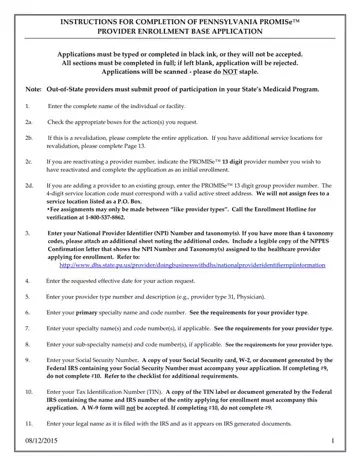
Navigating the complexities of the Pennsylvania PROMISe™ Provider Enrollment Base Application can be a daunting task for new and returning healthcare providers alike. This comprehensive form serves as a gateway for providers to participate in Pennsylvania's Medicaid program, necessitating accuracy and attention to detail in its completion. Whether providers are applying for the first time, revalidating, reactivating a provider number, or adding a provider to an existing group, the application demands that each step be completed with precision. Key requirements include typing or using black ink for clarity, avoiding staples due to the scanning process, and providing proof of Medicaid participation for out-of-state providers. The application instructs on various critical entries such as provider identification, service locations that must have a physical address rather than a P.O. Box, and the necessary financial and legal documents. Special attention is also given to compliance with the Americans with Disabilities Act (ADA), understanding the nuances of Provider Eligibility Programs (PEPs), and the importance of indicating managed care organization participation. The inclusion of licensing and certification information, alongside specifics about service locations, underscores the thorough nature of this process. Adherence to these guidelines ensures that healthcare providers can successfully navigate the enrollment process, paving the way for them to offer vital services to Medicaid recipients across Pennsylvania.
| Question | Answer |
|---|---|
| Form Name | Enrollment Promise |
| Form Length | 31 pages |
| Fillable? | Yes |
| Fillable fields | 500 |
| Avg. time to fill out | 35 min 56 sec |
| Other names | pa promise, dpw provider, enrollment application promise, dpw provider enrollment |
Enrollment Promise isn’t the one you’re looking for?
Please rate Enrollment Promise
