
F 82064 Form PDF Details

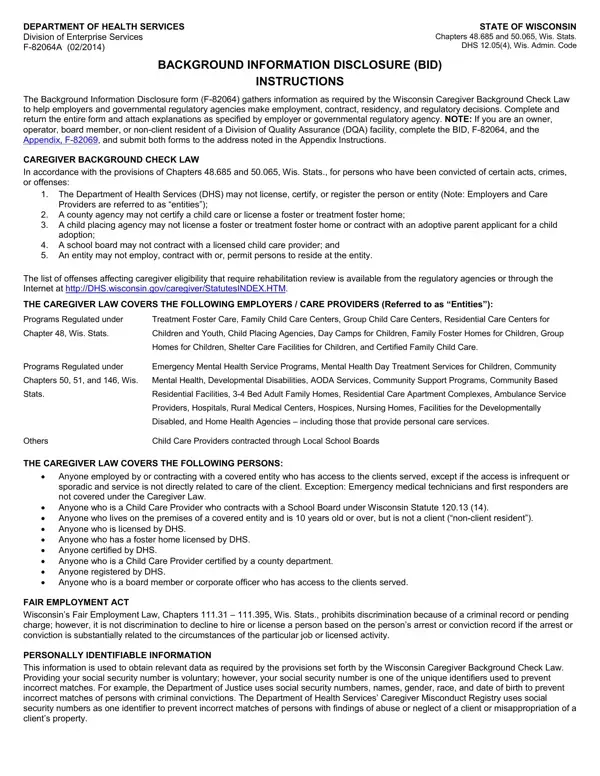
In today's stringent compliance environment, navigating the waters of employment and regulatory decisions within the caregiver industry in Wisconsin necessitates meticulous adherence to legal prerequisites. Central to this compliance framework is the Background Information Disclosure (BID) form, officially designated as F­82064, alongside its companion appendix, F­82069. This form serves as the linchpin in the caregiver background check law, outlined under Chapters 48.685 and 50.065 of the Wisconsin Statutes, ensuring that individuals and entities engaged in caregiving roles are meticulously vetted. The scope of validation extends across a broad spectrum of care providers and employers, including but not limited to child care, mental health services, and facilities catering to the developmentally disabled. In essence, it embodies a proactive measure to safeguard the vulnerable demographics these entities serve. Adherence to the mandates of the F­82064 form not only aligns with the legal statutes but also with the ethos of the Fair Employment Act, ensuring that the process of background checks circumvents discrimination while prioritizing the safety of care recipients. Moreover, the form emphasizes the significance of accurate and comprehensive disclosure of one's criminal and professional history, thereby serving as a critical filter in the hiring, licensing, and regulatory processes within Wisconsin's health and caregiving sectors. Failure to comply or providing falsified information can lead to severe repercussions, including financial penalties and the revocation of licenses or certifications, highlighting the form's crucial role in maintaining the integrity and trustworthiness of caregivers in the state.

QuestionAnswer
Form NameF 82064 Form
Form Length4 pages
Fillable?No
Fillable fields0
Avg. time to fill out1 min
Other nameswisconsin background check form form, wisconsin bid form, dhs bid, wisconsin disclosure

How to Edit F 82064 Form Online for Free

With the online PDF tool by FormsPal, you can easily fill in or edit wisconsin bid form here. To retain our tool on the forefront of efficiency, we aim to put into action user-oriented capabilities and enhancements regularly. We're routinely happy to receive feedback - play a vital role in remolding PDF editing. For anyone who is seeking to get started, here's what it takes:

Step 1: Access the PDF inside our editor by clicking on the "Get Form Button" at the top of this page.

Step 2: Using this online PDF file editor, you are able to accomplish more than simply complete forms. Edit away and make your docs appear perfect with customized textual content put in, or optimize the original input to excellence - all that supported by an ability to incorporate stunning photos and sign it off.

This document requires some specific information; in order to ensure consistency, take the time to heed the guidelines down below:

1. To start off, once filling in the wisconsin bid form, start out with the part with the next blank fields:

Filling out section 1 of state of wisconsin bid form

2. Just after completing the previous section, go on to the next part and fill in all required particulars in these blanks - Check the box that applies to you, Employee Contractor including new, Applicant for a license or, Household member lives on, NOTE If you are an owner operator, Name First and Middle, Name Last, Position Title Complete only if, or contractor or a current, Any Other Names By Which You Have, Birth Date, Gender M F, Race, American Indian or Alaskan Native, and Black White.

How you can fill out state of wisconsin bid form portion 2

3. Through this step, review federal state local military and, located You may be asked to supply, Were you ever found to be, offense NOTE A response to this, asked to supply additional, Has any government or regulatory, A response is required if the box, Only employers and regulatory, and should check this box, and If Yes explain including when and. All of these will need to be filled out with utmost accuracy.

Stage # 3 in filling in state of wisconsin bid form

It's easy to make a mistake when completing your If Yes explain including when and, hence be sure to reread it prior to deciding to finalize the form.

4. You're ready to begin working on this next form section! Here you'll get all of these client If Yes explain including, Has any government or regulatory, or used the property of a person, Has any government or regulatory, If Yes explain including when and, Do you have a government issued, and clients If Yes explain including blank fields to fill in.

Writing section 4 in state of wisconsin bid form

5. And finally, this final segment is what you need to complete before finalizing the document. The fields you're looking at are the next: provide care treatment or, Has any government or regulatory, a care providing facility If Yes, Have you been discharged from a, If yes indicate the year of, Have you resided outside of, and If Yes list each state and the.

Writing section 5 of state of wisconsin bid form

Step 3: Make certain your details are correct and click on "Done" to proceed further. Sign up with us now and easily get wisconsin bid form, set for download. Every change you make is handily saved , helping you to edit the file at a later stage when necessary. We do not share the information that you provide while completing forms at our website.