
Fema Form 086 0 32 PDF Details

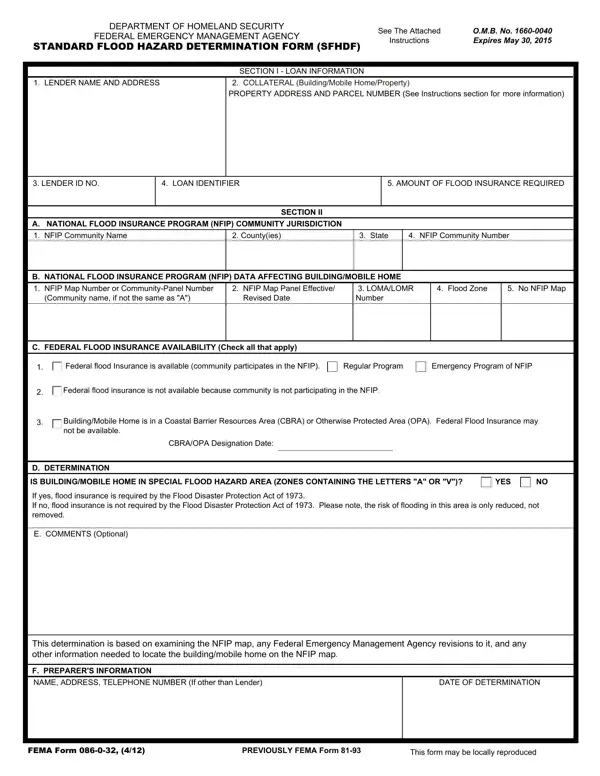
When navigating the complexities of flood insurance requirements, the Standard Flood Hazard Determination Form, FEMA Form 086-0-32, stands out as a crucial tool for both lenders and borrowers. Updated by the Federal Emergency Management Agency (FEMA) as part of the Department of Homeland Security, this form serves a vital role in the real estate and lending processes. Expiring on May 30, 2015, it was meticulously designed to aid in compliance with the Flood Disaster Protection Act of 1973 and the National Flood Insurance Reform Act of 1994, ensuring that properties at risk of flooding are properly identified and insured. By examining loan information, including lender details and collateral specifics, and delving into the National Flood Insurance Program (NFIP) data, the form assesses whether properties are within Special Flood Hazard Areas (SFHAs), thereby requiring mandatory flood insurance. Additionally, it scrutinizes Federal flood insurance availability, crucial for properties in NFIP-participating communities or those impacted by federal prohibitions in Coastal Barrier Resources Areas (CBRA) and Otherwise Protected Areas (OPA). With instructions for both preparation and completion, the form strives for a balance of thoroughness and accessibility, empowering lenders with the ability to make informed determinations about flood insurance requirements, which, in turn, informs homeowners and potential buyers about necessary insurance protections for their properties.

QuestionAnswer
Form NameFema Form 086 0 32
Form Length3 pages
Fillable?No
Fillable fields0
Avg. time to fill out45 sec
Other namesSFHDF department of homeland security standard flood hazard determination form

How to Edit Fema Form 086 0 32 Online for Free

Fema Form 086 0 32 can be completed without any problem. Simply use FormsPal PDF tool to do the job in a timely fashion. Our team is devoted to giving you the perfect experience with our editor by regularly adding new features and enhancements. Our editor is now a lot more useful as the result of the latest updates! So now, working with PDF forms is simpler and faster than before. It merely requires just a few basic steps:

Step 1: Simply click on the "Get Form Button" in the top section of this webpage to open our form editor. Here you will find everything that is required to work with your file.

Step 2: With this online PDF tool, it is easy to accomplish more than just fill in blank fields. Edit away and make your forms appear professional with customized text incorporated, or adjust the original input to perfection - all accompanied by the capability to incorporate stunning pictures and sign it off.

This PDF doc requires specific information; in order to guarantee consistency, please take into account the following guidelines:

1. To get started, once filling out the Fema Form 086 0 32, start in the page that features the subsequent blanks:

Fema Form 086 0 32 writing process described (part 1)

2. Your next step is to submit these blank fields: Federal flood Insurance is, Regular Program, Emergency Program of NFIP, Federal flood insurance is not, BuildingMobile Home is in a, CBRAOPA Designation Date, D DETERMINATION, IS BUILDINGMOBILE HOME IN SPECIAL, YES, If yes flood insurance is required, and E COMMENTS Optional.

Regular Program, YES, and D DETERMINATION in Fema Form 086 0 32

Many people frequently make errors when filling in Regular Program in this section. Ensure that you double-check everything you type in here.

3. The third part will be simple - fill in every one of the blanks in F PREPARERS INFORMATION, NAME ADDRESS TELEPHONE NUMBER If, DATE OF DETERMINATION, FEMA Form, PREVIOUSLY FEMA Form, and This form may be locally reproduced in order to finish this part.

Filling in section 3 of Fema Form 086 0 32

Step 3: After you have looked again at the details you filled in, simply click "Done" to complete your document generation. Create a 7-day free trial option with us and acquire immediate access to Fema Form 086 0 32 - with all changes saved and available from your personal cabinet. At FormsPal.com, we do everything we can to be certain that all of your details are maintained private.