
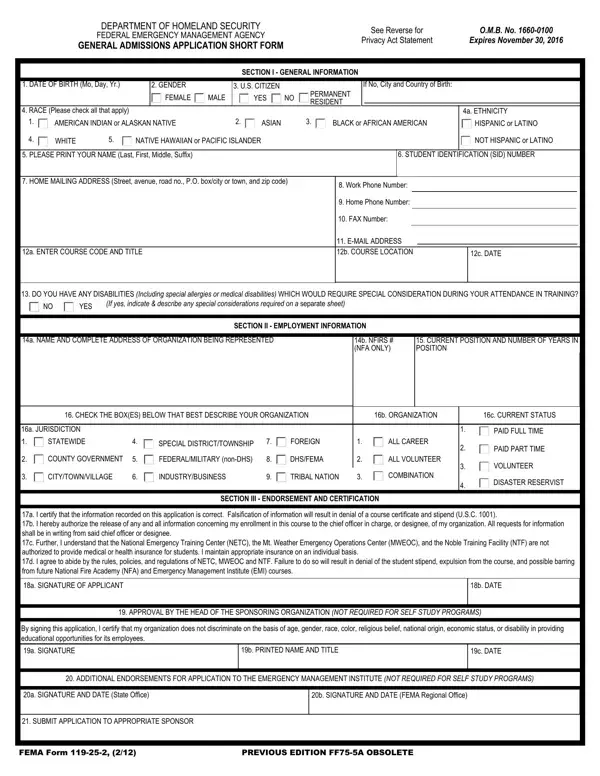
Fema Form 119 25 2 PDF Details

The FEMA 119-25-2 form serves as a crucial document for individuals seeking admission into training programs offered by the Federal Emergency Management Agency (FEMA), an agency within the Department of Homeland Security. This form is part of a broader effort to ensure that the agency operates with transparency while adhering to the Privacy Act Statement. It gathers essential personal information, such as date of birth, gender, citizenship status, ethnicity, and contact details, alongside employment information which includes the applicant's organization details and current position. The form not only facilitates the application process for various courses but also includes sections for disability disclosures, requiring special considerations, and the applicant's consent for the release of information and adherence to regulations of the National Emergency Training Center (NETC), the Mt. Weather Emergency Operations Center (MWEOC), and the Noble Training Facility (NTF). Signatures from the applicant, as well as approval by the head of the sponsoring organization, are imperative for the processing of the application. Furthermore, it outlines the equal opportunity statement, reinforcing FEMA's commitment to non-discrimination and encouraging minority and female participation. This document is governed by a set of laws and executive orders that aim to safeguard personal information while ensuring the efficient operation of training programs, with clear stipulations on the use, potential release of information, and the consequences of non-disclosure.

QuestionAnswer
Form NameFema Form 119 25 2
Form Length2 pages
Fillable?No
Fillable fields0
Avg. time to fill out30 sec
Other namesfema application for generator reimbursement, fema general admission application, fema application short get, fema application short form

How to Edit Fema Form 119 25 2 Online for Free

Once you open the online editor for PDFs by FormsPal, you are able to fill in or edit fema general application form right here. Our editor is constantly evolving to provide the very best user experience attainable, and that's due to our commitment to continuous development and listening closely to feedback from customers. Starting is easy! What you need to do is adhere to the following simple steps directly below:

Step 1: First of all, open the pdf tool by pressing the "Get Form Button" at the top of this webpage.

Step 2: This editor offers the ability to customize your PDF file in many different ways. Change it with any text, correct original content, and include a signature - all close at hand!

Completing this document requires attentiveness. Make sure that all mandatory fields are done correctly.

1. Start filling out your fema general application form with a selection of major fields. Collect all of the information you need and be sure nothing is forgotten!

Completing part 1 in fema form 119 25 2 fillable

2. Immediately after this section is filled out, go to enter the relevant details in these - a NAME AND COMPLETE ADDRESS OF, b NFIRS NFA ONLY, CURRENT POSITION AND NUMBER OF, CHECK THE BOXES BELOW THAT BEST, b ORGANIZATION, c CURRENT STATUS, a JURISDICTION, STATEWIDE, COUNTY GOVERNMENT, CITYTOWNVILLAGE, SPECIAL DISTRICTTOWNSHIP, FEDERALMILITARY nonDHS, INDUSTRYBUSINESS, FOREIGN, and DHSFEMA.

fema form 119 25 2 fillable completion process shown (part 2)

Always be really mindful while filling out b NFIRS NFA ONLY and DHSFEMA, since this is the part in which most users make mistakes.

3. This third stage is going to be simple - fill in all the form fields in By signing this application I, a SIGNATURE, b PRINTED NAME AND TITLE, c DATE, ADDITIONAL ENDORSEMENTS FOR, a SIGNATURE AND DATE State Office, b SIGNATURE AND DATE FEMA Regional, SUBMIT APPLICATION TO APPROPRIATE, FEMA Form, and PREVIOUS EDITION FFA OBSOLETE to conclude this process.

Writing part 3 of fema form 119 25 2 fillable

4. This next section requires some additional information. Ensure you complete all the necessary fields - a DISPOSITION, ACCEPTED, REJECTED, b SIGNATURE OF REVIEWER, c DATE, EQUAL OPPORTUNITY STATEMENT, NFA and EMI are Equal Opportunity, PRIVACY ACT STATEMENT, and GENERAL This information is - to proceed further in your process!

GENERAL  This information is, REJECTED, and NFA and EMI are Equal Opportunity inside fema form 119 25 2 fillable

Step 3: Before finalizing this file, double-check that form fields were filled in the correct way. The moment you believe it's all fine, click on “Done." Get hold of the fema general application form once you join for a 7-day free trial. Readily get access to the form inside your FormsPal account page, with any edits and adjustments being automatically synced! Here at FormsPal, we aim to make sure all of your details are stored protected.