
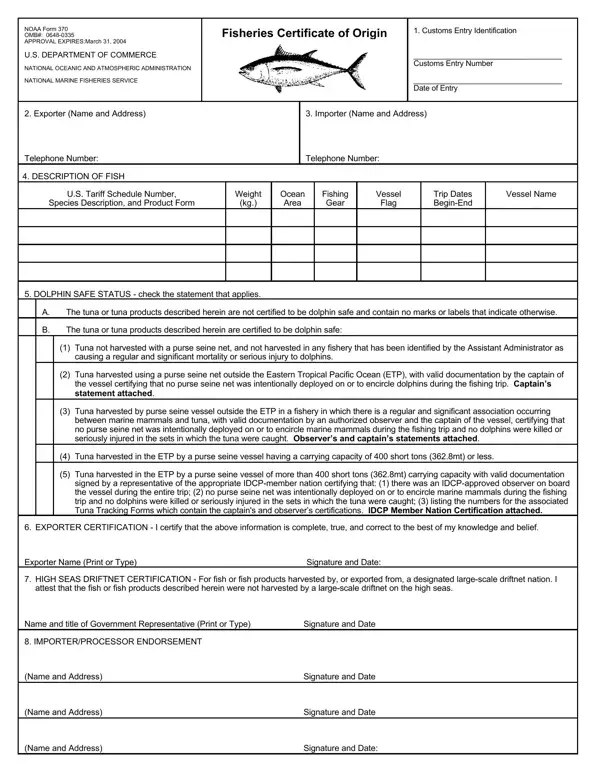

NOAA Form 370 at a glance
What it is: NOAA Form 370 is the Fisheries Certificate of Origin of the U.S. Department of Commerce, National Marine Fisheries Service (NMFS).
Who signs: Exporter certification: must be signed and dated by a responsible official of the export company listed in Section 2.
This form is required for all frozen and/or processed tuna and tuna products (excluding fresh tuna) entered into the United States, pursuant to 50 CFR 216.24(f)(2)(i) or (ii).
A filled-in NOAA Form 370 example: an exporter completes a tuna certificate
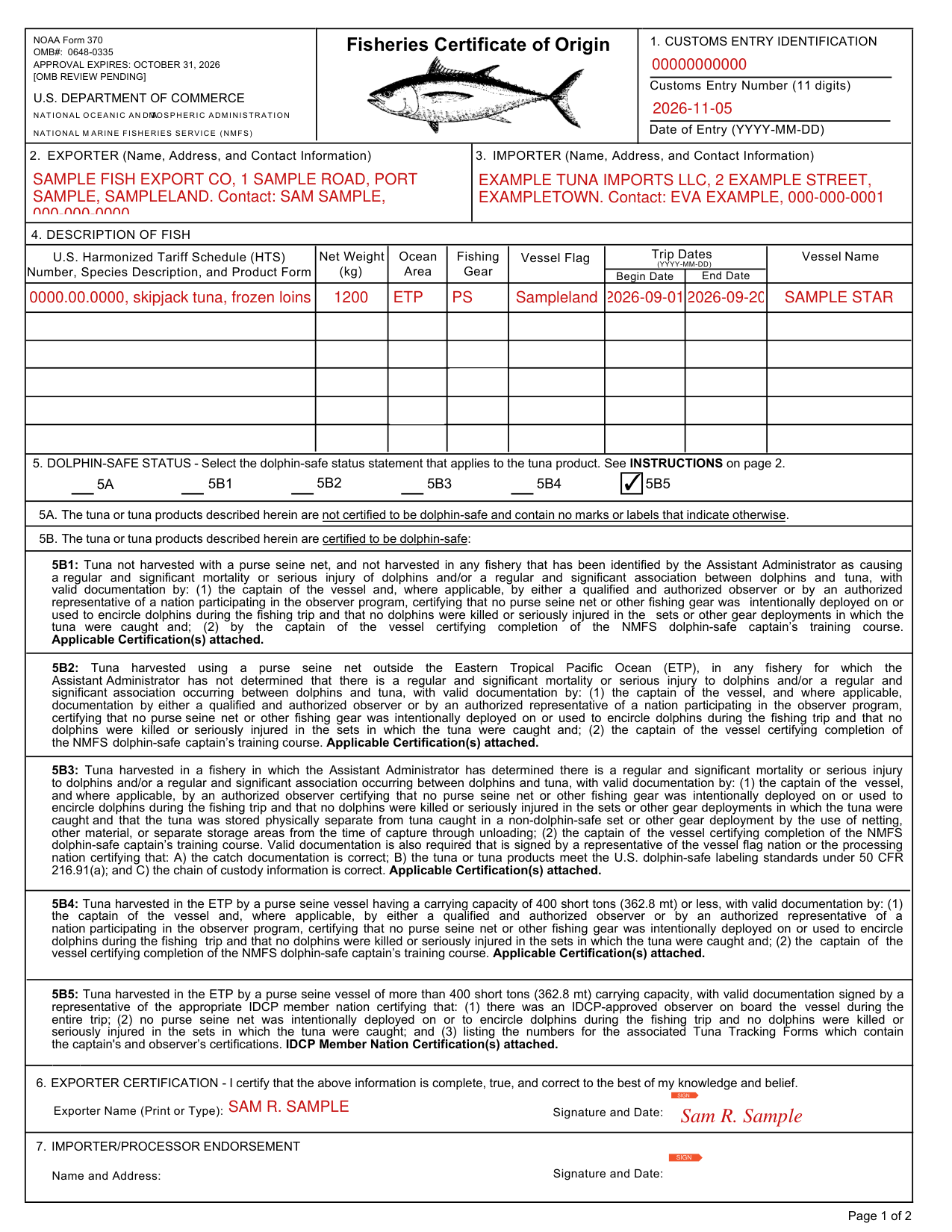
How to fill out NOAA Form 370, box by box
1. Customs entry identification
Enter the shipment's assigned U.S. Customs and Border Protection Entry Number and the projected date of entry [year-month-day, YYYY-MM-DD, e.g., December 19, 2024 = 2024-12-19].
2. Exporter and 3. Importer
Enter company name and address of exporter, and contact information for responsible company representative.
Enter name and address of the importer of record, and contact information for responsible company representative.
4. Description of fish
Enter U.S. HTS Number of the tuna or tuna product, the species description, and product form in English. Enter the total net weight of the shipment in kilograms. Enter the ocean area in which the fish contained in this shipment were harvested.
For ETP (Eastern Tropical Pacific), the ocean area is east of 160° W. longitude, between 40° N. and 40° S. latitude. Enter type of fishing gear used to harvest the fish: PL Pole and Line, Hook and Line; DN Large-scale Driftnet (High Seas); PS Purse Seine Net; GN Gillnet less than 1.5 miles (2.4 km) in total length; LL Longline; OTH Other Type (please describe). For the vessel flag, enter the country under whose laws the fishing vessel operated, or for certified charter vessels, enter the country that accepted responsibility for the vessel's fishing operations. For trip dates, enter the exact beginning and ending dates [year-month-day, YYYY-MM-DD, e.g., December 19, 2024 = 2024-12-19] of the fishing trip during which the described shipment of fish were harvested. For the vessel name, enter the name of the fishing vessel.
5. Dolphin-safe status
Select only one statement. Use a separate NOAA Form 370 if multiple statements apply.
5A: The tuna or tuna products described herein are not certified to be dolphin-safe and contain no marks or labels that indicate otherwise.
5B1, certified to be dolphin-safe: Tuna not harvested with a purse seine net, and not harvested in any fishery that has been identified by the Assistant Administrator as causing a regular and significant mortality or serious injury of dolphins and/or a regular and significant association between dolphins and tuna, with valid documentation by: (1) the captain of the vessel and, where applicable, by either a qualified and authorized observer or by an authorized representative of a nation participating in the observer program, certifying that no purse seine net or other fishing gear was intentionally deployed on or used to encircle dolphins during the fishing trip and that no dolphins were killed or seriously injured in the sets or other gear deployments in which the tuna were caught and; (2) by the captain of the vessel certifying completion of the NMFS dolphin-safe captain's training course. Applicable Certification(s) attached.
5B2, certified to be dolphin-safe: Tuna harvested using a purse seine net outside the Eastern Tropical Pacific Ocean (ETP), in any fishery for which the Assistant Administrator has not determined that there is a regular and significant mortality or serious injury to dolphins and/or a regular and significant association occurring between dolphins and tuna, with valid documentation by: (1) the captain of the vessel, and where applicable, documentation by either a qualified and authorized observer or by an authorized representative of a nation participating in the observer program, certifying that no purse seine net or other fishing gear was intentionally deployed on or used to encircle dolphins during the fishing trip and that no dolphins were killed or seriously injured in the sets in which the tuna were caught and; (2) the captain of the vessel certifying completion of the NMFS dolphin-safe captain's training course. Applicable Certification(s) attached.
5B3, certified to be dolphin-safe: Tuna harvested in a fishery in which the Assistant Administrator has determined there is a regular and significant mortality or serious injury to dolphins and/or a regular and significant association occurring between dolphins and tuna, with valid documentation by: (1) the captain of the vessel, and where applicable, by an authorized observer certifying that no purse seine net or other fishing gear was intentionally deployed on or used to encircle dolphins during the fishing trip and that no dolphins were killed or seriously injured in the sets or other gear deployments in which the tuna were caught and that the tuna was stored physically separate from tuna caught in a non-dolphin-safe set or other gear deployment by the use of netting, other material, or separate storage areas from the time of capture through unloading; (2) the captain of the vessel certifying completion of the NMFS dolphin-safe captain's training course. Valid documentation is also required that is signed by a representative of the vessel flag nation or the processing nation certifying that: A) the catch documentation is correct; B) the tuna or tuna products meet the U.S. dolphin-safe labeling standards under 50 CFR 216.91(a); and C) the chain of custody information is correct. Applicable Certification(s) attached.
5B4, certified to be dolphin-safe: Tuna harvested in the ETP by a purse seine vessel having a carrying capacity of 400 short tons (362.8 mt) or less, with valid documentation by: (1) the captain of the vessel and, where applicable, by either a qualified and authorized observer or by an authorized representative of a nation participating in the observer program, certifying that no purse seine net or other fishing gear was intentionally deployed on or used to encircle dolphins during the fishing trip and that no dolphins were killed or seriously injured in the sets in which the tuna were caught and; (2) the captain of the vessel certifying completion of the NMFS dolphin-safe captain's training course. Applicable Certification(s) attached.
5B5, certified to be dolphin-safe: Tuna harvested in the ETP by a purse seine vessel of more than 400 short tons (362.8 mt) carrying capacity, with valid documentation signed by a representative of the appropriate IDCP member nation certifying that: (1) there was an IDCP-approved observer on board the vessel during the entire trip; (2) no purse seine net was intentionally deployed on or to encircle dolphins during the fishing trip and no dolphins were killed or seriously injured in the sets in which the tuna were caught; and (3) listing the numbers for the associated Tuna Tracking Forms which contain the captain's and observer's certifications. IDCP Member Nation Certification(s) attached.
For tuna declared as 5B1, 5B2, or 5B4, a written Captain's Statement is required. A statement by an observer or a representative of a nation participating in the observer program may also be required where NMFS has determined that the observer program is qualified and authorized to issue observer statements for purposes of the dolphin-safe labeling program.
For tuna declared as 5B3, caught in a fishery where the Assistant Administrator has determined that a regular and significant mortality or serious injury to dolphins exists and/or a regular and significant association is occurring between dolphins and tuna, in addition to a Captain's Statement, a statement by an observer or a representative of a nation participating in the observer program may be required.
For tuna declared as 5B5, an “International Dolphin Conservation Program (IDCP) Member Nation Certification” is required.
6. Exporter certification
Exporter certification: must be signed and dated by a responsible official of the export company listed in Section 2.
Exporter certification, Box 6: By signing you certify that the above information is complete, true, and correct to the best of my knowledge and belief.
7. Importer/processor endorsement
Each importer or processor who takes custody of the shipment must sign and date the form to certify that the form and attached documentation accurately describe the shipment of tuna that they accompany.
Where and when to submit
Completed forms and applicable dolphin-safe certifications must be submitted prior to or at the time of importation, via the U.S. CBP ACE Document Imaging System.
Before you go
The information submitted on this form may also be used to document U.S. domestic landings and shipments of certain tuna and tuna products as required by 50 CFR Part 216.92(a); it is also necessary to substantiate the origin and method of harvest of tuna as required by 50 CFR Part 216.24(f), and will be used to determine whether or not the listed shipment will be allowed entry into the United States.
The information on this form will be treated as confidential pursuant to NMFS' internal control procedures.
Questions regarding this form may be directed to the Tuna Tracking and Verification Program by email at swrtuna.track@noaa.gov.
Sources
[1] NOAA Form 370, Fisheries Certificate of Origin, National Marine Fisheries Service (NMFS), U.S. Department of Commerce (the Official source link on this page).