
Foot Screening Form PDF Details

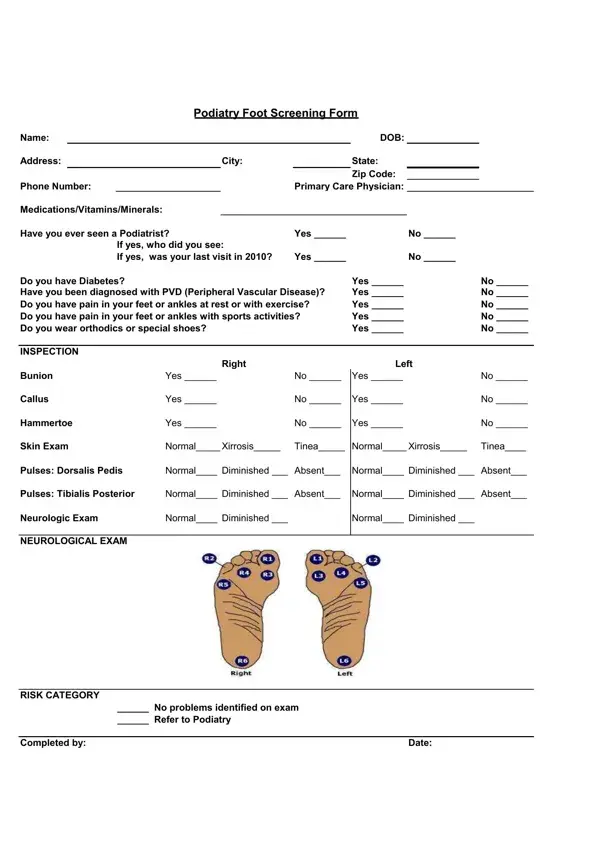
In a world where feet carry the burdens of daily life, their health often goes unnoticed until a problem arises. Enter the Podiatry Foot Screening Form: a comprehensive tool designed to facilitate early detection and management of foot-related health issues. This carefully structured document gathers essential information, starting with basic identification details such as the patient's name, date of birth, address, and contact number, and extends to their primary care physician and current medications, including vitamins and minerals. It probes the patient's history with podiatric care, asking if they've ever consulted a podiatrist, the identity of the podiatrist, and the timing of their last visit. Significantly, it inquires about the presence of diabetes or Peripheral Vascular Disease (PVD)—conditions that could greatly impact foot health. Additionally, the form is designed to identify symptoms that might not be evident without a thorough examination, including pain during rest, exercise, or sports activities, and the use of orthotics or special shoes. An inspection checklist targets common ailments like bunions, calluses, and hammertoes, alongside a skin exam and assessments of circulation and neurological health. By delineating each category from basic identification to detailed inspections and risk assessments, the form acts as a preventive measure, aiming to address foot problems before they escalate into more serious complications, thereby underscoring the importance of podiatric health in overall well-being.

QuestionAnswer
Form NameFoot Screening Form
Form Length1 pages
Fillable?No
Fillable fields0
Avg. time to fill out15 sec
Other nameswhat to chart on diabetic feet assessment, podiatry foot screening template, comprehensive diabetic foot exam forms, diabetic foot check patient logs

How to Edit Foot Screening Form Online for Free

When working in the online PDF tool by FormsPal, you're able to complete or alter podiatry foot screening here and now. We at FormsPal are aimed at providing you with the absolute best experience with our tool by consistently presenting new capabilities and upgrades. With all of these improvements, using our editor becomes better than ever! To get the process started, go through these easy steps:

Step 1: Click the orange "Get Form" button above. It's going to open up our pdf editor so you could start filling out your form.

Step 2: With the help of this handy PDF tool, you can accomplish more than just fill out blank form fields. Express yourself and make your documents look high-quality with customized textual content added, or adjust the original input to perfection - all comes with an ability to insert any pictures and sign it off.

As a way to finalize this PDF form, be sure to type in the necessary details in every single area:

1. When completing the podiatry foot screening, make sure to include all of the needed fields within its relevant section. It will help to facilitate the process, allowing for your details to be processed efficiently and appropriately.

The way to complete foot screening form stage 1

2. After the last part is complete, you have to include the required particulars in Skin Exam, NormalXirrosis, Tinea NormalXirrosis, Tinea, Pulses Dorsalis Pedis, Normal Diminished Absent Normal, Pulses Tibialis Posterior, Normal Diminished Absent Normal, Neurologic Exam, Normal Diminished, Normal Diminished, NEUROLOGICAL EXAM, RISK CATEGORY, No problems identified on exam, and Completed by in order to move on to the next step.

How to fill in foot screening form stage 2

As for Skin Exam and NEUROLOGICAL EXAM, be certain that you take another look here. The two of these are surely the key ones in this PDF.

Step 3: When you have looked once more at the details in the file's blanks, click "Done" to complete your form at FormsPal. Join us right now and immediately gain access to podiatry foot screening, ready for downloading. All alterations made by you are preserved , helping you to edit the file at a later time if required. We don't sell or share the information that you provide when working with documents at our website.