
Form 200 PDF Details

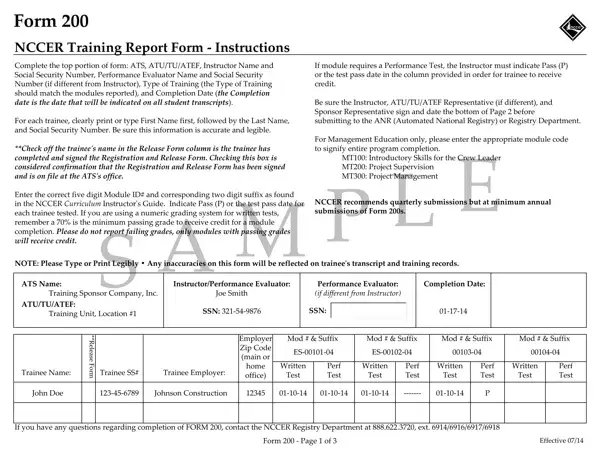
The journey of ensuring that trainees receive the recognition and credit for their hard work in various training modules is pivotal for both their professional growth and the credibility of the training institution. This journey is meticulously documented and validated through a crucial document known as Form 200, the NCCER Training Report Form. This form plays a significant role in the realm of vocational and technical education, offering a structured method for instructors to report on the completion of training modules by trainees. It is a comprehensive document that calls for detailed information, including the instructor's details, trainee's name, social security number, module codes, and the outcomes of both performance tests and written examinations. What stands out is the form's emphasis on precision and clarity, urging instructors to print or type legibly to avoid any inaccuracies that could reflect negatively on a trainee's transcript and training records. Furthermore, the form demands confirmation through signatures from the instructor, ATU/TU/ATEF Representative, and the Sponsor Representative to ensure the validity and integrity of the information provided before its submission to the ANR (Automated National Registry) or Registry Department. Endorsed by NCCER, the form not only facilitates a seamless workflow from training completion to official documentation but also upholds the standards of training delivery and assessment, ultimately benefiting the trainees in substantiating their skills and knowledge in their respective fields.

QuestionAnswer
Form NameForm 200
Form Length3 pages
Fillable?No
Fillable fields0
Avg. time to fill out45 sec
Other namesform training report, form 200, 200 form, form 200 pdf

How to Edit Form 200 Online for Free

You'll be able to fill in form nccer atef effectively in our PDFinity® online tool. Our editor is constantly evolving to give the best user experience achievable, and that is because of our commitment to continuous enhancement and listening closely to feedback from customers. To get the process started, consider these basic steps:

Step 1: Press the "Get Form" button at the top of this page to get into our tool.

Step 2: With our state-of-the-art PDF tool, you're able to accomplish more than just fill in blank fields. Try each of the features and make your forms appear professional with custom text added, or modify the file's original content to perfection - all that supported by an ability to insert stunning images and sign the PDF off.

In order to fill out this document, be sure to type in the required details in every single blank:

1. You have to fill out the form nccer atef properly, thus be mindful while working with the sections comprising all of these blanks:

Filling out section 1 in atu atef performance online

2. Soon after filling in the last part, head on to the subsequent part and fill out the essential details in all these blank fields - ATS Name, ATUTUATEF, Trainee Name First Name Last Name, InstructorPerformance Evaluator, Performance Evaluator if different, Completion Date, Name, SSN, Name, SSN, Trainee SS, F o r m, R e l e a s e, Trainee Employer Employer Zip, and Mod Suffix.

atu atef performance online writing process outlined (part 2)

Always be really attentive when filling out F o r m and SSN, since this is where many people make mistakes.

3. Completing ATS Name, ATUTUATEF, Trainee Name First Name Last Name, InstructorPerformance Evaluator, Performance Evaluator if different, Completion Date, Name, SSN, Name, SSN, F o r m, R e l e a s e, Trainee SS, Trainee Employer Employer Zip, and Mod Suffix is essential for the next step, make sure to fill them out in their entirety. Don't miss any details!

R e l e a s e, Trainee Employer  Employer Zip, and Name inside atu atef performance online

4. Completing Certified Instructor Signature, Date, Certified Instructor Name type or, ATUTUATEF Representative, Sponsor Representative NameTitleSS, Signature, Signature, For additional instructors attach, Date, Date, Return to, Sponsor Representative then ATS, NCCER Registry Department, Form Page of, and Effective is paramount in this section - make certain that you take your time and fill in every blank!

Part number 4 in completing atu atef performance online

Step 3: As soon as you've glanced through the information entered, press "Done" to finalize your FormsPal process. Sign up with us right now and instantly use form nccer atef, ready for download. Every edit made is handily saved , letting you edit the pdf later as needed. FormsPal is committed to the privacy of all our users; we ensure that all personal data handled by our system is confidential.