
Form 2099 PDF Details

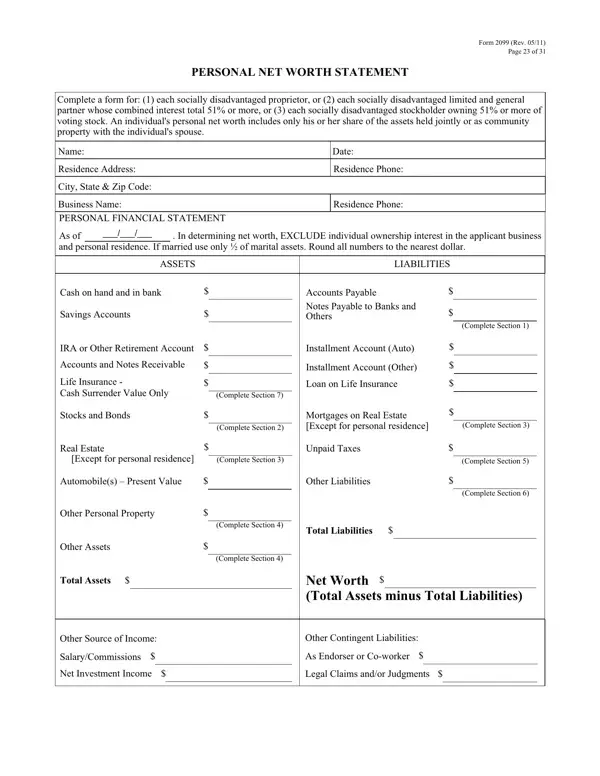
Form 2099, revised in May 2011, serves as a comprehensive Personal Net Worth Statement designed specifically for individuals seeking to establish their status as socially disadvantaged for business purposes. This form mandates detailed reporting from proprietors, partners, and stockholders who classify as socially disadvantaged and hold a 51% or more interest in a business. By carefully distinguishing between personal and business assets, the form ensures an accurate representation of an individual's net worth. It requires the exclusion of both the individual's personal residence and any ownership interest in the applying business, thereby focusing solely on personal financial strength. Contributions to the net worth calculation include cash, retirement accounts, real estate (excluding personal residence), automobiles, personal property, and any other significant assets. Conversely, liabilities encompass personal debts ranging from payable accounts and notes to mortgages on real estate and unpaid taxes. The form goes further to detail income sources outside of business operations and any contingent liabilities, thereby providing a well-rounded financial profile. Additionally, it addresses potential asset transfers to prevent misuse of disadvantaged status qualifications. The form's stringent requirements are underscored by a Personal Net Worth Affidavit, reinforcing the accuracy of the information provided under penalty of law, including significant fines and imprisonment for false declarations. Ultimately, Form 2099 stands as a pivotal document in the certification process for individuals claiming a socially disadvantaged status, governed by federal confidentiality laws to protect the personal information of the applicants.

QuestionAnswer
Form NameForm 2099
Form Length4 pages
Fillable?No
Fillable fields0
Avg. time to fill out1 min
Other namesjointly, misrepresents, Endorser, deems

How to Edit Form 2099 Online for Free

aver can be filled in easily. Simply make use of FormsPal PDF tool to get the job done right away. Our team is always endeavoring to enhance the tool and help it become even faster for people with its extensive functions. Enjoy an ever-evolving experience now! If you are seeking to start, here is what it will take:

Step 1: First, open the pdf editor by clicking the "Get Form Button" in the top section of this webpage.

Step 2: With this state-of-the-art PDF tool, you could accomplish more than simply fill out blank form fields. Try all of the features and make your docs look high-quality with customized text incorporated, or optimize the original content to perfection - all that comes along with an ability to incorporate almost any photos and sign it off.

As for the blanks of this particular form, this is what you want to do:

1. You will need to complete the aver accurately, therefore be mindful while working with the parts including all of these blank fields:

false conclusion process described (part 1)

2. Right after filling out this part, head on to the next part and fill in the essential particulars in these blank fields - Except for personal residence, Automobiles Present Value, Other Personal Property, Other Assets, Total Assets, Complete Section, Other Liabilities, Complete Section, Total Liabilities, Complete Section, Complete Section, Complete Section, Net Worth Total Assets minus Total, Other Source of Income, and SalaryCommissions.

Part number 2 for submitting false

3. This stage is normally straightforward - fill in all the blanks in Original Balance, Payment Amount, Frequency weekly monthly etc, How Secured or Endorsed Type of, Section Stocks and Bonds Use, Original Balance, Total Value, Cost, Market Value Quotation or Exchange, Date of Quotation or Exchange, Section Real Estate Owned Do not, Property A, Property B, Property C, and Type of Property to conclude this process.

false completion process clarified (stage 3)

4. Filling out Address, Date Purchased, Original Cost, Present Market Value, Name and Address of Mortgage Holder, Mortgage Account Number, Mortgage Balance, Amount of Payment per MonthYear, and Status of Mortgage is key in the next step - make sure you take the time and be attentive with each empty field!

Original Cost, Name and Address of Mortgage Holder, and Present Market Value inside false

People often make mistakes when completing Original Cost in this section. You should definitely double-check what you enter here.

5. Lastly, the following final portion is what you will need to complete prior to submitting the form. The blank fields at issue include the following: Section Other Personal Property, Section Unpaid Taxes Describe in, Section Other Liabilities, and Section Life Insurance Held Give.

Section  Other Personal Property, Section  Life Insurance Held Give, and Section  Other Liabilities of false

Step 3: Go through everything you have entered into the form fields and hit the "Done" button. Right after getting afree trial account here, you'll be able to download aver or email it without delay. The document will also be easily accessible through your personal account menu with your every single change. FormsPal is focused on the confidentiality of all our users; we make certain that all information used in our tool remains secure.