
Form 300Es PDF Details

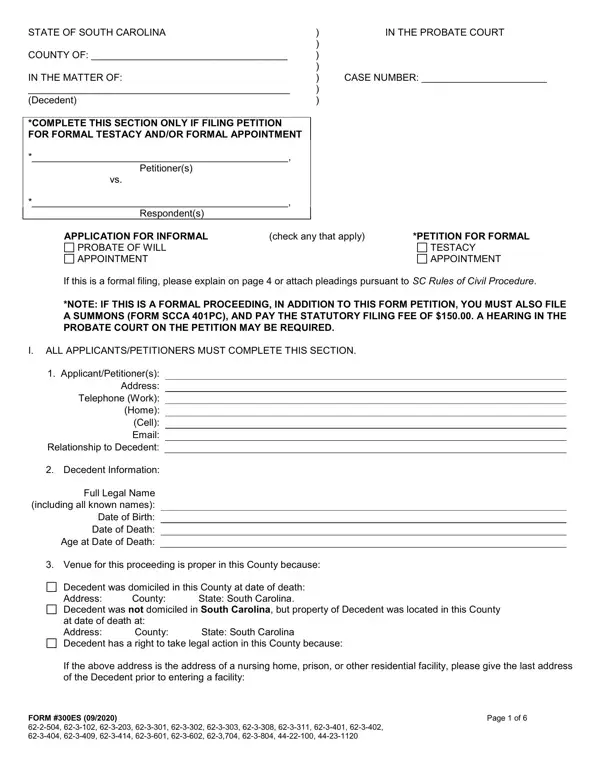
Managing the complexities of estate management and probate proceedings in South Carolina is facilitated by essential forms like the 300Es, pivotal for those embarking on this administrative journey. This form embodies the procedural essence for applications related to informal probate of wills, testacy, and formal appointments, among others, within the state's jurisdiction. The comprehensive layout requires detailed information about the deceased, including all known names, domicile details, and the intricacies surrounding the decedent's assets and potential beneficiaries. Crucially, the form distinguishes between informal and formal processes, guiding applicants through the decision on whether to proceed formally, which necessitates additional documents like a summons and the payment of statutory fees. Applicants are also urged to disclose any changes in the decedent's marital status, potential heirs born posthumously, or any instances where the decedent had been a mental health patient within state facilities. Addressing the requirements for appointing a Personal Representative and detailing the assets of the estate, the 300Es form stands as an indispensable tool for ensuring that due legal process is adhered to, providing a structured path for those navigating the challenging waters of probate and estate resolution.

QuestionAnswer
Form NameForm 300Es
Form Length6 pages
Fillable?No
Fillable fields0
Avg. time to fill out1 min 30 sec
Other names300 es probate, sc 300es probate, sc 300 es form, south carolina 300es form

How to Edit Form 300Es Online for Free

You could fill out sc 300es instantly using our PDFinity® online tool. In order to make our tool better and simpler to use, we constantly implement new features, with our users' suggestions in mind. With just a few easy steps, you can start your PDF journey:

Step 1: Hit the orange "Get Form" button above. It'll open our pdf editor so you could begin filling in your form.

Step 2: Once you launch the file editor, you'll see the form prepared to be filled out. Aside from filling in various blank fields, you can also do other actions with the form, specifically writing your own words, modifying the original textual content, inserting illustrations or photos, placing your signature to the PDF, and more.

To be able to complete this form, ensure that you type in the necessary information in every single blank field:

1. It is very important complete the sc 300es correctly, hence pay close attention while filling in the areas comprising these particular blank fields:

The right way to prepare sc 300 es form portion 1

2. Once your current task is complete, take the next step – fill out all of these fields - I ALL APPLICANTSPETITIONERS MUST, ApplicantPetitioners Address, Decedent Information, Full Legal Name including all, Venue for this proceeding is, and Decedent was domiciled in this with their corresponding information. Make sure to double check that everything has been entered correctly before continuing!

Filling out segment 2 in sc 300 es form

3. The following section should also be rather uncomplicated, Decedent was domiciled in this, If the above address is the, FORM ES, and Page of - all these form fields is required to be completed here.

Completing part 3 in sc 300 es form

People who work with this form often make some mistakes while filling in Decedent was domiciled in this in this section. Be sure to read again what you type in here.

4. This next section requires some additional information. Ensure you complete all the necessary fields - Year of Birth, including all known names, See attached for additional, b Names and addresses of intestate, Full Legal Name, including all known names, Year of Birth, Full Address, See attached for additional, Email Address, and Relationship to Decedent - to proceed further in your process!

Part number 4 for filling in sc 300 es form

5. While you draw near to the conclusion of the document, you will find a few more points to undertake. Specifically, c Did all of the above persons, YES, NO If no please explain on page, Did Decedent have any change of, To the best of your knowledge was, YES If yes please explain on page, facility during hisher lifetime, YES If yes please explain on page, Has a Guardian or Conservator, YES If yes please explain on page, elsewhere, Have you received or are you, YES If yes please state details, and page must all be filled out.

Completing segment 5 of sc 300 es form

Step 3: Check all the information you have entered into the blank fields and click the "Done" button. After starting a7-day free trial account here, you'll be able to download sc 300es or email it right off. The PDF form will also be available in your personal account menu with your adjustments. FormsPal guarantees your information confidentiality with a secure system that in no way saves or distributes any private data provided. Be confident knowing your docs are kept safe whenever you use our tools!