
Form 4710 10 PDF Details

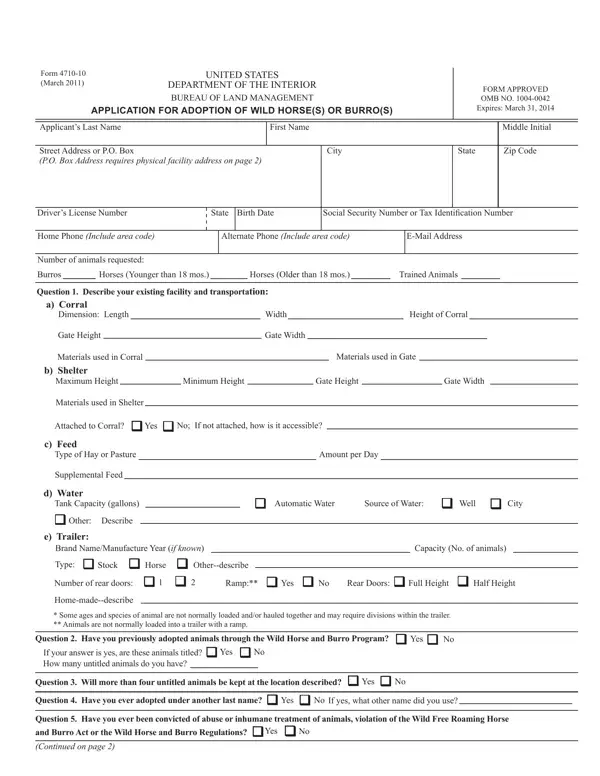
The Form 4710-10, developed by the United States Department of the Interior and administrated by the Bureau of Land Management (BLM), serves as a critical instrument in the adoption process of wild horses and burros. As of March 2011, this form not only facilitates the application procedure but also encapsulates the BLM's commitment to the humane treatment and welfare of these animals. Intending adopters are required to provide detailed information ranging from personal identification to specifics about the facilities where the animals will be housed, underscoring the rigorous considerations involved in qualifying for adoption. Through questions that probe into an applicant's previous experiences with adopted animals, facility specifications, and even convictions related to animal abuse, the form comprehensively evaluates suitability for adopting these wild creatures. Moreover, terms of adoption outlined within the document ensure adopters are fully aware of their responsibilities, including care and legal obligations post-adoption, aiming to fortify the protection and preservation of wild horses and burros. The inclusion of prohibitions against acts such as inhumane treatment and unauthorized selling reiterates the legal and ethical framework governing the adoption process. This attentiveness to both the welfare of animals and the qualifications of prospective adopters reflects a nuanced approach to wildlife management and conservation efforts.

QuestionAnswer
Form NameForm 4710 10
Form Length4 pages
Fillable?No
Fillable fields0
Avg. time to fill out1 min
Other namesadoption_applic ation_4710 010 icd 10 facility superbills form

How to Edit Form 4710 10 Online for Free

When using the online PDF tool by FormsPal, it is easy to fill in or modify Form 4710 10 here and now. Our editor is constantly developing to grant the very best user experience attainable, and that is due to our resolve for continuous enhancement and listening closely to user feedback. With just a couple of easy steps, you may begin your PDF editing:

Step 1: Open the PDF in our editor by clicking on the "Get Form Button" above on this webpage.

Step 2: As you open the file editor, you will see the document prepared to be filled out. In addition to filling in different blank fields, you may as well do other things with the Document, such as writing any text, editing the initial text, inserting images, putting your signature on the PDF, and a lot more.

This form will require specific info to be filled in, so be certain to take some time to provide exactly what is required:

1. Start filling out the Form 4710 10 with a number of major blanks. Collect all of the important information and ensure nothing is forgotten!

Filling out part 1 of Form 4710 10

2. Once your current task is complete, take the next step – fill out all of these fields - Attached to Corral, Yes, No If not attached how is it, c Feed, Type of Hay or Pasture, Supplemental Feed, d Water, Tank Capacity gallons, Other Describe, e Trailer, Amount per Day, Automatic Water, Source of Water, Well, and City with their corresponding information. Make sure to double check that everything has been entered correctly before continuing!

Filling in part 2 of Form 4710 10

3. The following section is mostly about Question Have you ever adopted, Yes, No If yes what other name did you, Question Have you ever been, and Burro Act or the Wild Horse, Yes, and Continued on page - type in each of these blanks.

Continued on page, Yes, and Question  Have you ever been inside Form 4710 10

4. All set to complete this next section! In this case you have all of these Applicants Name, Facility Address, City, Property Owners Name, MAP OF LOCATION OF ADOPTED WILD, State, Zip Code, Phone Number, Draw a map to the location where, and Draw a layout of corrals and blank fields to do.

Stage no. 4 in filling in Form 4710 10

Those who work with this PDF frequently make mistakes when filling out City in this area. Remember to read again whatever you enter here.

5. The very last section to finish this PDF form is crucial. Make sure that you fill out the mandatory blanks, for instance Directions to the Facility, Carefully read, the PROHIBITED ACTS and TERMS OF, State For the correct address, ADOPTION printed below, Carefully read information, Horse or Burro, Submit your completed Application, Horse or Burro or take it to an, So that we may notify you when, INSTRUCTIONS, PROHIBITED ACTS, a Maliciously or negligently, c Removing or attempting to remove, and public lands without authorization, prior to finalizing. Otherwise, it may contribute to an unfinished and probably nonvalid paper!

Form 4710 10 writing process shown (part 5)

Step 3: Just after rereading the entries, press "Done" and you're done and dusted! Find your Form 4710 10 the instant you sign up at FormsPal for a free trial. Quickly gain access to the form in your FormsPal cabinet, with any edits and changes all saved! FormsPal ensures your data confidentiality by using a protected system that in no way saves or distributes any personal information involved. Be confident knowing your docs are kept protected any time you work with our editor!