
Form 5208C 1 PDF Details

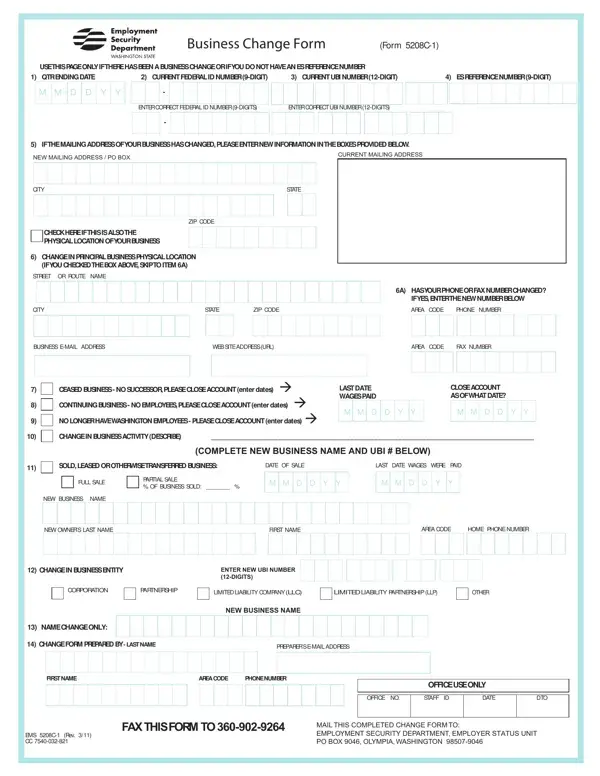
In the dynamic landscape of business, the necessity for organizational adaptability can lead to various changes that are essential to be documented and reported appropriately. The Business Change Form, known officially as FORM 5208C-1, is a pivotal document designed specifically for this purpose. Businesses experiencing a shift in operational parameters, such as a change in the mailing address, a transformation in the principal physical location, adjustments in contact numbers, or even more significant transitions like a change in business activity, ownership, or entity type, find this form indispensable. It serves as a bridge of communication with the Employment Security Department, ensuring that all relevant changes are accurately reflected in the department’s records. Whether a business ceases operations without a successor, continues without employees, or simply updates its name or structure, completing and submitting FORM 5208C-1 becomes a critical step in maintaining compliance and facilitating a smooth transition. Additionally, this form provides a structured approach for businesses to update their federal and state identification numbers, ensuring that all legal and operational records are up-to-date. By addressing these diverse needs through a singular submission, the 5208C-1 form exemplifies the blend of regulatory compliance and operational flexibility, supporting businesses through periods of change.

QuestionAnswer
Form NameForm 5208C 1
Form Length1 pages
Fillable?No
Fillable fields0
Avg. time to fill out15 sec
Other nameswa esd business change form, washington state unemployment fillable 5208c 1, 5208 c1 form, suta form 5208c 1

How to Edit Form 5208C 1 Online for Free

When using the online editor for PDFs by FormsPal, it is easy to complete or modify wa esd business change form here. Our professional team is always working to expand the editor and make it even faster for users with its cutting-edge functions. Make the most of the current modern prospects, and discover a myriad of unique experiences! To get the process started, consider these simple steps:

Step 1: Click the "Get Form" button at the top of this webpage to access our PDF editor.

Step 2: With this advanced PDF editing tool, you can actually accomplish more than simply complete forms. Express yourself and make your docs seem professional with custom textual content incorporated, or fine-tune the original content to excellence - all that comes with the capability to incorporate any kind of images and sign it off.

It will be an easy task to fill out the pdf using this detailed guide! Here's what you have to do:

1. Complete your wa esd business change form with a selection of essential blank fields. Note all of the important information and be sure absolutely nothing is omitted!

The right way to prepare form 5208 c1 step 1

2. Your next step is usually to fill in all of the following blank fields: CEASED BUSINESS NO SUCCESSOR, LAST DATE WAGES PAID, CLOSE ACCOUNT AS OF WHAT DATE, M M D D Y Y, M M D D Y Y, CHANGE IN BUSINESS ACTIVITY, COMPLETE NEW BUSINESS NAME AND UBI, SOLD LEASED OR OTHERWISE, DATE OF SALE, LAST DATE WAGES WERE PAID, FULL SALE, PARTIAL SALE OF BUSINESS SOLD, M M D D Y Y, M M D D Y Y, and NEW BUSINESS NAME.

CLOSE ACCOUNT AS OF WHAT DATE, DATE OF SALE, and PARTIAL SALE  OF BUSINESS SOLD in form 5208 c1

3. This third part is generally simple - complete every one of the fields in FIRST NAME, AREA CODE, PHONE NUMBER, OFFICE USE ONLY, OFFICE NO, STAFF ID, DATE, DTO, EMS C Rev CC, FAX THIS FORM TO, and MAIL THIS COMPLETED CHANGE FORM TO in order to finish this segment.

How to fill out form 5208 c1 step 3

Concerning MAIL THIS COMPLETED CHANGE FORM TO and STAFF ID, make sure that you double-check them in this section. The two of these could be the most significant fields in this document.

Step 3: Always make sure that the details are accurate and then just click "Done" to conclude the project. Obtain your wa esd business change form after you subscribe to a free trial. Quickly access the pdf file within your FormsPal account, along with any edits and changes conveniently synced! Whenever you work with FormsPal, you can certainly complete forms without the need to worry about personal information breaches or data entries being distributed. Our secure platform makes sure that your personal details are kept safely.