
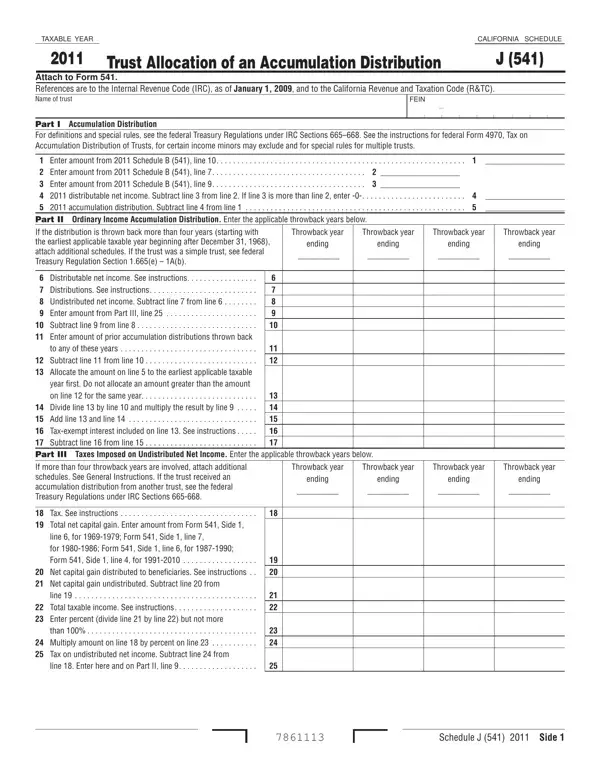
The 541 Schedule J form plays a crucial role for trusts in California, designed to manage and report accumulation distributions accurately. It attaches to the Form 541, California Fiduciary Income Tax Return, and addresses complex areas such as trust allocation of an accumulation distribution for both domestic complex trusts and certain foreign trusts. This form delves into the specifics of accumulation distributions, including definitions, special rules, and the intricate process of allocation to beneficiaries with reference to both the Internal Revenue Code (IRC) as of January 1, 2009, and the California Revenue and Taxation Code (R&TC). It also provides detailed instructions on how to account for ordinary income accumulation distributions and taxes imposed on undistributed net income, with a special emphasis on past taxable years, known as "throwback years". Moreover, it offers guidance for cases involving more than one beneficiary or when the trust receives an accumulation distribution from another trust, reflecting California's adherence to federal provisions while noting exceptions specific to state law. The form is meticulously designed to ensure that the complex mechanism of allocation to beneficiaries is transparent, equitable, and in compliance with both state and federal regulations.
| Question | Answer |
|---|---|
| Form Name | Form 541 Schedule J |
| Form Length | 2 pages |
| Fillable? | No |
| Fillable fields | 0 |
| Avg. time to fill out | 30 sec |
| Other names | wpapae, F-1, 2011, california |