
Form 5513 Natcep PDF Details

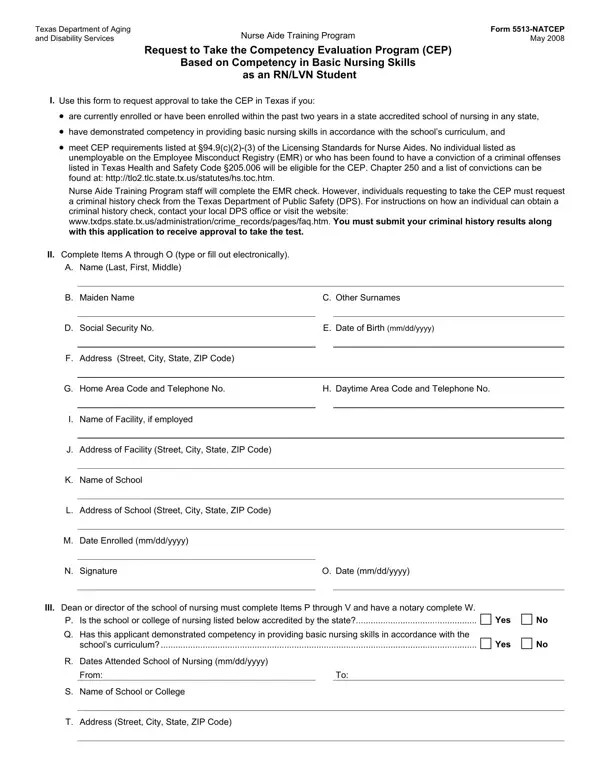
The Texas Department of Aging and Disability Services administers the Form 5513-NATCEP, an essential document for Registered Nurse (RN) or Licensed Vocational Nurse (LVN) students seeking to demonstrate their competency in basic nursing skills through the Competency Evaluation Program (CEP) in Texas. This form plays a pivotal role in the approval process, allowing these students to leverage their current or recent educational achievements towards qualifying for the CEP, provided they are enrolled or have been enrolled within the past two years in a state-accredited school of nursing across any state. It meticulously outlines the requirements for eligibility, including an uncompromised status regarding employment eligibility and a clean criminal record, as specified by the Employee Misconduct Registry (EMR) and the Texas Health and Safety Code §205.006. The procedural elements of the application involve a straightforward submission process comprising personal identification details, comprehensive academic records, and necessary declarations by the dean or director of the nursing school. Furthermore, applicants are guided through obtaining a criminal history check from the Texas Department of Public Safety, a prerequisite for the application's approval. Upon successful review, candidates are notified of their eligibility status and provided with the necessary materials to proceed with the Competency Evaluation Program, along with instructions for locating an approved facility for taking the CEP. It emphasizes applicants’ responsibilities in proceeding with the examination process and ensures their right to access and correct personal information collected during the application process, as governed by Texas Government Code Sections 552.021, 552.023, and 559.004. By delineating these procedures and requirements, Form 5513-NATCEP serves as an indispensable tool for nursing professionals in Texas aiming to formalize their competencies and advance their careers.

QuestionAnswer
Form NameForm 5513 Natcep
Form Length2 pages
Fillable?No
Fillable fields0
Avg. time to fill out30 sec
Other names5513-NATCEP, Disappr, DPS, yyyy

How to Edit Form 5513 Natcep Online for Free

Once you open the online editor for PDFs by FormsPal, you can easily fill in or edit E-420 right here and now. In order to make our tool better and more convenient to use, we consistently implement new features, taking into account suggestions coming from our users. With a few simple steps, you may start your PDF journey:

Step 1: Simply hit the "Get Form Button" at the top of this site to see our pdf form editing tool. There you'll find all that is needed to work with your document.

Step 2: As soon as you open the tool, you'll notice the document made ready to be completed. Aside from filling out different blanks, you could also do other sorts of actions with the PDF, such as adding any text, editing the initial textual content, adding graphics, putting your signature on the document, and a lot more.

For you to complete this form, be certain to type in the information you need in each blank field:

1. The E-420 requires certain details to be entered. Ensure that the subsequent blanks are finalized:

LVN conclusion process clarified (step 1)

2. After performing the previous part, go to the subsequent part and fill out the essential details in all these fields - M Date Enrolled mmddyyyy, N Signature, O Date mmddyyyy, III Dean or director of the school, P Is the school or college of, Q Has this applicant demonstrated, schools curriculum, Yes, Yes, R Dates Attended School of Nursing, From, S Name of School or College, and T Address Street City State ZIP.

Step # 2 for filling out LVN

3. This 3rd segment is relatively straightforward, U Signature Dean or Director, V Date, Title, Telephone, Form NATCEP Page, W TO THE STATE OF, COUNTY OF, BEFORE ME the undersigned, known to me to be the person whose, GIVEN under my hand and seal of, day of, notary public in and for, County Texas or, AFFIX NOTARY STAMP, and OR SEAL HERE - every one of these form fields has to be filled in here.

LVN conclusion process shown (portion 3)

Be really attentive when completing V Date and OR SEAL HERE, since this is where many people make a few mistakes.

Step 3: Make sure that the information is accurate and click "Done" to conclude the task. Right after starting afree trial account at FormsPal, you'll be able to download E-420 or send it through email at once. The file will also be readily available in your personal cabinet with your adjustments. We do not share or sell any information that you use while completing forms at FormsPal.