
Form Na 13075 PDF Details

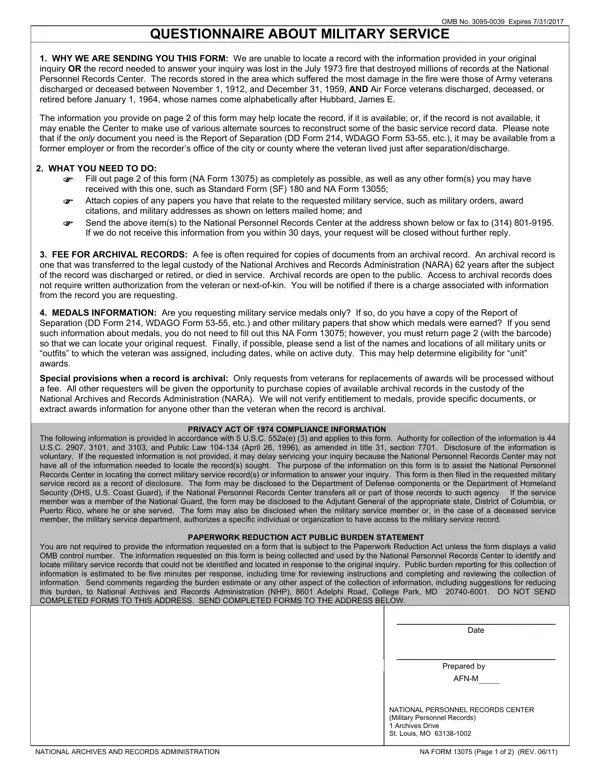
The NA Form 13075 serves a critical function in the realm of military service documentation, addressing instances when specific records cannot be located due to various reasons, including the catastrophic loss in the July 1973 fire at the National Personnel Records Center. This form, formally known as a Questionnaire About Military Service, acts as a pivotal bridge between the information provided by veterans or their families and the detailed records housed within the vast archives of military histories. It is especially significant for those affected by the 1973 fire, which resulted in the destruction of millions of records for Army veterans discharged or deceased between November 1, 1912, and December 31, 1959, as well as for Air Force veterans released, deceased, or retired before January 1, 1964, and whose surnames follow alphabetically after Hubbard, James E. By meticulously filling out the form, applicants offer crucial leads that might help locate alternative records or facilitate the reconstruction of some basic service record data. The questionnaire also elucidates the non-requirement of the form for solely medal information requests, provided that the separation documentation and relevant military papers are already in possession. Further, the form highlights the potential fees associated with accessing archival records, acknowledges the bounds of the Privacy Act of 1974, and notes the responsibility of compliance under the Paperwork Reduction Act. In essence, NA Form 13075 embodies the intersection of bureaucratic procedure and the personal histories of those who have served, offering a procedural pathway towards reclaiming what was thought to be lost from the annals of military service records.

QuestionAnswer
Form NameForm Na 13075
Form Length2 pages
Fillable?No
Fillable fields0
Avg. time to fill out30 sec
Other namesform na print, form na, va form 13075, na forms

How to Edit Form Na 13075 Online for Free

13075 can be completed online without any problem. Just try FormsPal PDF editing tool to accomplish the job in a timely fashion. We at FormsPal are devoted to giving you the absolute best experience with our tool by consistently presenting new features and enhancements. Our tool has become even more user-friendly with the latest updates! Currently, working with PDF forms is easier and faster than ever. It just takes several simple steps:

Step 1: Simply press the "Get Form Button" at the top of this webpage to see our pdf form editor. Here you'll find everything that is required to work with your file.

Step 2: This editor offers the ability to customize your PDF file in various ways. Modify it by including any text, adjust original content, and place in a signature - all at your convenience!

It really is an easy task to fill out the document adhering to our detailed tutorial! This is what you have to do:

1. For starters, while filling out the 13075, begin with the part that has the subsequent fields:

fillable 13075 conclusion process clarified (stage 1)

2. Once your current task is complete, take the next step – fill out all of these fields - Names used during service and, First, Middle, Branch of Service, Army, Air Force, Navy, Marine Corps, Coast Guard, Veterans Social Security Number, Date of Birth, City and State Country of Birth, Served as, SerialService numbers, and Home Address with their corresponding information. Make sure to double check that everything has been entered correctly before continuing!

Filling out section 2 of fillable 13075

A lot of people frequently make mistakes when filling in First in this part. You should definitely go over what you enter here.

3. This next part is easy - complete all the blanks in Last military organization and, Separation Station if this service, Date Released from Active Duty, MonthDayYear of any reenlistments, Did the veteran ever, File a claim for VA benefits, Yes, Dont Know, If yes show VA Claim Number, Serve in the Reserves after, c Receive a state bonus for, service Serve in the National Guard, Retire from any military service, Spend time on the Temporary, and Serve active duty in any other to complete this part.

Completing segment 3 in fillable 13075

4. Your next section requires your details in the following parts: Work for the Federal Government as, Yes, Dont Know, If yes show agency name, show citystate, show modayyr from, Purpose Optional An explanation, Relationship to veteran in question, SIGNATURE, TODAYS DATE, DAYTIME PHONE NUMBER, NATIONAL ARCHIVES AND RECORDS, and NA FORM Page of REV. Make certain to fill out all of the required info to move onward.

Filling out section 4 in fillable 13075

Step 3: Make sure your information is right and click on "Done" to proceed further. Go for a 7-day free trial plan at FormsPal and obtain instant access to 13075 - downloadable, emailable, and editable inside your personal account page. With FormsPal, you can easily fill out forms without needing to be concerned about information breaches or entries being shared. Our protected system helps to ensure that your personal information is maintained safely.