
Form 584 Can PDF Details

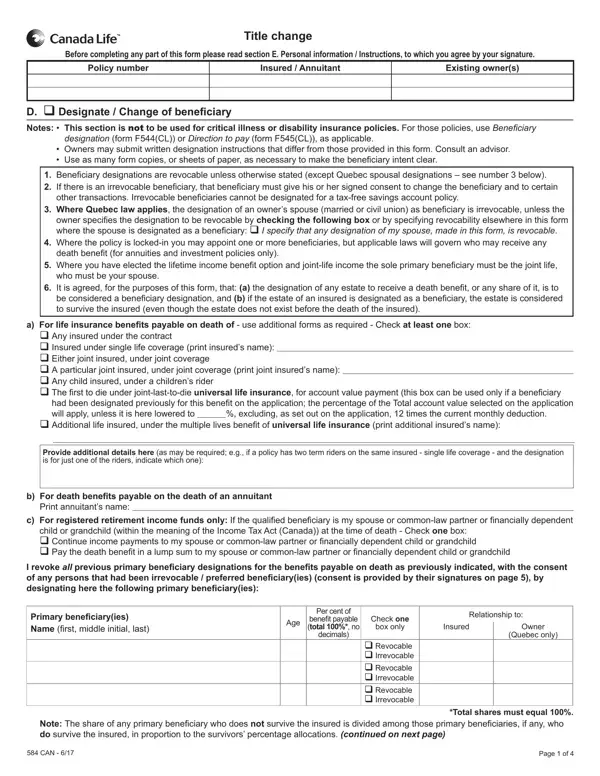
Understanding the nuances of the 584 Can form is crucial for policyholders looking to execute title changes, particularly in contexts involving life insurance and annuity contracts. This multi-faceted document guides the designation or alteration of beneficiaries, underpins the handling of personal information, and outlines the conditions under which policyholders can make these changes. Notably, it specifies the irrevocability of certain beneficiary designations, notably in Quebec where spousal designations, once made, cannot be easily altered without explicit consent. The form permits a range of beneficiary designations, including but not limited to, primary, contingent, and in specific regional contexts, dictates the handling of policies in the event of the policyholder's death. It further addresses scenarios involving minors as beneficiaries, detailing the appointment of trustees in such cases. This comprehensive approach ensures policyholders are well-informed about their rights and obligations regarding beneficiary designations, the potential tax implications of ownership transfers, and the procedural requirements for making such changes effectively. Understanding each section of the form is essential, as it directly influences the policy's execution and its alignment with the policyholder's intentions. Additionally, the form reinforces the role of legal advice in ensuring that designations and changes therein fulfill legal requirements and are in the best interest of all parties involved.

QuestionAnswer
Form NameForm 584 Can
Form Length4 pages
Fillable?No
Fillable fields0
Avg. time to fill out1 min
Other namescanada life change advisor form, canada life change of beneficiary form, canada life beneficiary form, canada life change form

How to Edit Form 584 Can Online for Free

It is possible to fill out canada life forms without difficulty using our PDFinity® PDF editor. The tool is continually maintained by our team, getting powerful functions and turning out to be more versatile. To begin your journey, take these basic steps:

Step 1: Access the PDF inside our tool by clicking on the "Get Form Button" at the top of this webpage.

Step 2: With our advanced PDF file editor, you may accomplish more than just complete blank fields. Edit away and make your docs seem sublime with customized textual content added, or adjust the original content to perfection - all accompanied by an ability to insert your own photos and sign the PDF off.

This form requires particular info to be filled in, hence be sure to take the time to provide what's requested:

1. To start off, when filling out the canada life forms, start in the form section that features the following blank fields:

Step no. 1 for filling in canada life beneficiary change form

2. When the previous array of fields is done, it's time to add the needed specifics in q Any insured under the contract, Provide additional details here, b For death beneits payable on the, Printannuitantsname, c For registered retirement income, I revoke all previous primary, Primary beneiciaryies, Age, Per cent of, beneitpayable total no, decimals, Relationshipto, Insured, Owner, and Quebeconly in order to progress to the third stage.

Provide additional details here, b For death beneits payable on the, and q Any insured under the contract inside canada life beneficiary change form

Always be extremely careful when filling out Provide additional details here and b For death beneits payable on the, as this is the part where a lot of people make some mistakes.

3. This next part will be focused on q Revocable q Irrevocable q, Note, Total shares must equal, CAN, and Page of - complete these empty form fields.

canada life beneficiary change form conclusion process clarified (part 3)

4. This specific section comes with these empty form fields to focus on: Before completing any part of this, D q Designate Change of, beneitpayable total no, Relationshipto, Owner, Quebeconly, Insured, Age, Per cent of, decimals, Total shares must equal, Notes, who do survive the insured in, If the, and Trustee For all provinces except.

Stage # 4 for submitting canada life beneficiary change form

5. To conclude your form, this final segment involves several additional blank fields. Filling in Trustee For all provinces except, Relationship to owner, SignedatCity, Province, on ddmmmyyyy, X Signatureofowners if entity, Print name of owners, X Signatureofpreferred, X Signatureofwitness to all, Print name of witness, CAN, and Pageof is going to wrap up the process and you will be done very fast!

Stage number 5 of filling in canada life beneficiary change form

Step 3: After proofreading the form fields you've filled out, click "Done" and you're all set! Get hold of your canada life forms once you sign up for a 7-day free trial. Quickly access the pdf file within your personal account page, together with any edits and changes being conveniently synced! FormsPal is dedicated to the confidentiality of our users; we make certain that all personal information used in our editor continues to be confidential.