
Form 740 A Virginia PDF Details

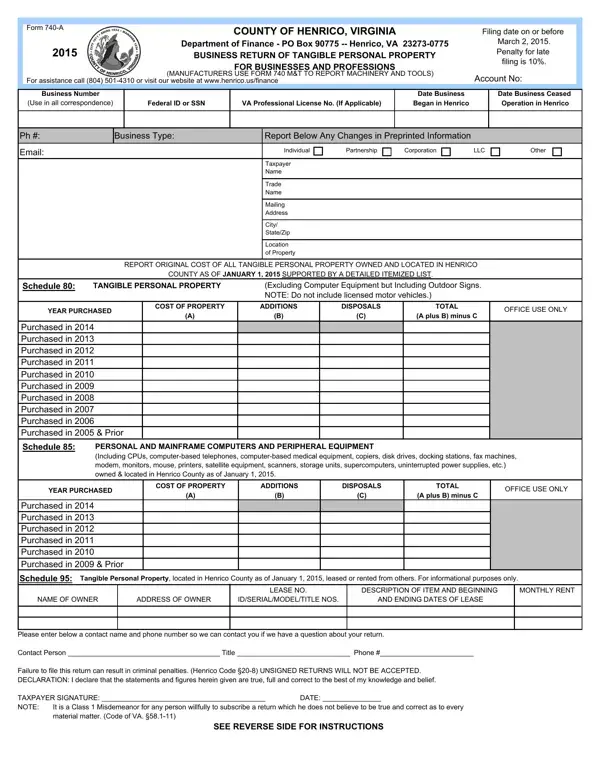
Businesses operating within Henrico County, Virginia, are required to file Form 740-A, a crucial document ensuring compliance with local tax regulations concerning tangible personal property. This form must be submitted to the Department of Finance by a specified deadline, currently set for March 2, 2015, to avoid a late filing penalty of 10%. Form 740-A is designed to catalog all tangible personal property located in Henrico County as of January 1, 2015, excluding licensed motor vehicles but including items such as furniture, fixtures, machinery (except for manufacturers who use Form 740 M&T), computers, and peripheral equipment. Detailed reporting includes the original cost of items, year of purchase, and any additions or disposals, aimed at a fair assessment for tax purposes. Businesses must also provide information about any tangible personal property leased from others. Failure to comply accurately with the submission requirements, including the provision of a detailed itemized list of property and the signature of the taxpayer, may lead to criminal penalties. Moreover, the code stipulates a formula for assessment based on the purchase year and specific percentage rates. With such comprehensive coverage, Form 740-A serves not just as a tax document but as a snapshot of a business's asset base within Henrico County, underscoring the importance of precise and timely filing.

QuestionAnswer
Form NameForm 740 A Virginia
Form Length2 pages
Fillable?No
Fillable fields0
Avg. time to fill out30 sec
Other namesLLC, Preprinted, 740-A, leasehold

How to Edit Form 740 A Virginia Online for Free

Using PDF files online is actually quite easy with our PDF editor. You can fill in SSN here and use many other functions available. To make our editor better and more convenient to work with, we constantly design new features, with our users' suggestions in mind. With some basic steps, you may start your PDF editing:

Step 1: Click the "Get Form" button above on this page to get into our tool.

Step 2: This editor provides you with the capability to change nearly all PDF forms in a variety of ways. Modify it by adding your own text, adjust existing content, and put in a signature - all when it's needed!

It is actually straightforward to fill out the document adhering to this helpful tutorial! Here is what you must do:

1. Complete the SSN with a group of major blank fields. Get all of the necessary information and make sure absolutely nothing is left out!

Filling in section 1 in 2009

2. Just after this selection of blank fields is completed, go on to type in the applicable information in these - Purchased in Purchased in, Schedule, PERSONAL AND MAINFRAME COMPUTERS, YEAR PURCHASED, COST OF PROPERTY, ADDITIONS, DISPOSALS, TOTAL, A plus B minus C, OFFICE USE ONLY, Purchased in Purchased in, Purchased in Prior, Schedule, Tangible Personal Property located, and NAME OF OWNER.

Schedule, DISPOSALS, and Schedule inside 2009

Many people often get some things wrong while filling out Schedule in this part. Be certain to re-examine whatever you enter here.

Step 3: Right after you've glanced through the information in the document, click "Done" to finalize your document creation. After creating afree trial account here, you'll be able to download SSN or email it right away. The PDF form will also be accessible in your personal cabinet with all of your changes. FormsPal is committed to the personal privacy of all our users; we make sure all personal data handled by our editor is confidential.