
Form 933 PDF Details

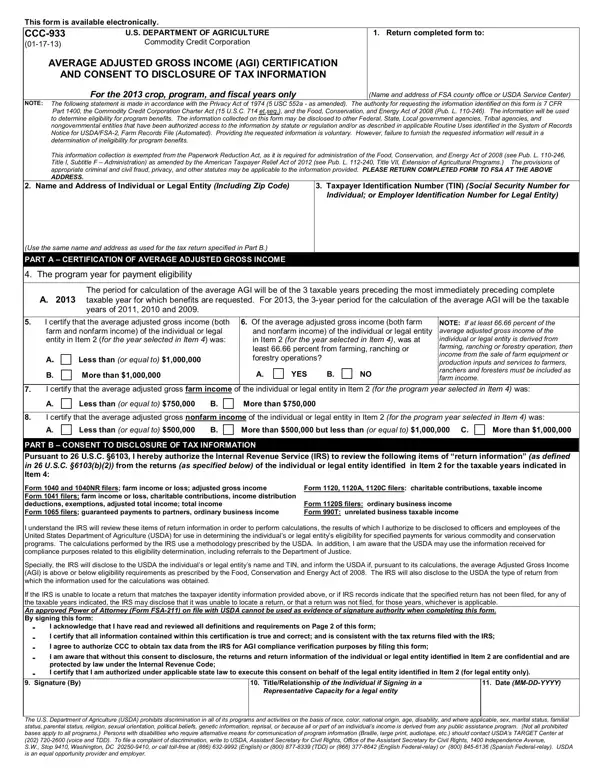
The CCC-933 form, a critical document managed by the U.S. Department of Agriculture (USDA), serves as a testament to the intricate relationship between agricultural income and eligibility for certain government programs. This document, officially titled "Average Adjusted Gross Income (AGI) Certification and Consent to Disclosure of Tax Information," is specifically tailored for the 2013 crop, program, and fiscal years, emphasizing the targeted nature of such forms in addressing temporally specific needs. Its primary function is to ascertain the eligibility of individuals or legal entities for program benefits by evaluating their average adjusted gross income. To do this, the form meticulously collects information on both farm and nonfarm income, creating a comprehensive perspective of an applicant's financial landscape. Moreover, it mandates consent for the USDA to obtain and use tax return information from the Internal Revenue Service (IRS), underlying the interdepartmental cooperation fundamental to the administration of agricultural programs. While submission of the form is voluntary, failure to do so results in ineligibility for benefits, illustrating the form's significant role in the distribution of government support to the agricultural sector. Furthermore, the form takes privacy concerns and legal statutes into account, ensuring that applicants' information is handled with due diligence and in accordance with the Privacy Act of 1974, thereby reinforcing the governmental commitment to safeguard individual and entity privacy rights.

QuestionAnswer
Form NameForm 933
Form Length2 pages
Fillable?No
Fillable fields0
Avg. time to fill out30 sec
Other namesthis form 933 online, form 933 irs, department 933 corporation pdf, this form 933

How to Edit Form 933 Online for Free

how to form 933 can be completed online very easily. Simply open FormsPal PDF editing tool to get it done fast. To retain our tool on the forefront of practicality, we work to put into practice user-oriented features and improvements regularly. We're at all times looking for feedback - play a pivotal role in revolutionizing PDF editing. Starting is easy! All that you should do is stick to the next basic steps down below:

Step 1: Click on the "Get Form" button above on this webpage to access our editor.

Step 2: The editor provides you with the opportunity to work with your PDF form in many different ways. Enhance it by adding your own text, correct what is originally in the file, and include a signature - all possible within minutes!

This document will need some specific details; in order to ensure accuracy and reliability, make sure you adhere to the subsequent guidelines:

1. First of all, while completing the how to form 933, start with the part that features the subsequent blanks:

form department 933 form conclusion process clarified (part 1)

2. Immediately after the prior part is filled out, proceed to type in the relevant details in these - NOTE If at least percent of the, farm and nonfarm income of the, and nonfarm income of the, Less than or equal to, More than, YES B, I certify that the average, Less than or equal to B, More than, I certify that the average, Less than or equal to B, More than but less than or equal, More than, PART B CONSENT TO DISCLOSURE OF, and Form and NR filers farm income or.

Simple tips to fill in form department 933 form part 2

It's easy to make a mistake while filling out your I certify that the average, for that reason be sure you go through it again prior to when you submit it.

3. Completing Signature By, TitleRelationship of the, Date MMDDYYYY, Representative Capacity for a, and The US Department of Agriculture is essential for the next step, make sure to fill them out in their entirety. Don't miss any details!

Filling in part 3 in form department 933 form

4. Filling in Adjusted Gross Farm Income is the, Adjusted Gross Nonfarm Income is, Individual Internal Revenue, HOW TO DETERMINE ADJUSTED GROSS, Trust or Estate the adjusted, Corporation the adjusted gross, Limited Partnership LP Limited, Taxexempt Organization the, GENERAL INFORMATION ON CONSENT TO, This consent allows IRSs access to, and This consent authorizes the is crucial in this part - make certain that you take your time and take a close look at every single blank!

Stage no. 4 in completing form department 933 form

5. The form needs to be concluded with this particular section. Below you will see a detailed set of fields that need to be filled in with accurate details in order for your document usage to be accomplished: Program Year, The year for which program, Average Adjusted Gross, Income, Select the box next to the, Average Adjusted Gross, Income from Farming Ranching or, Average Adjusted Gross, Farm Income, Select the appropriate response to, Average Adjusted Gross, Nonfarm Income, Select the box next to the, Signature, and Read the acknowledgments.

Step # 5 for completing form department 933 form

Step 3: Right after you've looked once more at the details you given, press "Done" to finalize your document generation. Find the how to form 933 when you register online for a 7-day free trial. Conveniently gain access to the form within your personal account, with any edits and changes conveniently synced! With FormsPal, you'll be able to complete forms without having to worry about personal data leaks or data entries being shared. Our protected platform ensures that your private information is kept safe.