
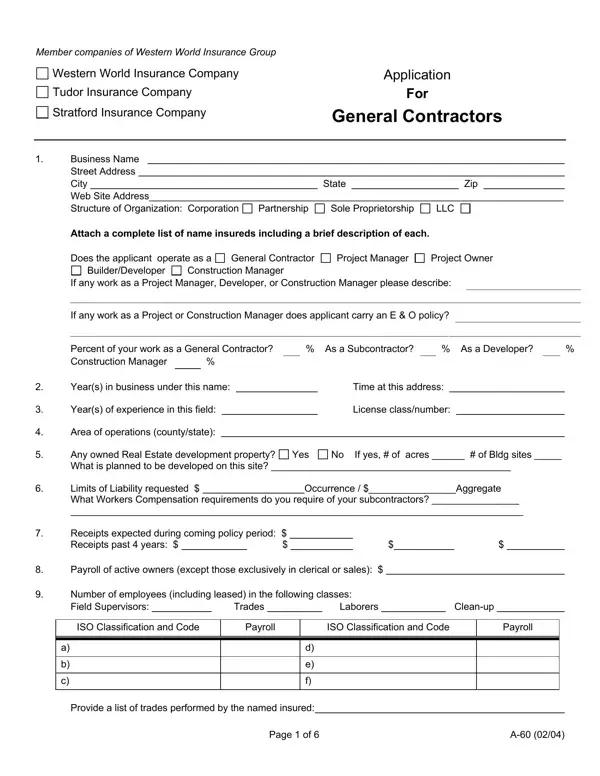
Form A 60 PDF Details

In the complex landscape of insurance applications, the A-60 form emerges as a comprehensive document utilized by member companies of the Western World Insurance Group, including Western World Insurance Company, Tudor Insurance Company, and Stratford Insurance Company, designed specifically for general contractors. This form encompasses detailed sections capturing a wide array of information required for the underwriting process, ranging from basic business details such as name and address to more intricate data like the structure of the organization, operational specifics, years in business, and areas of operation. Applicants are prompted to disclose their role in the construction industry—whether as general contractors, project managers, developers, or construction managers—and the extent of their experience, including licensing details and the geographic scope of their operations. Additional sections delve into liability limits, Workers Compensation for subcontractors, and the expected financials such as receipts and payroll. It also interrogates the company's history with subcontracting, querying on the relationships with, and the insurance status of, subcontractors, thereby providing insight into the applicant's risk management practices. Furthermore, the form requires applicants to detail their operations in residential, commercial, and industrial sectors, their engagement in real estate development, and the nature of their projects, including any work in specific or sensitive areas like hilltops, coastal areas, or flood zones. The application process is rounded off with questions on equipment leasing, safety practices including any use of standard A.I.A. contracts, and a thorough examination of the applicant's loss history and control measures, underscoring the depth and breadth of information that is critical for assessing the risk profile of contractors seeking insurance coverage.

QuestionAnswer
Form NameForm A 60
Form Length6 pages
Fillable?No
Fillable fields0
Avg. time to fill out1 min 30 sec
Other namesgeneral contractors application western world fillable supplemental application general contractors form

How to Edit Form A 60 Online for Free

Form A 60 can be filled out online without difficulty. Simply make use of FormsPal PDF editor to complete the task right away. The editor is consistently maintained by our team, acquiring new awesome features and becoming greater. To start your journey, take these simple steps:

Step 1: Press the "Get Form" button at the top of this page to open our editor.

Step 2: Once you open the PDF editor, you'll see the document made ready to be filled in. In addition to filling in different blanks, you may also perform many other actions with the form, specifically putting on custom textual content, changing the initial text, adding graphics, putting your signature on the PDF, and a lot more.

It is actually an easy task to complete the document with this detailed guide! This is what you should do:

1. First of all, when filling out the Form A 60, begin with the page that features the following blank fields:

Stage no. 1 of completing Form A 60

2. Once your current task is complete, take the next step – fill out all of these fields - Percent of your work as a General, As a Subcontractor, As a Developer, Years in business under this name, Years of experience in this field, Area of operations countystate, Time at this address, License classnumber, Any owned Real Estate development, No If yes of acres of Bldg, Yes, Limits of Liability requested, Occurrence Aggregate, Receipts expected during coming, and Payroll of active owners except with their corresponding information. Make sure to double check that everything has been entered correctly before continuing!

Time at this address, No If yes  of acres   of Bldg, and Payroll of active owners except inside Form A 60

3. Within this stage, review Provide a list of trades performed, and Page of. All these must be completed with highest accuracy.

Part # 3 for filling out Form A 60

People frequently make errors while filling out Provide a list of trades performed in this section. Be sure to re-examine whatever you enter here.

4. This next section requires some additional information. Ensure you complete all the necessary fields - Annual subcontracted cost labor, Does applicant normally employ the, Provide a list of major, Do all subs provide Certificates, Occurrence, Yes, Yes Yes Yes, Aggregate, No No No, What is the cost and number of any, How long are they kept, Explain any No responses to quest, and Attach sample copy of agreements - to proceed further in your process!

Form A 60 conclusion process shown (stage 4)

5. This pdf should be finished by filling out this segment. Further one can find a comprehensive set of blanks that need to be completed with accurate details in order for your form submission to be faultless: Residential New Construction, Rural Suburban Urban, Commercial New Construction, Rural Suburban Urban, Industrial, New Construction Remodeling, Rural Suburban Urban, Do you loan lease or rent, Yes, If so what type of equipment With, Have you built or are you building, Yes, and Have you built are you building or.

Step no. 5 in completing Form A 60

Step 3: Before moving on, double-check that form fields were filled out properly. Once you confirm that it's correct, click “Done." After setting up afree trial account here, you'll be able to download Form A 60 or send it through email promptly. The PDF document will also be at your disposal via your personal cabinet with all your edits. When using FormsPal, you can easily fill out forms without being concerned about database leaks or data entries being shared. Our secure platform ensures that your personal data is kept safely.