
Form Boe 267 S PDF Details

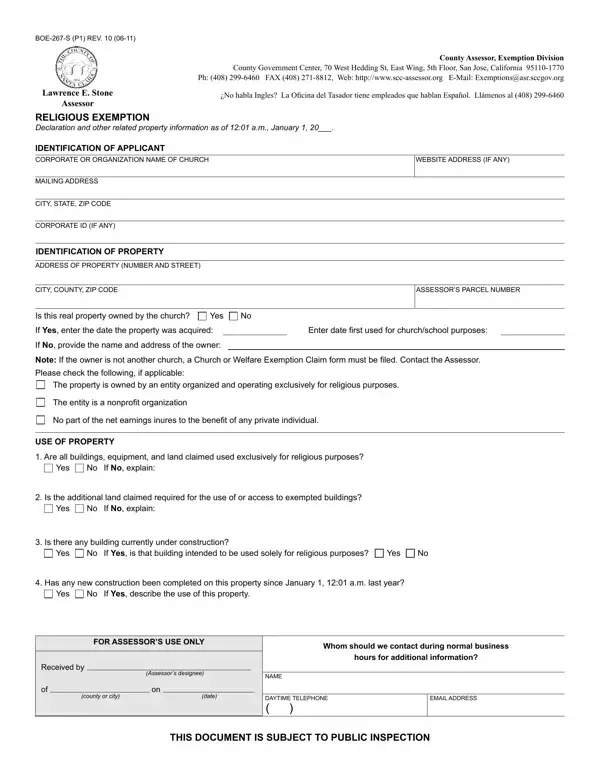
In today's complex world of property ownership and taxation, it’s crucial for religious organizations to understand the intricacies of tax exemptions available to them. The Boe 267 S form is a vital document for religious entities in California seeking property tax exemptions. This form, officially titled as the Declaration for Religious Exemption, serves as a bridge between such organizations and the County Assessor’s office, providing a structured means to claim exemptions for properties exclusively used for religious purposes. Addressed to the County Assessor, Exemption Division in San Jose, California, it encompasses a comprehensive set of instructions and requirements that need careful attention. The form not only asks for basic identification details of the applicant, such as the organization’s name and address, but also dives deeper into the specifics of the property’s use, whether for worship, school purposes, or other religious activities, ensuring that all prerequisites are met for the exemption. Moreover, it emphasizes the importance of the property being owned by the organization claiming the exemption and outlines the conditions under which properties used for parking or leased from another party might still qualify. The document also touches on penalties for failure to comply with the terms of the exemption, making it clear that accuracy and honesty in completing the form are paramount. With the deadline for filing set at February 15th annually, religious organizations are encouraged to stay ahead of their paperwork to benefit from these exemptions, highlighting the form’s role in maintaining the balance between religious practices and fiscal responsibilities.

QuestionAnswer
Form NameForm Boe 267 S
Form Length3 pages
Fillable?No
Fillable fields0
Avg. time to fill out45 sec
Other namesinures, empleados, P1, tiene

How to Edit Form Boe 267 S Online for Free

tiene can be filled out online without difficulty. Simply make use of FormsPal PDF tool to complete the task without delay. To make our tool better and less complicated to use, we continuously design new features, bearing in mind suggestions coming from our users. Here is what you'd need to do to get going:

Step 1: Access the PDF in our tool by hitting the "Get Form Button" at the top of this webpage.

Step 2: As soon as you start the PDF editor, you will notice the document made ready to be filled in. Apart from filling in various blank fields, it's also possible to do some other things with the form, such as putting on any words, editing the initial textual content, adding images, placing your signature to the form, and much more.

This PDF doc needs some specific details; to guarantee consistency, please be sure to pay attention to the recommendations down below:

1. Before anything else, once completing the tiene, beging with the form section that includes the following fields:

Guidelines on how to fill in habla part 1

2. Now that this array of fields is completed, it's time to include the required particulars in If No provide the name and address, The property is owned by an entity, The entity is a nonproit, No part of the net earnings inures, USE OF PROPERTY, Are all buildings equipment and, Yes, If No explain, Is the additional land claimed, Yes, If No explain, Is there any building currently, Yes, If Yes is that building intended, and Yes so you can go to the next step.

Completing segment 2 of habla

3. This part will be hassle-free - complete all the empty fields in county or city, date, DAYTIME TELEPHONE, EMAIL ADDRESS, and THIS DOCUMENT IS SUBJECT TO PUBLIC in order to finish this part.

Ways to fill out habla portion 3

A lot of people generally make mistakes when completing DAYTIME TELEPHONE in this part. Make sure you read twice everything you type in right here.

4. The subsequent paragraph requires your information in the following areas: Does the real property include, Yes, If Yes is all real property owned, Yes, Is there a sanctuary church on or, Yes, If No a claim for Welfare, Check as applicable the types of, Preschool, Nursery school, Kindergarten, Elementary school, Secondary school, Both secondary and college, and Are bingo games being operated on. Make sure you enter all required details to go onward.

Nursery school, Yes, and If No a claim for Welfare in habla

5. The form needs to be finished by dealing with this part. Here you can find a full list of blank fields that require accurate information to allow your form submission to be accomplished: Note Living quarters are not, Is any portion of this property, Yes, If Yes describe, Is any portion of this property, Yes, If Yes describe that portion its, Has there been any change in the, Yes, If Yes describe, and Remarks.

habla writing process outlined (portion 5)

Step 3: Proofread what you have typed into the blank fields and click the "Done" button. Sign up with us today and easily access tiene, prepared for download. Each and every edit made is conveniently saved , helping you to customize the form further as required. FormsPal is dedicated to the privacy of our users; we ensure that all information used in our system remains secure.