
Form Boe 267 PDF Details

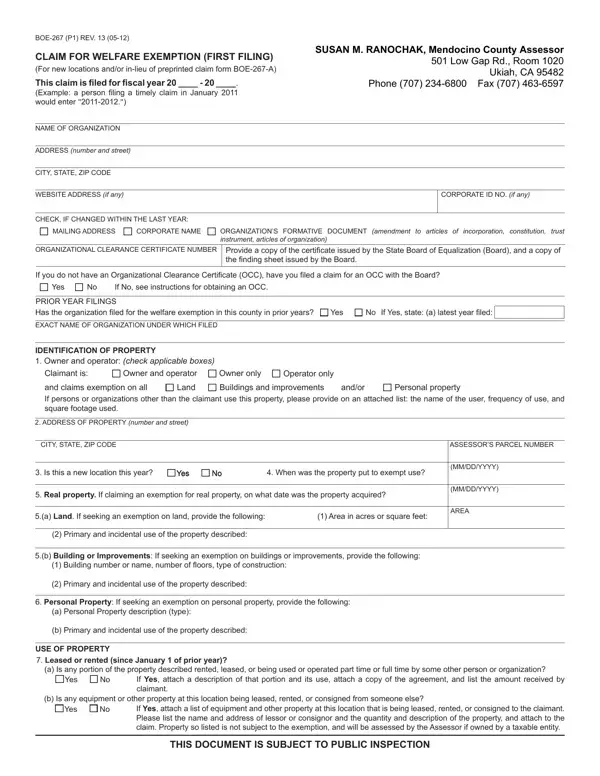
The Boe 267 form, officially titled "Claim for Welfare Exemption (First Filing)," serves as a critical tool for organizations seeking property tax exemptions in California. Authored by Susan M. Ranochak of the Mendocino County Assessor's office, this document facilitates the exemption process for eligible organizations, particularly those new to the filing process or undergoing changes in their operational status. It covers an array of vital details, from the organization’s basic information to more complex aspects such as property identification, use, and financial disclosures. Organizations are required to provide extensive documentation, including but not limited to organizational clearance certificates, prior year filings, and plans for future expansion. The form not only seeks to understand the ownership and operational dynamics of the property in question but also dives into the specifics of property use, including leased spaces, residential quarters, and income-generating activities. Financial statements relating specifically to the property's operations are mandatory, ensuring a comprehensive evaluation of the organization's eligibility for tax exemption. Mandated annually, the precise submission of this form, alongside required documents, plays a pivotal role in maintaining the organization's tax-exempt status, highlighting its significance in nonprofit operational planning and compliance.

QuestionAnswer
Form NameForm Boe 267
Form Length4 pages
Fillable?No
Fillable fields0
Avg. time to fill out1 min
Other namesYYYY, BOE-267-R, 2011, YesNo

How to Edit Form Boe 267 Online for Free

Dealing with PDF files online is definitely very easy using our PDF tool. Anyone can fill out OCC here painlessly. Our professional team is continuously working to improve the tool and enable it to be much faster for people with its extensive functions. Take your experience to the next level with continually improving and amazing opportunities we provide! To get the process started, consider these easy steps:

Step 1: Access the PDF doc inside our editor by hitting the "Get Form Button" above on this webpage.

Step 2: With the help of this handy PDF tool, it's possible to accomplish more than just fill out blank fields. Edit away and make your forms look perfect with custom text added, or fine-tune the original input to perfection - all that supported by an ability to incorporate any type of graphics and sign the file off.

Completing this PDF requires attention to detail. Make sure that every field is done correctly.

1. When completing the OCC, be sure to complete all important fields in their associated area. It will help expedite the process, which allows your information to be processed fast and properly.

Simple tips to complete propertys portion 1

2. Right after completing the previous section, go to the subsequent stage and fill in all required details in all these blanks - Owner and operator, Claimant is and claims exemption, Owner only Buildings and, andor, Personal property, Operator only, Land, ADDRESS OF PROPERTY number and, CITY STATE ZIP CODE, ASSESSORS PARCEL NUMBER, Is this a new location this year, Yes Yes, No No, When was the property put to, and Real property If claiming an.

Claimant is and claims exemption, Owner only Buildings and, and Operator only in propertys

People frequently make errors while filling out Claimant is and claims exemption in this part. You should definitely read twice whatever you type in right here.

3. The following portion focuses on If Yes attach a description of, b Is any equipment or other, Yes, If Yes attach a list of equipment, and THIS DOCUMENT IS SUBJECT TO PUBLIC - fill out each of these fields.

THIS DOCUMENT IS SUBJECT TO PUBLIC, If Yes attach a list of equipment, and If Yes attach a description of in propertys

4. All set to fill in the next form section! In this case you will have all of these Living quarters since January of, Is any portion of the property, Yes, If Yes describe that portion, Sale of personal property since, a Is any portion of the property, Yes, If Yes list the hours per week, b Is the property used as a thrift, Yes, If Yes submit BOER, LowIncome Housing, Is this property used as lowincome, Yes, and If Yes and the property is owned fields to do.

Completing part 4 in propertys

5. This very last point to complete this form is pivotal. Be sure to fill in the mandatory form fields, like Is the property for which this, section of the Internal Revenue, Yes, If Yes you must attach to this, The organizations information and, applicable a description of that, franchise taxation and the amount, Please check the following if, The property is used for the, Financial statements relating, immediately preceding the claim, NAME, DAYTIME TELEPHONE, Whom should we contact during, and TITLE, before using the pdf. If not, it could result in a flawed and possibly invalid paper!

Whom should we contact during, Please check the following if, and TITLE in propertys

Step 3: After you have looked over the details in the fields, press "Done" to finalize your document generation. Join FormsPal today and easily gain access to OCC, set for download. Every single modification made is handily saved , allowing you to modify the pdf at a later stage as required. FormsPal is committed to the confidentiality of all our users; we make sure that all information put into our system stays secure.