
Form Cdph 8591 PDF Details

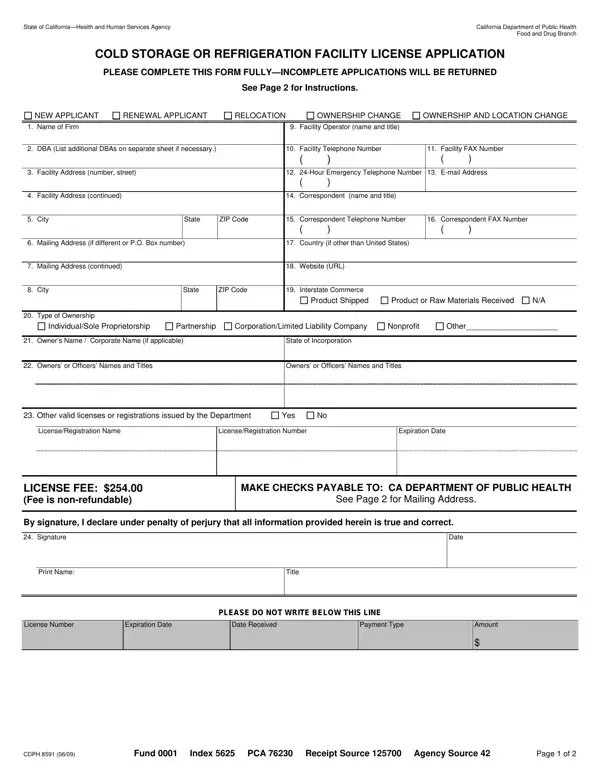
The State of California Health and Human Services Agency, under its Food and Drug Branch, mandates the completion of the CDPH 8591 form for cold storage or refrigeration facility license applications. This crucial document serves a broad spectrum of purposes, including new applications, renewals, relocations, and changes in ownership or combined ownership and location changes. Detailed in the form are fields covering basic identification of the firm applying, including any doing business as (DBA) names, contact details for both the facility and its correspondence, as well as specific operational data like 24-hour emergency contact numbers and interstate commerce activities. The type of ownership structure is also to be declared, covering a spectrum from individual/sole proprietorships to corporations and nonprofits, along with detailed information on owners or officers. Moreover, the form requires the disclosure of any other valid licenses or registrations issued by the Department of Public Health, amplifying its role in ensuring regulatory compliance. The application closes with sections for the applicant’s acknowledgment, signature, and payment details, highlighting its comprehensive nature in facilitating the licensure process. The form not only acts as a critical step towards obtaining the necessary operational permissions but also signifies the applicant's commitment to adhering to the standards set forth by the California Department of Public Health.

QuestionAnswer
Form NameForm Cdph 8591
Form Length2 pages
Fillable?No
Fillable fields0
Avg. time to fill out30 sec
Other namescdph8591 cdph 8591 form

How to Edit Form Cdph 8591 Online for Free

Should you want to fill out Form Cdph 8591, you won't need to install any programs - just try our PDF tool. The tool is continually improved by us, getting powerful features and growing to be better. In case you are seeking to get going, here is what it takes:

Step 1: Press the "Get Form" button above. It'll open up our tool so you could start filling in your form.

Step 2: With this state-of-the-art PDF editing tool, you could do more than merely complete blank form fields. Try each of the features and make your documents look professional with customized text put in, or optimize the file's original content to perfection - all comes with an ability to insert stunning images and sign it off.

This form will require particular details to be entered, thus make sure to take some time to fill in what's requested:

1. While filling out the Form Cdph 8591, make certain to incorporate all of the needed blank fields in their associated form section. It will help hasten the process, allowing for your information to be handled without delay and appropriately.

Form Cdph 8591 conclusion process described (stage 1)

2. Once this part is done, it is time to insert the necessary particulars in LicenseRegistration Name, LicenseRegistration Number, Expiration Date, LICENSE FEE Fee is nonrefundable, MAKE CHECKS PAYABLE TO CA, See Page for Mailing Address, By signature I declare under, Signature, Date, Print Name, Title, PLEASE DO NOT WRITE BELOW THIS LINE, License Number, Expiration Date, and Date Received so that you can proceed further.

Stage no. 2 of filling in Form Cdph 8591

Always be very mindful when filling out LICENSE FEE Fee is nonrefundable and LicenseRegistration Name, because this is where most people make mistakes.

Step 3: Once you've looked once again at the details in the file's blanks, click "Done" to conclude your form. Get the Form Cdph 8591 the instant you register at FormsPal for a free trial. Easily gain access to the pdf file from your personal account page, together with any edits and changes being all preserved! FormsPal guarantees protected form tools devoid of data record-keeping or sharing. Be assured that your data is in good hands with us!