Please rate Form Dh 3075 6-22

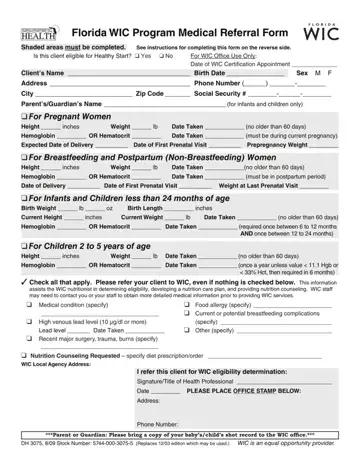
Even if you have not identified a health problem, refer the client to the WIC program.
Measurements: height and weight measurements are to be taken no more than 60 days before the client's WIC appointment.
Infants: a bloodwork value is required once during infancy between 6 to 12 months of age and once between 1 to 2 years of age.
Children 2 to 5: a bloodwork value is required once a year unless the value is abnormal, then a bloodwork value is required in 6 months.
Stamp: stamp the form with the office stamp or the health professional's stamp.
Completed form: give this completed form to the client or parent/guardian to bring to the WIC certification appointment, or mail/fax it to the local WIC agency.
| Question | Answer |
|---|---|
| Form Name | DH 3075 |
| Form Length | 2 pages |
| Fillable? | Yes |
| Fillable fields | 72 |
| Avg. time to fill out | 12 min |
| Edition | 6/22 |
| Issuing agency | Florida Department of Health, WIC Program |
| Other names | DH 3075, DH3075, Form DH 3075, Florida WIC Program Medical Referral Form, Florida WIC form |
| Official source | DH 3075 (Rev 6/22), Florida Department of Health, WIC Program |
Form Dh 3075 isn’t the one you’re looking for?
Please rate Form Dh 3075 6-22
