Please rate Form Dhec 2738 8-2014

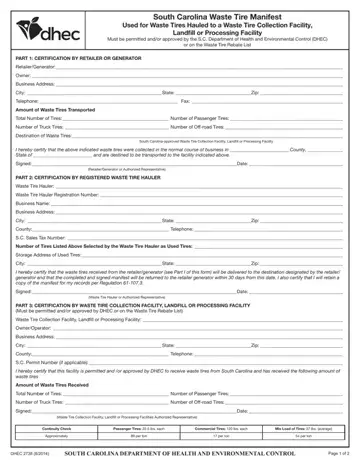
The DHEC 2738 form serves a crucial role in South Carolina's environmental management, specifically in the tracking and certifying the proper disposal of waste tires. This detailed document is integral for retailers, generators, waste tire haulers, and waste tire collection facilities, ensuring compliance with the state's Department of Health and Environmental Control (DHEC) regulations. Its purpose is to accurately track waste tires from their point of generation to their final disposal, landfill, or processing facility that must be permitted or approved by DHEC or listed on the DHEC Waste Tire Rebate List. The form comprises three primary sections, each requiring certification by different parties involved: the retailer or generator, the registered waste tire hauler, and the waste tire collection facility, landfill, or processing facility. With rigorous details demanded, such as business addresses, quantities of tires transported, and specific tire types, the form ensures accountability and environmental compliance. It mandates the hauler to return the completed and signed manifest to the retailer or generator within 30 days, while also keeping a copy for records as per Regulation 61-107.3. This not only supports environmental regulatory compliance but also reinforces the tracking mechanism for waste tires, promoting responsible waste management and recycling efforts in South Carolina.
| Question | Answer |
|---|---|
| Form Name | South Carolina DES 2738 Waste Tire Manifest |
| Form Length | 2 pages |
| Fillable? | Yes |
| Fillable fields | 48 |
| Avg. time to fill out | 30 sec |
| Other names | D 2738 scdhec tire manifest form |
Form Dhec 2738 isn’t the one you’re looking for?
Please rate Form Dhec 2738 8-2014
