
Form Dp 457 PDF Details

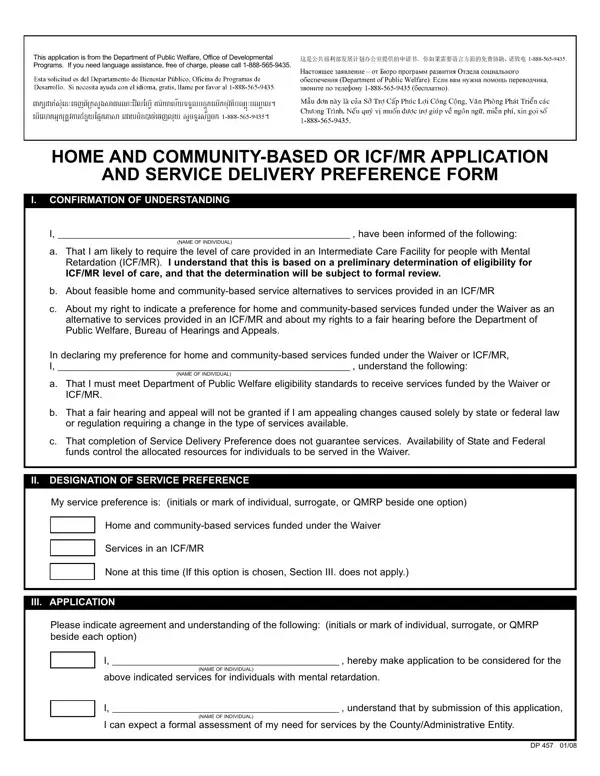
The DP 457 form, pivotal in the landscape of public welfare, serves as a vital tool within the Office of Developmental Programs for those requiring specialized care. It stands as a bridge for individuals likely needing the level of care similar to what is provided in an Intermediate Care Facility for people with Mental Retardation (ICF/MR), facilitating their access to home and community-based services as a viable alternative. By completing this form, the applicant acknowledges a preliminary determination of eligibility for ICF/MR level care, while also expressing their service delivery preference—either favoring home and community-based services funded under the Waiver or opting for services in an ICF/MR. It's important to note that this form does more than record preferences; it sets in motion a process of formal review and eligibility verification against the Department of Public Welfare standards, underscoring the applicant's rights to fair hearing before any decisions are reached. Additionally, the form intricately details how completion and submission do not guarantee services, emphasizing the influence of available State and Federal funds on the allocation of resources. The DP 457 form, structured into sections for applicant information, surrogate details, if applicable, and signatures from relevant parties including the Independent Qualified Mental Retardation Professional and County MH/MR Program/Administrative Entity Designee, embodies a comprehensive approach to the application and service preference declaration for individuals with mental retardation seeking tailored care options within their communities.

QuestionAnswer
Form NameForm Dp 457
Form Length2 pages
Fillable?No
Fillable fields0
Avg. time to fill out30 sec
Other namesDP, allocated, QMRP, Designee

How to Edit Form Dp 457 Online for Free

You'll be able to complete Designee effortlessly using our online editor for PDFs. Our tool is continually evolving to deliver the best user experience possible, and that's due to our commitment to continuous improvement and listening closely to customer opinions. It merely requires several simple steps:

Step 1: Press the orange "Get Form" button above. It will open our editor so you could start completing your form.

Step 2: The tool will let you modify almost all PDF documents in a variety of ways. Transform it with your own text, correct what is already in the file, and put in a signature - all when it's needed!

In an effort to complete this document, make sure that you enter the information you need in each blank field:

1. It is recommended to fill out the Designee properly, therefore be attentive when filling out the parts including these blanks:

Writing segment 1 in MH

2. Given that the last segment is done, you're ready insert the needed specifics in My service preference is initials, Home and communitybased services, Services in an ICFMR, None at this time If this option, III APPLICATION, Please indicate agreement and, I hereby make application to be, above indicated services for, NAME OF INDIVIDUAL, I understand that by submission, I can expect a formal assessment, and NAME OF INDIVIDUAL so that you can proceed further.

MH writing process described (portion 2)

3. The next step is going to be simple - fill out every one of the blanks in INDIVIDUAL NAME, ACCESS NUMBER, CURRENT STREET ADDRESS, CITY, SIGNATURE, STATE, ZIP, TELEPHONE NUMBER, DATE, B Surrogate This section must be, Waiver or ICFMR services on the, NAME, STREET ADDRESS, CITY, and SIGNATURE to complete this part.

The best way to prepare MH stage 3

People often make some mistakes when filling out CITY in this section. Make sure you read twice what you type in right here.

4. The following subsection requires your input in the subsequent areas: NAME, AGENCY, STREET ADDRESS, CITY, SIGNATURE, STATE, ZIP, TELEPHONE NUMBER, DATE, D County MHMR, MHMR ProgramAdministrative Entity, COUNTY DESIGNEE NAME, TITLE, AGENCY STREET ADDRESS, and CITY. Be sure that you give all of the required info to move onward.

Step # 4 for submitting MH

5. To finish your form, the last segment has some extra blank fields. Typing in SIGNATURE, and DATE should conclude everything and you're going to be done in an instant!

SIGNATURE, DATE, and DATE inside MH

Step 3: Once you have looked over the information in the file's blanks, just click "Done" to finalize your FormsPal process. After setting up afree trial account at FormsPal, it will be possible to download Designee or send it via email directly. The form will also be readily accessible through your personal cabinet with your each edit. Here at FormsPal, we do our utmost to make certain that all of your information is maintained protected.