
Form Ee 2 PDF Details

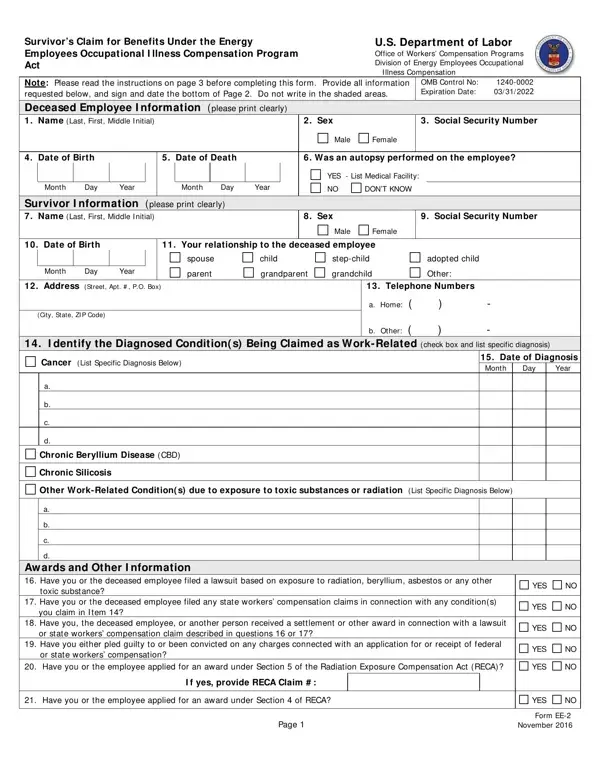
The EE-2 form is a critical document for those pursuing claims under the Energy Employees Occupational Illness Compensation Program Act (EEOICPA), administered by the U.S. Department of Labor's Office of Workers' Compensation Programs. It serves as a survivor’s claim for benefits, and its completion is a necessary step for eligible family members to receive compensation due to the illness or death of an employee linked to their work in the energy sector, particularly when such illness or death is connected to exposure to harmful substances or environments. The form requires detailed information about both the deceased employee, including but not limited to, their full name, social security number, date of birth, date of death, and the diagnosed conditions believed to be work-related. Additionally, it seeks information regarding the claimant, such as their relationship to the deceased, their personal details, and any previous compensations or lawsuits related to the claimed conditions. Notably, the form also includes a section for listing other potential survivors who may qualify for benefits, underscoring the importance of identifying all individuals who might be eligible. To ensure integrity and compliance, a survivor declaration is included, emphasizing the legal implications of falsifying information. Instructions provided with the form guide claimants through each section, highlighting the necessity of attaching additional documentation, such as medical records or death certificates, to support the claim. With deadlines and thoroughness in submission critical to the claim's success, understanding the EE-2 form's specifications is paramount for survivors seeking compensation.

QuestionAnswer
Form NameForm Ee 2
Form Length3 pages
Fillable?No
Fillable fields0
Avg. time to fill out45 sec
Other namesee 2, form ee download, form ee 2, form ee

How to Edit Form Ee 2 Online for Free

form ee download can be filled in online very easily. Simply use FormsPal PDF editor to do the job in a timely fashion. Our team is aimed at making sure you have the best possible experience with our editor by consistently adding new capabilities and enhancements. With all of these updates, working with our editor gets better than ever before! To start your journey, consider these basic steps:

Step 1: First, access the pdf editor by clicking the "Get Form Button" above on this webpage.

Step 2: With our online PDF editing tool, you can actually accomplish more than simply complete blank fields. Try all the functions and make your documents seem professional with customized text put in, or optimize the original input to perfection - all that comes with an ability to add just about any pictures and sign the file off.

It is actually easy to finish the form adhering to our helpful tutorial! Here is what you need to do:

1. While submitting the form ee download, make certain to complete all of the necessary fields within the relevant section. This will help to hasten the work, allowing for your information to be handled swiftly and properly.

Completing part 1 of ee 2

2. After this section is done, go to type in the applicable details in these - Chronic Beryllium Disease CBD, Chronic Silicosis, Other WorkRelated Condition s due, Aw ards and Other I nformation, toxic substance, Have you or the deceased employee, you claim in I tem, Have you the deceased employee or, or state workers compensation, Have you either pled guilty to or, or state workers compensation, YES, YES, YES, and YES.

or state workers compensation, or state workers compensation, and YES in ee 2

3. In this specific part, look at Name, Relationship to the deceased, Address, Phone Numbers, Home, Other, Home, Other, Home, Other, Home, Other, Home, Other, and Home. Every one of these are required to be filled in with greatest awareness of detail.

Other, Other, and Name in ee 2

People who work with this document frequently get some things incorrect while completing Other in this section. Ensure that you re-examine whatever you type in here.

4. This particular subsection arrives with all of the following fields to consider: Home, Other, Home, Other, Survivor Declaration Any person, Resource Center Date Stamp, Claimant Signature, Date, Form EE November, and Page.

Stage number 4 in filling out ee 2

Step 3: Proofread all the information you've entered into the blanks and then click on the "Done" button. Grab your form ee download after you sign up at FormsPal for a free trial. Quickly gain access to the pdf form from your FormsPal account, along with any modifications and adjustments all kept! Here at FormsPal.com, we strive to guarantee that all of your details are kept secure.