
Form Hea 5801 PDF Details

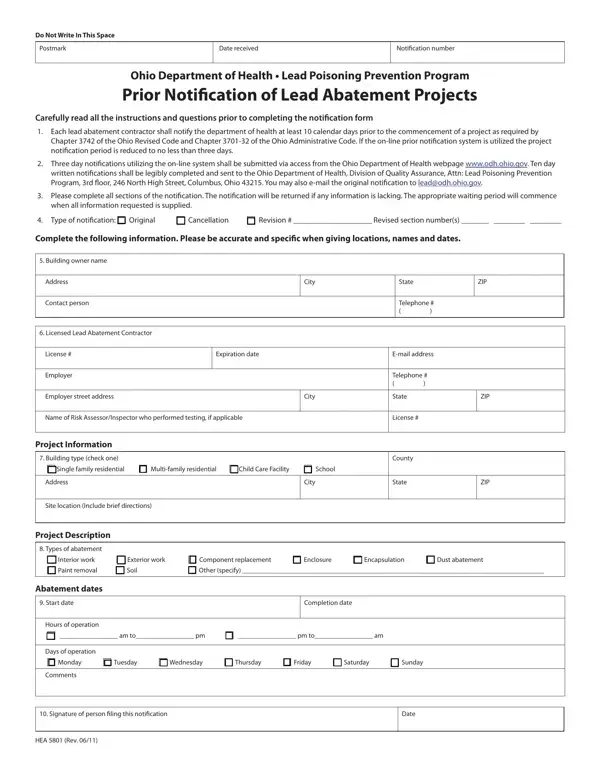
In an effort to safeguard public health, particularly from the hazards of lead exposure, the Ohio Department of Health has established a comprehensive protocol for the management of lead abatement projects through the use of the HEA 5801 form. This form serves multiple critical functions: it acts as a preliminary notification to the health department about planned lead abatement activities, thereby facilitating regulatory oversight and ensuring compliance with both state and federal health standards. The form requires detailed information about the project, including the identification of the lead abatement contractor, the start and end dates of the project, the specific type of abatement activities to be conducted, and the location of the project. Compliance with the mandate to submit this form well before the commencement of any lead abatement project—ten calendar days for standard notifications, or three days for those submitted via the online system—is crucial for lead abatement contractors. This process underscores the commitment of the Ohio Department of Health to prevent lead poisoning, particularly in environments occupied by vulnerable populations such as children in schools and childcare facilities. By mandating this formal notification process, the department aims to maintain a safe and healthy environment by minimizing the exposure risks associated with lead-based paint and other lead-containing materials.

QuestionAnswer
Form NameForm Hea 5801
Form Length1 pages
Fillable?No
Fillable fields0
Avg. time to fill out15 sec
Other nameshea5801 lead prior notification login form

How to Edit Form Hea 5801 Online for Free

Whenever you would like to fill out Form Hea 5801, you won't need to download any software - simply give a try to our online PDF editor. FormsPal expert team is always endeavoring to enhance the editor and insure that it is even better for users with its many functions. Enjoy an ever-improving experience now! Here's what you would have to do to begin:

Step 1: Click the orange "Get Form" button above. It is going to open our editor so you can begin completing your form.

Step 2: After you start the tool, you'll notice the form prepared to be completed. In addition to filling in different blanks, you may also do several other things with the form, particularly adding your own text, changing the initial textual content, adding illustrations or photos, placing your signature to the document, and much more.

This PDF will need particular details to be filled out, therefore make sure to take some time to provide what's requested:

1. Start completing your Form Hea 5801 with a selection of essential blanks. Get all the necessary information and ensure nothing is omitted!

Tips on how to prepare Form Hea 5801 part 1

2. After this array of fields is completed, you're ready insert the essential details in Employer, Employer street address, City, Name of Risk AssessorInspector who, Project Information, Building type check one c Single, Address, City, Site location Include brief, Project Description, Telephone, State, License, County, and State so you can move forward further.

Ways to complete Form Hea 5801 step 2

3. Completing Days of operation c Monday c, Comments, Signature of person iling this, Date, and HEA Rev is essential for the next step, make sure to fill them out in their entirety. Don't miss any details!

Part # 3 for completing Form Hea 5801

Those who work with this form generally make some errors when completing Days of operation c Monday c in this area. You need to go over everything you enter here.

Step 3: Make certain your details are right and then click "Done" to proceed further. Acquire your Form Hea 5801 once you sign up for a free trial. Conveniently get access to the form inside your FormsPal account, along with any edits and changes being all kept! With FormsPal, you're able to complete documents without stressing about personal data breaches or entries being distributed. Our protected platform ensures that your private details are stored safe.