
Form It Consol PDF Details

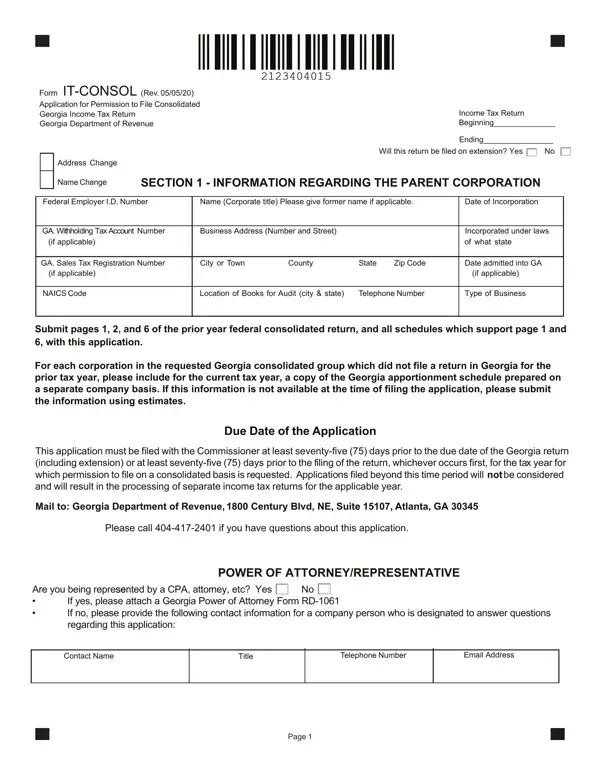
The Form IT-CONSOL, updated as of May 5, 2020, serves as an application for corporations seeking permission to file a consolidated income tax return in the state of Georgia, an option managed by the Georgia Department of Revenue. This detailed form embodies a crucial step for parent corporations and their subsidiaries that opt to navigate their tax obligations under a single consolidated banner, ensuring streamlined processing and potentially beneficial tax treatments. Beginning with requisite corporate information, including changes in name or address and the provision for extensions, the form meticulously gathers details about the parent corporation’s identification, incorporation details, and business specifics. Compliant with Regulation 560-7-3-.13(2)(b), it mandates inclusion of all affiliated group members subject to Georgia income tax, excluding those exempt under federal law. The form's structure, which facilitates the attachment of required documents, including prior year's federal returns and apportionment schedules, underscores the thoroughness desired by the Department of Revenue. Designation of a member authorized to receive notices and consenting on behalf of the group, net operating loss queries, and detailed scrutiny into entities not covered by the Georgia group reveal the form’s comprehensive nature. Also, it incorporates sections probing into interest expenses and other financials pertinent to entities outside the Georgia consolidated group. The declaration of truthfulness and completeness under penalty of perjury at the conclusion of the form underscores the seriousness and legal obligations incumbent upon applicants. Navigating through the IT-CONSOL form illuminates the intricacies involved in tax consolidation processes, embodying both the complex regulatory environment and the meticulous compliance expected from corporations operating within Georgia.

QuestionAnswer
Form NameForm It Consol
Form Length4 pages
Fillable?No
Fillable fields0
Avg. time to fill out1 min
Other namesit consol form georgia, georgia consol

How to Edit Form It Consol Online for Free

When you would like to fill out it consol form georgia, it's not necessary to download any kind of programs - just make use of our online PDF editor. To maintain our editor on the cutting edge of convenience, we work to integrate user-driven capabilities and enhancements regularly. We are at all times glad to get suggestions - assist us with remolding how we work with PDF forms. Starting is easy! Everything you need to do is follow the following easy steps down below:

Step 1: Hit the "Get Form" button above. It's going to open up our pdf tool so you can start completing your form.

Step 2: The editor will allow you to change PDF documents in various ways. Improve it with customized text, correct existing content, and place in a signature - all within a couple of clicks!

With regards to the fields of this precise document, here's what you should do:

1. Whenever filling out the it consol form georgia, be certain to include all needed blanks in its associated part. It will help facilitate the work, allowing your details to be handled efficiently and appropriately.

Form It Consol conclusion process clarified (step 1)

2. The third stage is to fill out the following fields: POWER OF ATTORNEYREPRESENTATIVE, Are you being represseented by a, If yes please attach a Georgia, Contact Name, Title, Telephone Number, Email Address, and Page.

Part number 2 for filling out Form It Consol

3. This subsequent step is considered quite uncomplicated, In order to file a consolidated, If the federal parent is also, Name of Member, Federal Employer Identification, and Attach additional schedules if - every one of these blanks needs to be filled out here.

Form It Consol writing process outlined (part 3)

Be extremely mindful when completing Attach additional schedules if and In order to file a consolidated, because this is where a lot of people make a few mistakes.

4. It's time to proceed to this next portion! In this case you will have all these Federal Employer ID Number, Name Corporate title Please give, Business Address Number and Street, City or Town, County, State, Zip Code, and Page fields to complete.

Guidelines on how to fill out Form It Consol portion 4

5. As a final point, this last subsection is what you'll want to complete prior to finalizing the PDF. The blanks here include the following: Net Operating Loss, Is a loss being carried forward, If the answer to question is yes, Entities Not Included in the, and If so please list the name and FEI.

Part number 5 for completing Form It Consol

Step 3: Right after looking through the entries, press "Done" and you're all set! After registering afree trial account at FormsPal, it will be possible to download it consol form georgia or send it through email right away. The file will also be available from your personal account with your every single edit. When using FormsPal, you can easily complete documents without being concerned about personal data leaks or entries getting shared. Our protected software makes sure that your personal information is stored safe.