
Form Navmed 1300 1 PDF Details

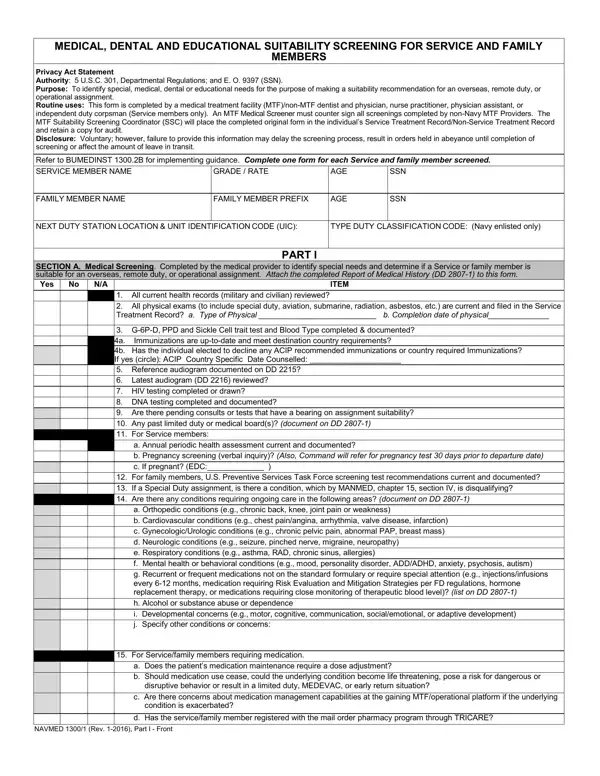
In the realm of military healthcare and readiness, the NAVMED 1300/1 form stands as a critical document, shaping the process by which service members and their families are assessed for overseas, remote duty, or operational assignments. This comprehensive form, driven by the prerequisites outlined within, encompasses both medical and dental assessments, aiming to identify any special, medical, dental, or educational needs that might influence the suitability of an individual for such assignments. Administered by medical and dental professionals within military treatment facilities (MTFs) or by equivalent civilian providers, the NAVMED 1300/1 process not only reviews current health records, immunizations, and potential medical or dental conditions but also evaluates the necessary continuity of care for ongoing conditions. Its scope extends further, addressing educational requirements for service members' children, potentially affecting the family's suitability for the proposed location. The inherent complexity of this form reflects a balance between meeting the operational needs of the military and ensuring the well-being of its service members and their dependents, underlining the importance of a thorough and insightful assessment process. By mandating a detailed scrutiny of medical, dental, and educational needs, the NAVMED 1300/1 form serves as a key determinant in the intricate decision-making process regarding the feasibility of assignments that take service members and their families away from established support systems in the United States.

QuestionAnswer
Form NameForm Navmed 1300 1
Form Length3 pages
Fillable?No
Fillable fields0
Avg. time to fill out45 sec
Other namesform 1300 1, navmed 1300 1 fillable, navmed 1300 1 pdf fillable, navmed 1300

How to Edit Form Navmed 1300 1 Online for Free

Dealing with PDF files online is actually a piece of cake using our PDF editor. You can fill out navmed 1300 1 form here with no trouble. We are committed to providing you the absolute best experience with our tool by continuously introducing new functions and improvements. Our tool has become much more useful as the result of the most recent updates! At this point, editing PDF forms is easier and faster than ever before. It just takes a few simple steps:

Step 1: Access the form in our editor by hitting the "Get Form Button" above on this webpage.

Step 2: Once you access the file editor, you'll see the form prepared to be filled in. Apart from filling in different fields, you can also perform other sorts of things with the form, specifically putting on custom text, changing the initial text, adding graphics, putting your signature on the form, and much more.

This document will need specific information to be typed in, hence be sure you take some time to enter exactly what is required:

1. The navmed 1300 1 form needs specific information to be entered. Be sure the next fields are finalized:

Part number 1 of completing navmed 1300 1 pdf fillable

2. Soon after filling out the last part, go on to the next step and enter the essential details in all these blanks - For family members US Preventive, a Orthopedic conditions eg chronic, For Servicefamily members, a Does the patients medication, disruptive behavior or result in a, c Are there concerns about, d Has the servicefamily member, and NAVMED Rev Part I Front.

disruptive behavior or result in a, NAVMED  Rev  Part I  Front, and a Does the patients medication inside navmed 1300 1 pdf fillable

3. Completing ITEM For servicefamily members, a Is there a requirement for, accommodations etc, b If exposed to a physically or, threatening pose a risk for, c Are there any chronic medical or, specialized medical care document, d Are there any potential, For infants and toddlers birth to, For preschool and school age, Explanation of yes responses in, Navy MTF SSC Name Signature Stamp, NonNavy Medical Providers STOP and, Yes, and ITEM is essential for the next step, make sure to fill them out in their entirety. Don't miss any details!

Writing section 3 of navmed 1300 1 pdf fillable

People generally get some things incorrect while filling in d Are there any potential in this section. Remember to read again whatever you enter right here.

4. To go ahead, this next step will require completing a few blank fields. Examples include Yes, Are any of the above shaded, b Does the gaining location have, IS THE SERVICEFAMILY MEMBER, SECTION C Contact Information, NonNavy MTFCivilian Medical, and Navy MTF Medical Screener, which are vital to going forward with this particular form.

Step no. 4 of filling in navmed 1300 1 pdf fillable

5. Because you come near to the end of your document, there are actually a couple extra requirements that have to be fulfilled. Specifically, Navy MTF Medical Screener, and NAVMED Rev Part I Back must all be filled out.

Step number 5 in filling in navmed 1300 1 pdf fillable

Step 3: Right after double-checking the form fields, press "Done" and you are done and dusted! Try a 7-day free trial account at FormsPal and acquire instant access to navmed 1300 1 form - download, email, or edit inside your personal cabinet. With FormsPal, you can easily complete forms without stressing about database breaches or entries getting shared. Our protected platform helps to ensure that your private information is stored safely.