
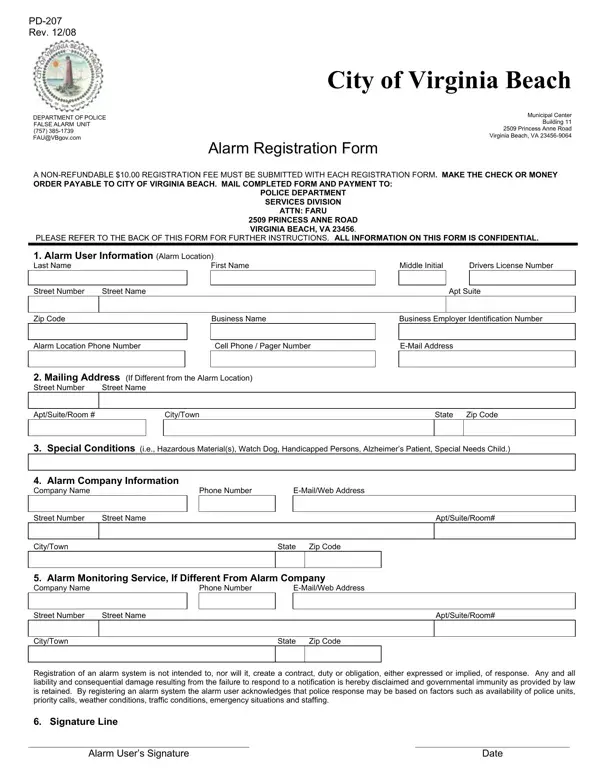
In the bustling city of Virginia Beach, safeguarding homes and businesses with alarm systems has become a common practice to deter crime and ensure safety. However, managing these security measures entails responsibilities beyond installation, notably the mandatory registration of alarm systems. The PD-207 form plays a crucial role in this process, facilitating communication between Virginia Beach residents and the local police department. For a nominal non-refundable fee of $10.00, this form requires detailed user information ranging from personal contact details to special conditions that may affect police response, such as hazardous materials or the presence of individuals with special needs. Moreover, the registration process underscores the importance of accurate and up-to-date information, including any updates to the alarm company and monitoring service details, to avoid delays in registration and potential 'No Response' status from the police department. The form also serves as a reminder of the legal and financial implications of false alarms, aiming to minimize unnecessary police dispatches that can detract from more pressing community needs. Detailed within the PD-207 are also the stipulations of the Virginia Beach Alarm Ordinance, which lays out the requirements for permits, the non-transferability of alarm permits, and the charges applied for false alarms, emphasizing the collective effort required to balance community security with efficient police service. By completing and submitting the PD-207 form, Virginia Beach residents and business owners acknowledge the shared responsibility in maintaining a safe and responsive alarm system, ensuring that police resources are allocated effectively while retaining the protective reassurance an alarm system is meant to provide.
| Question | Answer |
|---|---|
| Form Name | Form Pd 207 |
| Form Length | 2 pages |
| Fillable? | No |
| Fillable fields | 0 |
| Avg. time to fill out | 30 sec |
| Other names | 2009, fairfax county alarm system registration form, Virginia, fairfax county false alarm reduction unit |
Form Pd 207 isn’t the one you’re looking for?