
Form Rc151 E PDF Details

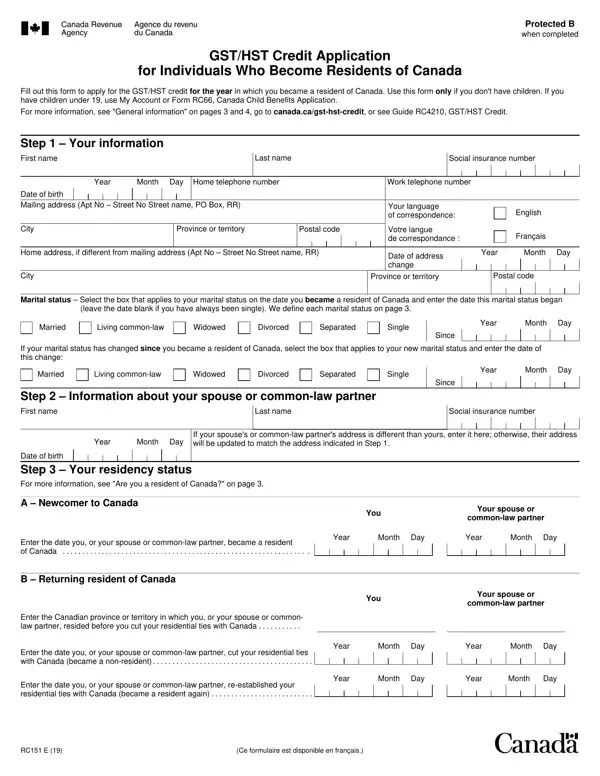
Adjusting to a new country involves navigating through a myriad of forms and policies, among which the RC151 E form plays a crucial role for individuals who have recently made Canada their home. This vital form serves as a GST/HST Credit Application, specifically designed for individuals who have become residents of Canada within a specific tax year and do not have children under the age of 19. The objective of filling out this form is to apply for the GST/HST credit, a non-taxable amount paid quarterly to assist individuals and families with low and modest incomes in offsetting part or all of the GST/HST they pay, making it an essential step in financial adjustment to the Canadian system. The form demands detailed personal information, including social insurance numbers, date of birth, marital status at the time of becoming a resident, and comprehensive income information that was not reported on a Canadian tax return, requiring conversion into Canadian dollars. Importantly, it emphasizes the status of individuals (or their spouse/common-law partner) as new or returning residents, delineating clear instructions for both scenarios. Furthermore, the form lays out the procedure for those unable to provide a Social Insurance Number (SIN), hence acknowledging various residency situations and ensuring inclusivity. The RC151 E form, while seemingly just another piece of bureaucracy, stands as a bridge for new residents to access financial benefits and smoothens their transition into Canadian society, ultimately reflecting Canada's commitment to supporting its diverse populace.

QuestionAnswer
Form NameForm Rc151 E
Form Length4 pages
Fillable?No
Fillable fields0
Avg. time to fill out1 min
Other namesrc151 gst hst credit application, gst credit application, gst hst application, canada gst application form

How to Edit Form Rc151 E Online for Free

When you wish to fill out rc151 form, it's not necessary to install any programs - just try our online tool. Our tool is consistently evolving to grant the very best user experience possible, and that is due to our commitment to continual improvement and listening closely to user comments. All it requires is several basic steps:

Step 1: Just hit the "Get Form Button" at the top of this page to see our pdf file editing tool. This way, you will find all that is necessary to work with your document.

Step 2: Once you access the online editor, you will notice the form prepared to be completed. Apart from filling out different blank fields, you may as well do some other things with the Document, specifically putting on your own textual content, editing the initial text, adding images, affixing your signature to the PDF, and a lot more.

In order to finalize this form, ensure that you type in the information you need in each blank:

1. The rc151 form needs particular information to be inserted. Make certain the following blank fields are filled out:

Learn how to complete rc151 gst hst credit application stage 1

2. Just after filling out this step, go on to the subsequent step and fill in all required details in these blank fields - Year Month Day, If your spouses or commonlaw, Date of birth Step Your, A Newcomer to Canada, Enter the date you or your spouse, B Returning resident of Canada, Enter the Canadian province or, Enter the date you or your spouse, Enter the date you or your spouse, You, Your spouse or, commonlaw partner, Year Month Day, Year Month Day, and You.

Stage number 2 of filling in rc151 gst hst credit application

3. This next part is focused on A The year you became a resident, Enter the year you became a, Do not enter your spouses or, Enter the income earned from, B One year before you became a, Enter the year that is one year, For example if you became a, Enter the income earned one year, C Two years before you became a, You, You, Your spouse or, commonlaw partner, Your spouse or, and commonlaw partner - fill out all of these empty form fields.

Part no. 3 for filling in rc151 gst hst credit application

4. The following subsection will require your details in the following areas: I certify that the information, Your signature, Spouses or commonlaw partners, Year Month Day, Year Month Day, Date, Date, and Personal information including the. Be sure to enter all of the needed information to go onward.

The best way to complete rc151 gst hst credit application portion 4

It's very easy to make errors when filling in your Personal information including the, therefore be sure to reread it before you send it in.

Step 3: Make certain the information is accurate and click "Done" to finish the project. Sign up with FormsPal right now and instantly get access to rc151 form, prepared for downloading. Every single edit made is conveniently kept , which enables you to change the pdf at a later time as required. We do not share or sell any details you type in when dealing with documents at FormsPal.