
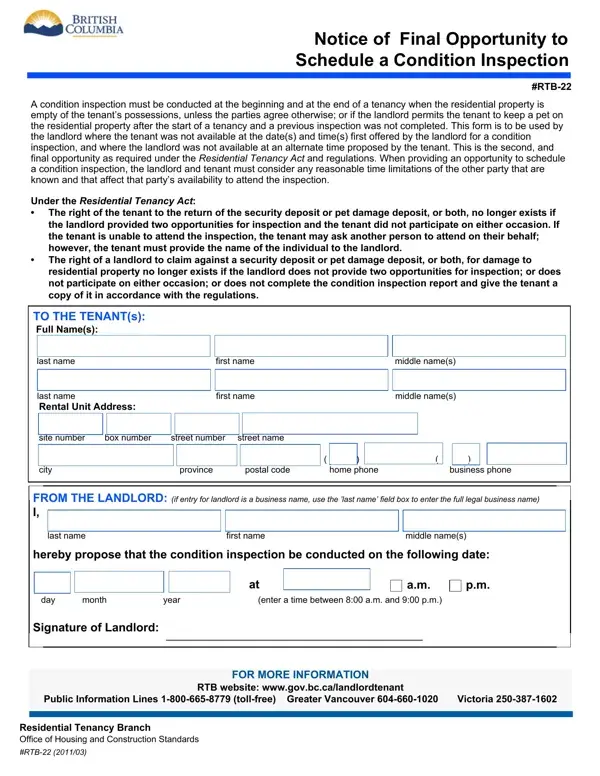
When it comes to managing residential properties, landlords and tenants often face a multitude of legal formalities designed to protect the rights and interests of both parties. Among these, the Notice of Final Opportunity to Schedule a Condition Inspection, identified as the RTB-22 form, plays a crucial role in ensuring the property's condition is thoroughly documented at the start and end of a tenancy. This form becomes particularly relevant when an initial attempt to conduct a condition inspection fails due to the unavailability of either the landlord or the tenant. The RTB-22 serves as a critical legal document, providing one last chance to arrange for a condition inspection, as mandated by the Residential Tenancy Act and its regulations. It underscores the importance of cooperation and reasonable scheduling between landlords and tenants, highlighting the potential financial implications for both parties should this opportunity be missed. Specifically, tenants risk forfeiting their security or pet damage deposits if they fail to participate in the condition inspection process, while landlords might lose their right to claim against these deposits for property damages if they do not offer two opportunities for an inspection or fail to participate. This form, therefore, not only facilitates a fair assessment of the property’s condition but also enforces a structure within which both landlords and tenants must operate to safeguard their respective rights and interests.
| Question | Answer |
|---|---|
| Form Name | Form Rtb 22 |
| Form Length | 1 page |
| Fillable? | Yes |
| Fillable fields | 17 |
| Avg. time to fill out | 15 sec |
| Other names | RTB 22 rto22 form |
Form Rtb 22 isn’t the one you’re looking for?