


Form STD 692 at a glance
What it is: STD. 692 is the Dental Plan Enrollment Authorization of the State of California, California Department of Human Resources.
Where and when to file: Type or use ball point pen, print clearly, and send the completed form to the personnel/payroll office.
A filled-in Form STD 692 example: Dana Sample enrolls for the first time
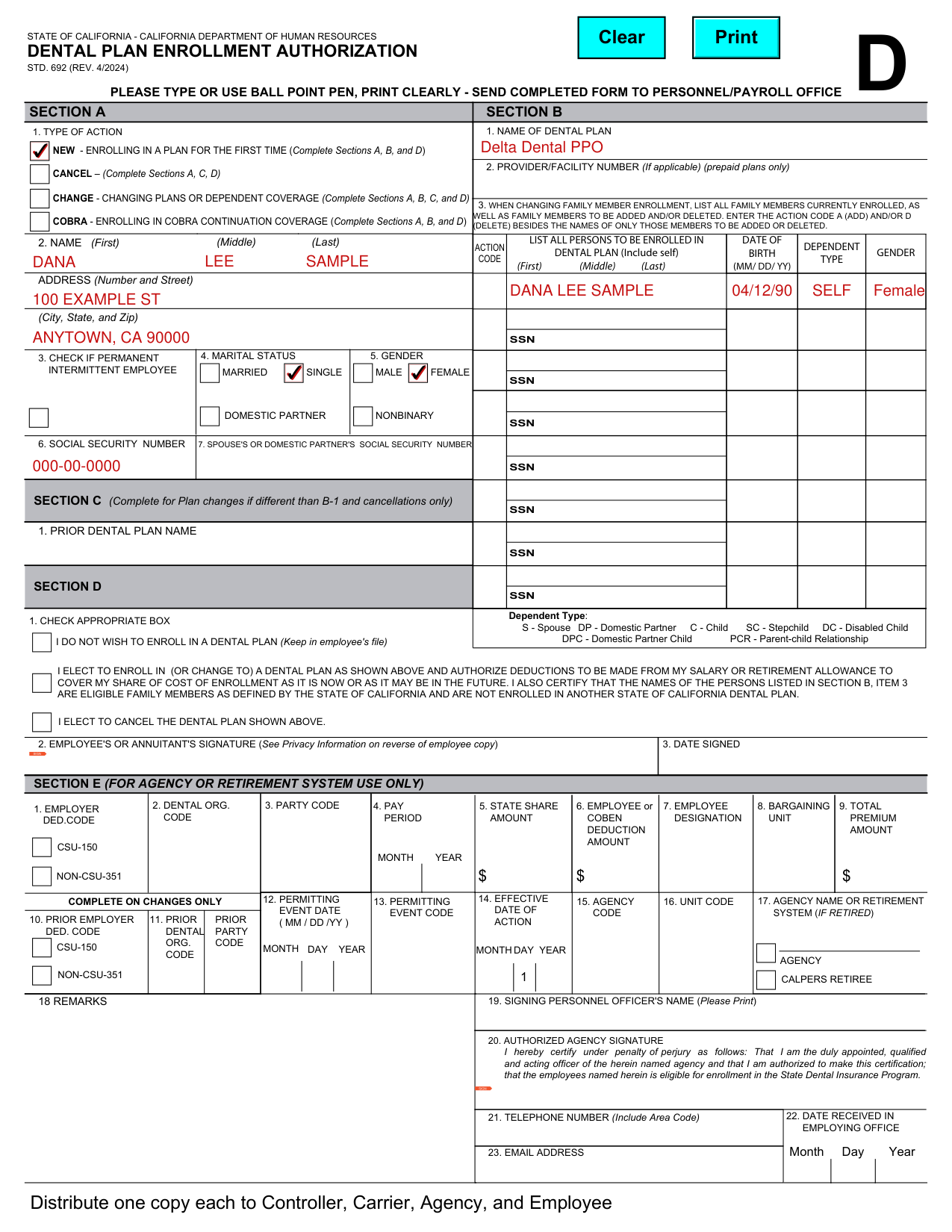
How to fill out Form STD 692, box by box
Section A. Type of action
Check NEW - ENROLLING IN A PLAN FOR THE FIRST TIME and complete Sections A, B, and D.
Check CANCEL and complete Sections A, C, D.
Check CHANGE - CHANGING PLANS OR DEPENDENT COVERAGE and complete Sections A, B, C, and D.
Check COBRA - ENROLLING IN COBRA CONTINUATION COVERAGE and complete Sections A, B, and D.
Section A. Name and address
In Section A, enter your name in box 2: First, Middle, Last.
Enter your address: Number and Street, then City, State, and Zip.
Section A. Permanent intermittent employee, marital status and gender
Check box 3 if you are a permanent intermittent employee.
Box 4 is marital status: married, single or domestic partner. Box 5 is gender: male, female or nonbinary.
It is mandatory to furnish all information requested on this form except for employee's gender and marital status, which may be furnished on a voluntary basis.
Section B. Dental plan
In Section B, enter the name of the dental plan in box 1.
In box 2, enter the provider/facility number if applicable (prepaid plans only).
Section B. Persons to enroll
List all persons to be enrolled in dental plan (include self) with First, Middle, Last and date of birth (MM/DD/YY).
When changing family member enrollment, list all family members currently enrolled, as well as family members to be added and/or deleted. Enter the action code A (add) and/or D (delete) besides the names of only those members to be added or deleted.
Dependent type: S - Spouse, DP - Domestic Partner, C - Child, SC - Stepchild, DC - Disabled Child, DPC - Domestic Partner Child, PCR - Parent-child Relationship.
Section C. Prior dental plan
Complete Section C for plan changes if different than B-1 and cancellations only.
In Section C, enter the prior dental plan name in box 1.
Section D. Check appropriate box, signature and date
Check the appropriate box in box 1: I DO NOT WISH TO ENROLL IN A DENTAL PLAN (keep in employee's file).
Check I ELECT TO ENROLL IN (OR CHANGE TO) A DENTAL PLAN AS SHOWN in Section B, item 1 to authorize deductions to be made from your salary or retirement allowance to cover your share of cost of enrollment as it is now or as it may be in the future. It also certifies that the names of the persons listed in Section B, item 3 are eligible family members as defined by the State of California and are not enrolled in another State of California dental plan.
Check I ELECT TO CANCEL THE DENTAL PLAN SHOWN in Section C.
Sign as the employee or annuitant in box 2 (see Privacy Information on reverse of employee copy) and enter the date in box 3.
More rules for Form STD 692
In Section E (for agency or retirement system use only), one copy each is distributed to Controller, Carrier, Agency, and Employee.
The State Controller's Office and the dental insurance company use the information requested on this form for the purposes of identification and dental coverage processing.
Failure to provide the mandatory information may result in the dental enrollment action not being processed or being processed incorrectly.
Common questions about Form STD 692
Where do I file it?
Type or use ball point pen, print clearly, and send the completed form to the personnel/payroll office.
Is there a penalty?
In Section E (for agency or retirement system use only), the authorized agency signature certifies under penalty of perjury that the employees named herein is eligible for enrollment in the State Dental Insurance Program.
Sources
[1] Form STD 692 (REV. 4/2024), Dental Plan Enrollment Authorization, State of California, California Department of Human Resources (the Official source link on this page).