

Form T4E at a glance
What it is: Form T4E is the Statement of Employment Insurance and Other Benefits. Attach this copy to your federal return.
A filled-in Form T4E example: a slip with a 30% repayment rate
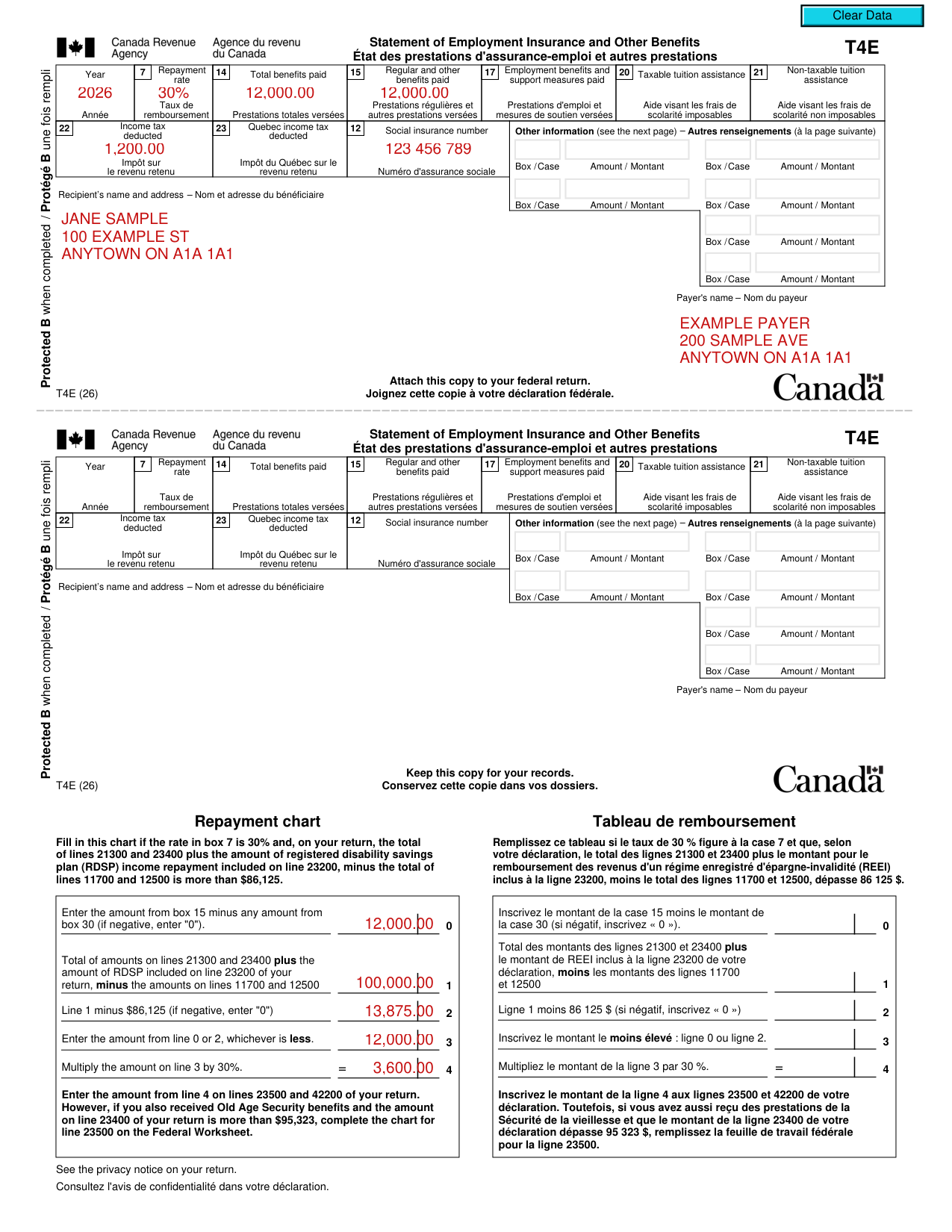
How to fill out Form T4E, box by box
Repayment rate and benefits paid

In box 7, if the rate is 30%, see the repayment chart.
In box 14, take this amount and subtract any amount in box 18. Write the total on line 11900 of your return. Box 14 includes amounts in boxes 15, 17, 18, 33, 36, and 37.
Box 15 includes work-sharing benefits paid and the income benefits under section 25 of the Employment Insurance Act.
Box 17 includes employment insurance funded financial assistance paid while you were taking part in an approved employment program (that is not included in box 15). This amount is included in box 14.
For box 20, see Form T2202 for more information on claiming a tax credit. This amount is included in box 17 or 33.
Enter the box 21 amount on line 25600 of your return. This amount does not qualify for a non-refundable tax credit. This amount is included in box 17 or 33.
Tax deducted and social insurance number

Enter the box 22 amount on line 43700 of your return.
In box 23, if you were a resident of Quebec on December 31, enter this amount on your Quebec provincial return. If you were a resident of a province or territory other than Quebec, enter this amount on line 43700 of your federal return.
Other information
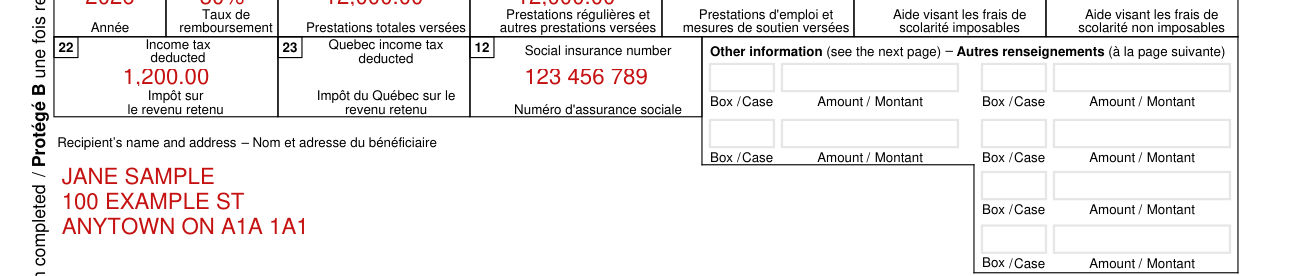
Box 18, tax exempt benefits, applies to Indians registered, or eligible to be registered, under the Indian Act.
Box 24, non-resident tax deducted: enter this amount on line 43700 of your return.
Box 26, overpayment recovered or repaid, is the amount recovered from benefits paid, cash or a returned warrant applied to an overpayment.
Box 27, reversal of income tax deducted, is a reversal of the income tax deducted from an amount that was repaid. The amount of the reversal is included in box 30.
Box 30, total repayment: enter this amount on line 23200 of your return. The amount in this box is the total of boxes 26 and 27. Use the amount in box 30 to determine the amount to report on line 0 of the repayment chart.
Box 33, payments out of the consolidated revenue fund: this amount is included in box 14.
Box 36, Provincial Parental Insurance Plan benefits: this amount is included in box 14.
Box 37, EI maternity, parental, and adoption benefits payments: this amount is included in box 14.
Repayment chart
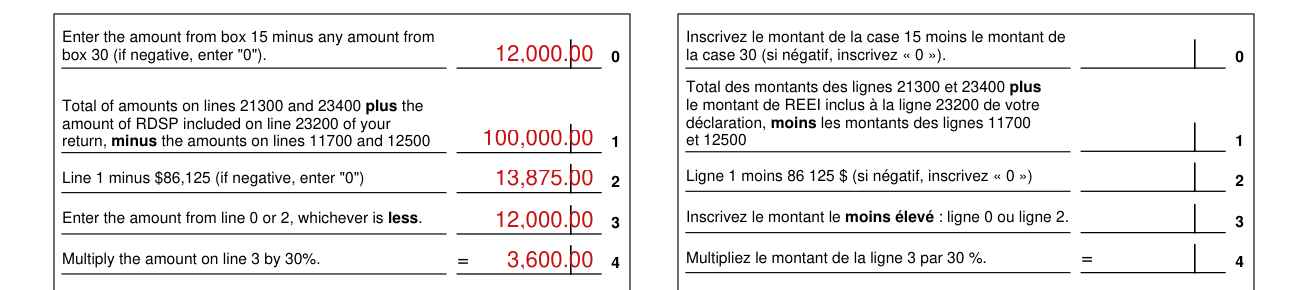
Fill in the repayment chart if the rate in box 7 is 30% and, on your return, the total of lines 21300 and 23400 plus the amount of registered disability savings plan (RDSP) income repayment included on line 23200, minus the total of lines 11700 and 12500 is more than $86,125. (checked November 9, 2026)
On line 0, enter the amount from box 15 minus any amount from box 30 (if negative, enter "0").
On line 1, enter the total of amounts on lines 21300 and 23400 plus the amount of RDSP included on line 23200 of your return, minus the amounts on lines 11700 and 12500.
On line 2, enter line 1 minus $86,125 (if negative, enter "0"). (checked November 9, 2026)
On line 3, enter the amount from line 0 or 2, whichever is less.
On line 4, multiply the amount on line 3 by 30%.
Enter the amount from line 4 on lines 23500 and 42200 of your return. However, if you also received Old Age Security benefits and the amount on line 23400 of your return is more than $95,323, complete the chart for line 23500 on the Federal Worksheet. (checked November 9, 2026)
More rules for Form T4E
Keep this copy for your records.
Common questions about Form T4E
What is a T4E form in Canada?
Form T4E is the Statement of Employment Insurance and Other Benefits. Attach this copy to your federal return. These benefits may include benefits earned in the previous year but paid in the year shown on this slip.
Sources
[1] Form T4E (26), Statement of Employment Insurance and Other Benefits, Canada Revenue Agency (the Official source link on this page).