
Frs Certification Form PDF Details

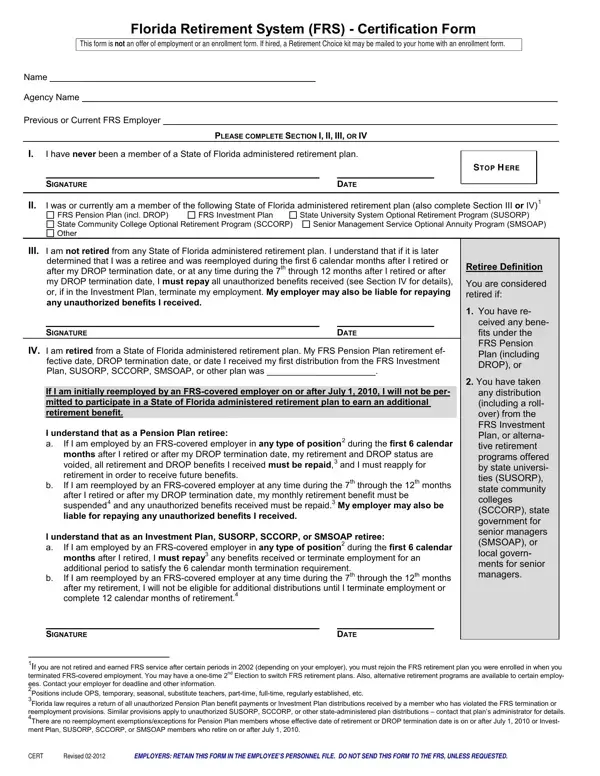
Navigating the complexities of retirement can be a daunting task, especially for individuals involved with the Florida Retirement System (FRS). The FRS Certification Form serves as a crucial step in clarifying the retirement status and previous engagements of employees or potential hires within the state of Florida's administered retirement plans. This document is pivotal for those interacting with the FRS, detailing essential actions and implications for individuals who are either entering retirement, considering reemployment, or switching between retirement plans. It outlines various scenarios, including never being part of a State of Florida administered retirement plan, being a current or past member, not being retired from any State of Florida administered retirement plan, and being retired from one. For each circumstance, the form provides specific instructions and conditions, such as the repayment of unauthorized benefits or the suspension of monthly retirement benefits under certain reemployment situations after retirement. Moreover, it underscores the importance of abiding by the rules regarding employment post-retirement and the potential financial repercussions of not doing so. These guidelines aim to prevent any conflicts with the FRS retirement benefits eligibility and ensure that individuals are correctly navigating their retirement pathways, making it an indispensable tool for both employers and employees within the Florida Retirement System.

QuestionAnswer
Form NameFrs Certification Form
Form Length1 pages
Fillable?No
Fillable fields0
Avg. time to fill out15 sec
Other namesSMSOAP, florida retirement system certification form, Florida, frs form

How to Edit Frs Certification Form Online for Free

Making use of the online editor for PDFs by FormsPal, you'll be able to fill in or edit 2010 here and now. The tool is consistently updated by us, getting new awesome functions and growing to be greater. Getting underway is effortless! All you have to do is adhere to the following basic steps directly below:

Step 1: Click on the "Get Form" button at the top of this webpage to get into our PDF editor.

Step 2: The tool will allow you to customize most PDF forms in a variety of ways. Transform it by writing customized text, correct what is originally in the file, and add a signature - all at your disposal!

This form will need some specific details; to guarantee accuracy, you need to pay attention to the guidelines down below:

1. Start completing the 2010 with a group of necessary blank fields. Consider all of the information you need and ensure nothing is overlooked!

florida retirement system certification form conclusion process detailed (stage 1)

2. After this selection of blank fields is done, go on to enter the suitable information in all these - If I am employed by an FRScovered, and any unauthorized benefits, I understand that as an Investment, If I am employed by an FRScovered, You have taken any distribution, SIGNATURE, DATE, If you are not retired and earned, CERT, Revised, and EMPLOYERS RETAIN THIS FORM IN THE.

If you are not retired and earned, If I am employed by an FRScovered, and If I am employed by an FRScovered inside florida retirement system certification form

People frequently make mistakes when filling out If you are not retired and earned in this part. You need to read twice what you enter here.

Step 3: Make sure the information is accurate and click "Done" to proceed further. After starting a7-day free trial account at FormsPal, it will be possible to download 2010 or email it promptly. The PDF will also be easily accessible through your personal account page with all of your edits. FormsPal is invested in the privacy of our users; we always make sure that all information put into our tool remains protected.