
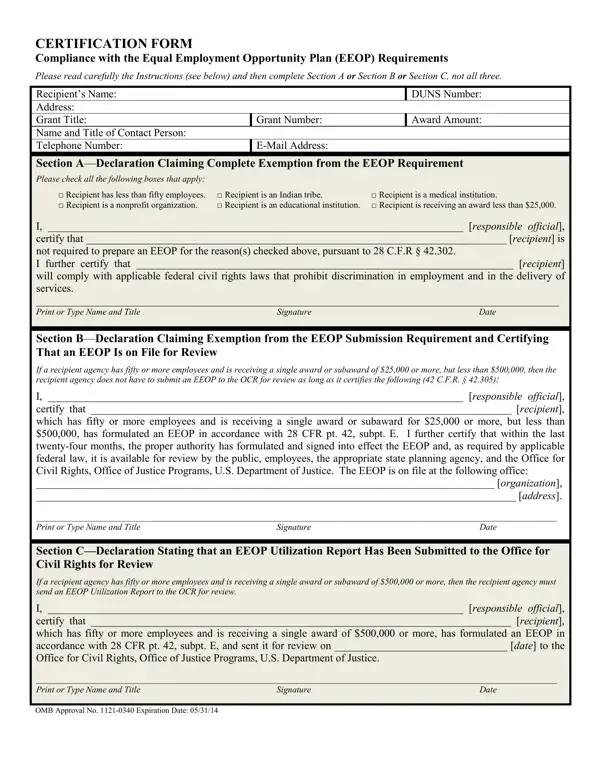
The EEOP Certification form serves as a critical instrument for ensuring compliance with the Equal Employment Opportunity Plan (EEOP) requirements, mandated under federal regulations. Organizations that receive financial assistance from the U.S. Department of Justice and are subject to the administrative provisions of the Omnibus Crime Control and Safe Streets Act of 1968, as amended, find themselves navigating through these requirements. The form outlines a tiered compliance mechanism, divided into three sections: A, B, and C, each addressing different scenarios based on the size of the recipient organization, the amount of grant awarded, and specific exemptions. For entities claiming a complete exemption from the EEOP requirements, Section A mandates the identification of the basis for exemption such as having less than fifty employees, being an educational, medical, Indian tribe, nonprofit organization, or receiving an award less than $25,000. Section B offers a limited exemption for those with fifty or more employees and receiving awards between $25,000 and $500,000, allowing them to maintain an EEOP on file without submitting it for review, provided it has been updated in the last twenty-four months. Finally, Section C obligates recipients with fifty or more employees and awards of $500,000 or more to submit an EEOP Utilization Report for review. The form is not only a declaration of compliance but also a certification of adherence to applicable federal civil rights laws, underscoring the recipient's commitment to maintaining an equitable workplace.
| Question | Answer |
|---|---|
| Form Name | Eeop Certification Form |
| Form Length | 3 pages |
| Fillable? | No |
| Fillable fields | 0 |
| Avg. time to fill out | 45 sec |
| Other names | eeop form, equal opportunity plan, eeop, certification equal employment |
Eeop Certification Form isn’t the one you’re looking for?