
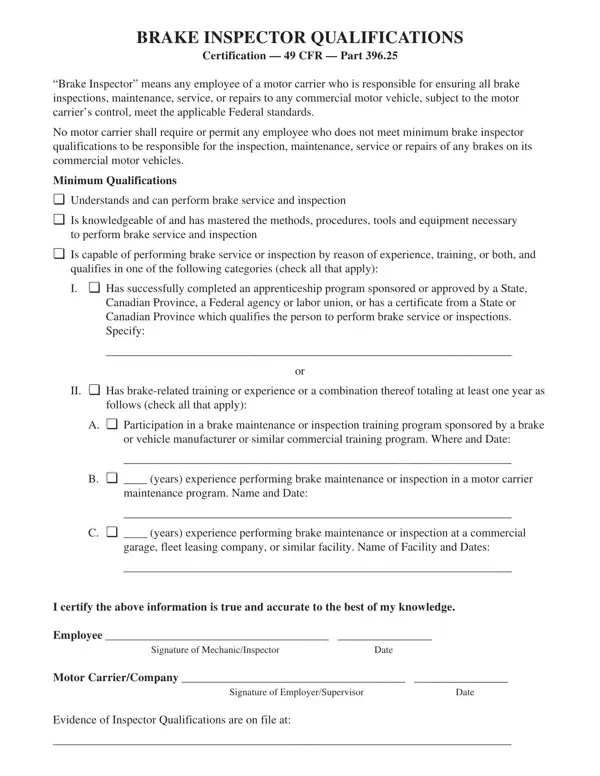
A Brake Inspector Certification Form is the official record required by 49 CFR Part 396.25 that confirms a commercial vehicle technician meets the minimum qualifications to perform brake inspections, maintenance, service, or repairs. Motor carriers must keep completed forms on file for FMCSA compliance reviews.
Under federal regulations, a qualified brake inspector must be an employee of a motor carrier who has demonstrated all of the following:
Acceptable proof of qualification includes training program certificates, documented work experience records, or a combination of both. The Brake Inspector Certification Form consolidates this evidence into one document for the carrier's files.
A standard brake inspector certification form collects the following details from each qualified technician:
The FMCSA requires motor carriers to employ only qualified brake inspectors. Maintaining signed Brake Inspector Certification Forms demonstrates that the carrier has verified each technician's qualifications before assigning brake-related work. Inspectors from a DOT compliance review team may request these records. Missing or incomplete forms can lead to driver or vehicle out-of-service orders and significant civil penalties for the carrier.
49 CFR Part 396.25 does not specify a fixed expiration date. Most carriers renew certifications when an inspector changes roles, completes new training, or begins working on a different brake system type. Reviewing certifications each year is a common best practice.
Both the employee (the brake inspector) and the employer or supervisor must sign. The inspector confirms their qualifications in writing, and the employer confirms the carrier's verification of those qualifications.
A single certification form can cover multiple brake systems if the inspector holds qualifications for all of them. If the inspector is only qualified for specific systems, that limitation should be noted on the form rather than listed as a blanket certification.
| Question | Answer |
|---|---|
| Form Name | Brake Inspector Certification Form |
| Form Length | 1 pages |
| Fillable? | No |
| Fillable fields | 0 |
| Avg. time to fill out | 15 sec |
| Other names | dot air brake certification, dot brake certification, brake inspection form, brake inspector certification |
Brake Inspector Certification Form isn’t the one you’re looking for?