
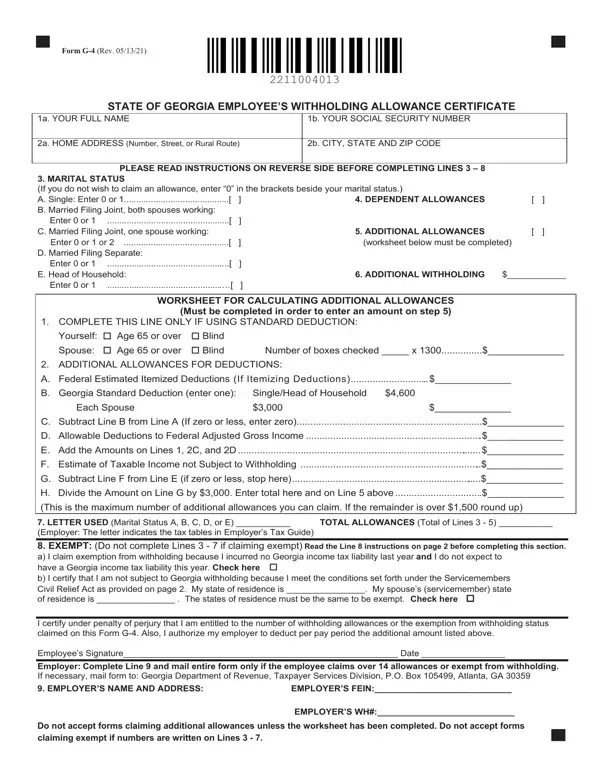
O.C.G.A. § 48-7-102 requires you to complete and submit Form G-4 to your employer in order to have tax withheld from your wages.
Exempt: You cannot claim exempt if you did not file a Georgia income tax return for the previous tax year.
Refund: Receiving a refund in the previous tax year does not qualify you to claim exempt.
Line 5: Complete the worksheet on Form G-4 if you claim Georgia adjustment allowances.
Line 5 worksheet: Failure to complete and submit the worksheet will result in automatic denial on your claim.
Employers: Employers are required to mail any Form G-4 claiming more than 14 allowances or exempt from withholding to the Georgia Department of Revenue.
| Question | Answer |
|---|---|
| Form Name | Form G-4 |
| Form Length | 2 pages |
| Fillable? | Yes |
| Fillable fields | 28 |
| Avg. time to fill out | 5 min |
| Edition | 06/03/26 |
| Where to send | Employer: mail entire form only if the employee claims over 14 allowances or exempt from withholding. If necessary, mail form to: Georgia Department of Revenue, Taxpayer Services Division, P.O. Box 105685, Atlanta, GA 30348-5685 |
| Matches the agency's file | Yes, checked October 2, 2026 |
| Other names | G-4, G4, Form G-4, Georgia G-4, Employee's Withholding Allowance Certificate |
| Official source | Form G-4 (Rev 06/03/26), Georgia Department of Revenue |
Form G 4 Georgia isn’t the one you’re looking for?