Please rate Gen215B Form

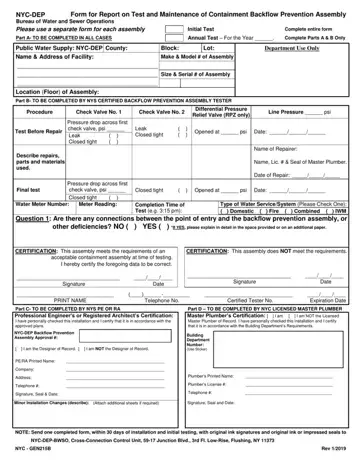
The Gen215B form, integral to maintaining the integrity of New York City's public water supply, serves as a comprehensive report on the test and maintenance procedures of containment backflow prevention assemblies. This document is a requisite tool employed by the NYC Department of Environmental Protection (DEP) to ensure that the water supply remains uncontaminated by potential backflows. The form caters to various scenarios, including initial tests for newly installed assemblies and annual tests for existing ones, thus requiring meticulous completion of its multiple parts by different certified professionals. Part A, which needs to be filled out in all cases, captures basic information about the facility and the backflow prevention assembly. Part B is tailored for NYS certified backflow prevention assembly testers, detailing the assembly's operational metrics and any repairs undertaken. In situations warranting initial testing, Part C demands the expertise of a NYS licensed professional engineer or registered architect to certify the installation's compliance with approved plans. Finally, Part D requires a NYC licensed master plumber's certification, ensuring the assembly adheres to the Building Department's requirements. Together, these sections work in tandem to fortify NYC’s water system against contamination, highlighting the form's pivotal role in safeguarding public health.
| Question | Answer |
|---|---|
| Form Name | Gen215B Form |
| Form Length | 2 pages |
| Fillable? | No |
| Fillable fields | 0 |
| Avg. time to fill out | 30 sec |
| Other names | gen215b, gen215b dep, nyc dep gen 215b, gen 215b |
Gen215B Form isn’t the one you’re looking for?
Please rate Gen215B Form
