
Gr Tr Bene Form PDF Details

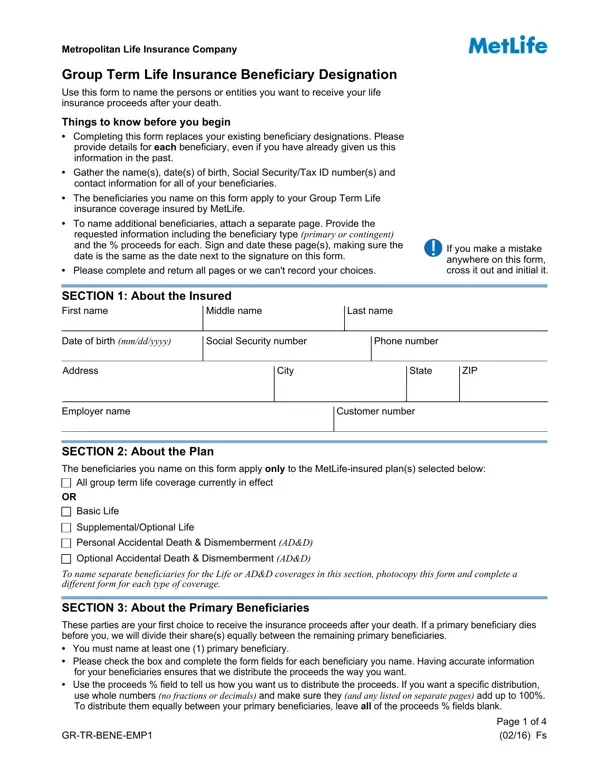
Life insurance is a cornerstone of financial planning, allowing individuals to provide for their loved ones even after they're gone. The Group Term Life Insurance Beneficiary Designation form, supplied by the Metropolitan Life Insurance Company, plays a crucial role in this process. It specifically enables policyholders to name or change the beneficiaries who will receive the insurance proceeds. This form highlights the importance of providing detailed information for each beneficiary, including their names, dates of birth, Social Security or Tax ID numbers, and contact details. Whether naming a person, a trust, or a charity, understanding the distinction between primary and contingent beneficiaries ensures that the proceeds are distributed according to the policyholder's wishes should the unexpected happen. Instructions within the form caution that filling it out supersedes all previous designations and stress the significance of accuracy—errors must be crossed out, initialed, and the total proceeds percentages for both primary and contingent beneficiaries must precisely total 100%. Additionally, the document includes guidance for designating proceeds to estates, trusts, or organizations, making it a comprehensive tool for ensuring your life insurance benefits are allocated exactly as you intend. Completing this form correctly and returning it as instructed guarantees that your final wishes regarding your group term life coverage are clearly communicated and will be followed by MetLife.

QuestionAnswer
Form NameGr Tr Bene Form
Form Length4 pages
Fillable?No
Fillable fields0
Avg. time to fill out1 min
Other namesbene emp1, trbene metropolitan, metlife beneficiary form, gr bene download

How to Edit Gr Tr Bene Form Online for Free

When working in the online PDF editor by FormsPal, you'll be able to fill in or modify metlife term grtrbene here. Our editor is constantly developing to present the very best user experience attainable, and that is thanks to our resolve for constant development and listening closely to customer feedback. With just a couple of basic steps, you are able to begin your PDF journey:

Step 1: Open the PDF inside our editor by clicking on the "Get Form Button" in the top area of this page.

Step 2: The tool offers you the opportunity to change almost all PDF files in many different ways. Modify it by writing your own text, adjust original content, and include a signature - all when it's needed!

This PDF form will require particular info to be entered, therefore you should definitely take whatever time to fill in precisely what is asked:

1. To start with, while completing the metlife term grtrbene, start out with the area with the subsequent blanks:

Ways to prepare metlife beneficiary portion 1

2. Once this part is done, proceed to enter the relevant details in all these: About the Primary Beneficiaries, Individual, First name, Address, City, Middle name, Last name, Date of birth mmddyyyy, State, ZIP, Gender, Social Security number, Phone number, Relationship to Insured, and Individual.

About the Primary Beneficiaries, Social Security number, and Relationship to Insured in metlife beneficiary

3. The third stage is hassle-free - complete all the empty fields in City, State, ZIP, Gender, Social Security number, Phone number, Relationship to Insured, Your Estate If you name your, Testamentary Trust created in your, Living Inter Vivos Trust See, CharityOrganization List the, Write in the of proceeds assigned, to this person, Proceeds, and Proceeds in order to complete this process.

Living Inter Vivos Trust  See, State, and Gender of metlife beneficiary

People generally get some things incorrect when completing Living Inter Vivos Trust See in this part. Remember to read twice everything you enter here.

4. The next section will require your details in the following places: use whole numbers no fractions or, Individual, First name, Address, City, Middle name, Last name, Date of birth mmddyyyy, State, ZIP, Gender, Social Security number, Phone number, Relationship to Insured, and Individual. Always fill in all required information to move forward.

metlife beneficiary completion process detailed (portion 4)

5. Because you near the completion of this file, you'll notice a few more requirements that have to be fulfilled. Particularly, Testamentary Trust created in your, Living Inter Vivos Trust See, CharityOrganization List the, Proceeds, Proceeds, Proceeds, Proceeds, Total proceeds for all contingent, GRTRBENEEMP, and Page of Fs should be filled out.

Best ways to complete metlife beneficiary part 5

Step 3: After you've reviewed the information in the file's blank fields, simply click "Done" to finalize your form. Join us right now and immediately gain access to metlife term grtrbene, ready for downloading. All changes you make are kept , allowing you to customize the pdf at a later time as needed. FormsPal provides safe form editor without data recording or distributing. Be assured that your details are in good hands with us!