Please rate Hud Form 2880 1-27-2023

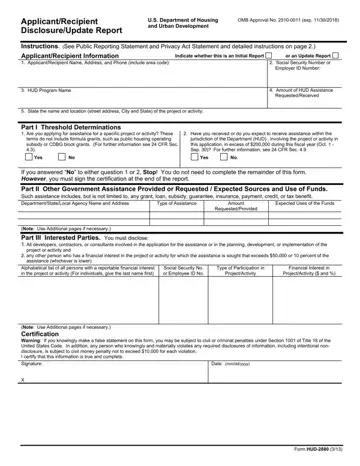
Part I, Threshold Determinations, is for applicants only. Recipients filing Update Reports should not complete this Part.
Part II: this Part is to be completed by both applicants and recipients for assistance and recipients filing update reports.
Part III: this Part is to be completed by both applicants and recipients filing update reports.
Names: if the person is an entity, the listing must include the full name and address of the entity as well as the CEO.
Social security numbers: individuals must not include social security numbers on this form.
Update reports: all recipients of covered assistance must submit update reports to reflect substantial changes to the initial applicant disclosure reports.
| Question | Answer |
|---|---|
| Form Name | Form HUD-2880 |
| Form Length | 4 pages |
| Fillable? | Yes |
| Fillable fields | 82 |
| Avg. time to fill out | 14 min |
| Edition | 1/27/2023 |
| Issuing agency | U.S. Department of Housing and Urban Development |
| Other names | HUD-2880, HUD 2880, HUD2880, Form HUD-2880, HUD form 2880, 2880, Applicant/Recipient Disclosure/Update Report |
| Official source | Form HUD-2880 (Rev 1/27/2023), U.S. Department of Housing and Urban Development |
Hud Form 2880 isn’t the one you’re looking for?
Please rate Hud Form 2880 1-27-2023
