
Ides Form Bpp009F PDF Details

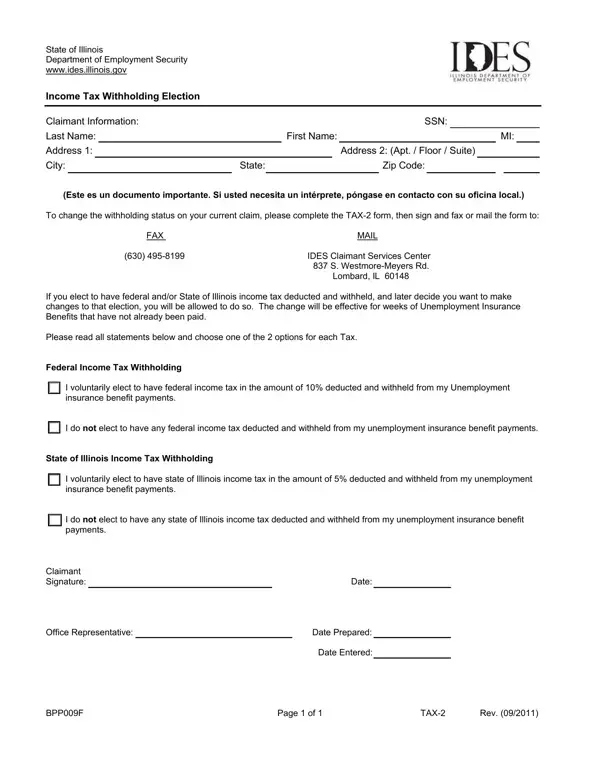
In the realm of managing unemployment benefits within Illinois, understanding and correctly utilizing the IDES Bpp009F form is crucial for claimants. This document, offered by the State of Illinois Department of Employment Security (www.ides.illinois.gov), facilitates individuals in making an informed choice about their income tax withholding preferences directly linked to their unemployment insurance benefit payments. It encompasses vital claimant information, including Social Security Number (SSN), name, and address details. More importantly, it lays out options for electing whether or not to have federal and State of Illinois income tax withheld from these payments. The form allows for adjustments to withholding status through the completion and submission of a TAX-2 form, reflecting a claimant's right to alter their election before benefits that have not been paid are issued. It highlights a flexible approach to handling taxation on unemployment benefits, catering to the diverse financial situations of claimants. The options presented for both federal and state tax withholdings—namely, the choice to elect a 10% deduction for federal taxes and a 5% deduction for state taxes, or to opt-out of deductions entirely—underscore the importance of understanding one’s financial obligations and planning accordingly. This flexibility and the subsequent need for clear decision-making are underscored by the form's requirement for claimant signatures, confirming their decisions regarding the taxation of their unemployment benefits.

QuestionAnswer
Form NameIdes Form Bpp009F
Form Length1 pages
Fillable?No
Fillable fields0
Avg. time to fill out15 sec
Other namesIncomeTaxWithho ldingElection_B PP009F ides withholding change form

How to Edit Ides Form Bpp009F Online for Free

Making use of the online editor for PDFs by FormsPal, you may fill out or alter Ides Form Bpp009F here. FormsPal is dedicated to providing you the best possible experience with our tool by regularly presenting new functions and enhancements. Our editor is now even more useful as the result of the latest updates! So now, filling out documents is simpler and faster than ever before. To get the ball rolling, consider these easy steps:

Step 1: Just click on the "Get Form Button" in the top section of this webpage to launch our pdf form editing tool. Here you will find everything that is needed to work with your file.

Step 2: Once you access the PDF editor, you will get the form all set to be filled out. Other than filling in different blanks, you can also do other sorts of actions with the file, specifically putting on custom textual content, changing the initial textual content, inserting images, placing your signature to the document, and much more.

This PDF will need specific information to be entered, so you should take whatever time to provide what's asked:

1. You will need to complete the Ides Form Bpp009F correctly, so be mindful when filling in the parts containing these specific blank fields:

Part # 1 for filling in Ides Form Bpp009F

2. After the last part is done, it is time to put in the necessary details in Address Address Apt Floor allowing you to go further.

How you can fill out Ides Form Bpp009F portion 2

Be extremely attentive while completing Address Address Apt Floor and Address Address Apt Floor, since this is where many people make a few mistakes.

Step 3: Right after you have looked over the information you filled in, click "Done" to complete your FormsPal process. Try a 7-day free trial option at FormsPal and gain direct access to Ides Form Bpp009F - available inside your personal account page. FormsPal guarantees protected document completion with no personal data record-keeping or any sort of sharing. Feel comfortable knowing that your data is in good hands with us!