Irs Form 8850 PDF Details

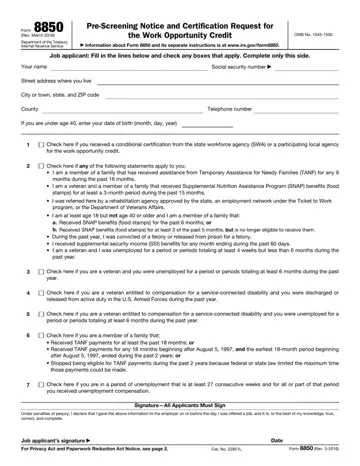
The IRS Form 8850, revised in March 2016, serves as a Pre-Screening Notice and Certification Request for the Work Opportunity Credit, a vital facet of the Department of the Treasury's incentives for employers. This form plays a crucial role by enabling employers to identify candidates who may qualify them for tax credits before making a hiring decision. It is designed for job applicants to fill out, providing personal details, employment status, and eligibility for various targeted groups that the Work Opportunity Tax Credit program supports, including veterans, food stamp recipients, and individuals living in certain economic zones, among others. The instructions for Form 8850, accessible on the IRS website, further guide employers and applicants on its completion and submission. This document not only assists employers in potentially lowering their tax liability but also aims to encourage the hiring of individuals facing significant barriers to employment. The information collected facilitates the employer's request for certification that the individual belongs to one of these targeted groups, which is critical for claiming the credit on their federal tax return. Additionally, the Privacy Act and the Paperwork Reduction Act Notice included in the form assure applicants of the confidentiality and purpose behind the collection of personal details, emphasizing the dual benefits of compliance and contribution to workforce integration efforts.

QuestionAnswer
Form NameIrs Form 8850
Form Length2 pages
Fillable?No
Fillable fields0
Avg. time to fill out30 sec
Other names8850 form 2021, 8850 form, wotc form 8850, irs form 8850

How to Edit Irs Form 8850 Online for Free

Our leading web developers have worked collectively to set-up the PDF editor that you may apply. The software allows you to prepare form 8850 pre screening notice documentation immediately and efficiently. This is everything you need to do.

Step 1: You can hit the orange "Get Form Now" button at the top of the following page.

Step 2: When you have entered the form 8850 pre screening notice editing page you can see all of the actions you'll be able to perform with regards to your document at the top menu.

Type in the information required by the application to create the document.

stage 1 to completing 8850 form

Fill in the Check here if you are a veteran, Check here if you are a veteran, Check here if you are a veteran, Check here if you are a member of, after August ended during the, Stopped being eligible for TANF, those payments could be made, Check here if you are in a period, Under penalties of perjury I, and SignatureAll Applicants Must Sign areas with any information that may be asked by the program.

Completing 8850 form step 2

The software will ask you for information to effortlessly prepare the field Employers name, Street address, City or town state and ZIP code, For Employers Use Only, Telephone no, EIN, Person to contact if different, Telephone no, Street address, City or town state and ZIP code, If based on the individuals age, Date applicant, Gave information, Was offered job, and Was hired.

8850 form Employers name, Street address, City or town state and ZIP code, For Employers Use Only, Telephone no, EIN, Person to contact if different, Telephone no, Street address, City or town state and ZIP code, If based on the individuals age, Date applicant, Gave information, Was offered job, and Was hired fields to fill out

Step 3: When you have clicked the Done button, your file should be readily available export to any type of device or email address you identify.

Step 4: Make copies of the document - it can help you stay clear of upcoming complications. And fear not - we do not reveal or see your data.

Watch Irs Form 8850 Video Instruction

Please rate Irs Form 8850

2 Votes
If you believe this page is infringing on your copyright, please familiarize yourself with and follow our DMCA notice and takedown process - click here to proceed .
