
Lpt4 Form PDF Details

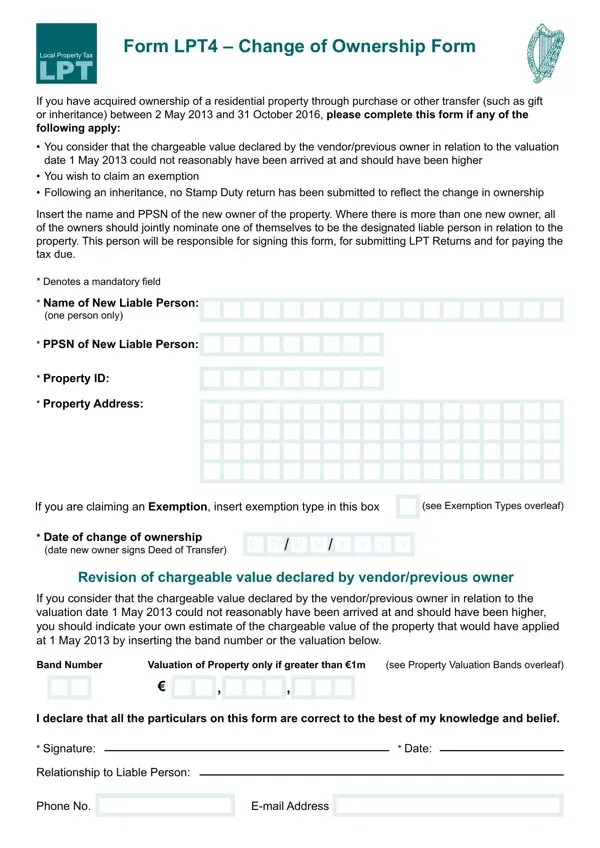
The Form LPT4 serves a critical function for individuals who have recently acquired ownership of a residential property, whether through purchase, gift, inheritance, or other transfers, specifically between 2 May 2013 and 31 October 2016. This form is pivotal for those situations where the new owner disputes the chargeable value declared by the previous owner as of the valuation date on 1 May 2013, believes it to have been undervalued, or if the new owner wishes to claim an exemption under several specified criteria. Additionally, it outlines the procedure for individuals who, following an inheritance, haven't submitted a Stamp Duty return to reflect the change in ownership. To ensure compliance, the form requests essential details such as the new owner’s name, Personal Public Service Number (PPSN), property identification, and address. Furthermore, it outlines the liability for Local Property Tax (LPT), directing that the property's owner as of 1 November in any given year is responsible for the LPT of the ensuing year, with options for payment outlined. Exemptions from LPT are well detailed, catering to various circumstances including properties acquired or not used from specific dates, properties with certain levels of disrepair like significant pyrite damage, and properties used for charitable purposes or as a principal residence under special conditions. This comprehensive form ensures that owners are well informed about their tax liabilities and exemption qualifications, while also facilitating a fair assessment and transfer of ownership responsibilities.

QuestionAnswer
Form NameLpt4 Form
Form Length2 pages
Fillable?No
Fillable fields0
Avg. time to fill out30 sec
Other namesOriginators, 2013, lpt4, Carers

How to Edit Lpt4 Form Online for Free

Any time you wish to fill out 2nd, it's not necessary to download and install any sort of programs - simply use our online tool. To have our tool on the forefront of convenience, we strive to put into practice user-oriented capabilities and improvements regularly. We're routinely happy to get suggestions - play a pivotal part in revolutionizing how you work with PDF forms. With a few easy steps, you may start your PDF journey:

Step 1: Simply click on the "Get Form Button" in the top section of this webpage to launch our form editor. Here you will find everything that is necessary to fill out your document.

Step 2: After you open the PDF editor, you'll see the form ready to be filled in. Besides filling in various blank fields, you may also do some other things with the file, namely writing any textual content, modifying the original text, adding images, putting your signature on the document, and a lot more.

As for the fields of this particular PDF, here is what you should do:

1. It is crucial to complete the 2nd correctly, hence be mindful when filling out the areas containing all these fields:

Filling in section 1 of 127A

2. Right after this section is filled out, go to type in the suitable details in these - Band Number, Valuation of Property only if, see Property Valuation Bands, I declare that all the particulars, Signature, Relationship to Liable Person, Date, Phone No, and Email Address.

127A conclusion process shown (stage 2)

3. Completing Payment of Local Property Tax LPT, Exemption Types The following, A New and unused properties, exempt until the end of, B Second hand properties purchased, used as the persons sole or main, C Properties constructed and owned, Environment Community and Local, E Properties certiied as having a, Residential properties owned by a, G Registered Nursing Homes, H A property previously occupied, and months or more due to long term is essential for the next step, make sure to fill them out in their entirety. Don't miss any details!

Stage # 3 in submitting 127A

4. You're ready to fill out this next section! In this case you'll have all of these Properties purchased or adapted, J Mobile homes vehicles or vessels, K Properties fully subject to, L Diplomatic properties, M Properties used by charitable, integral part of the bodys, Property Valuation Bands, Valuation Band Number, and Valuation Band Range empty form fields to complete.

How to fill in 127A part 4

It's easy to make a mistake when filling in your Valuation Band Range, for that reason be sure you look again before you send it in.

Step 3: Go through what you've inserted in the blanks and then press the "Done" button. Make a 7-day free trial option with us and get immediate access to 2nd - with all changes preserved and accessible inside your personal cabinet. We do not share the details that you provide when working with forms at our site.